Home Assistant Connect ZBT-2
Home Assistant Connect ZBT-2 is the second generation of the official USB adapter for Zigbee and Thread from the Home Assistant team. If you've been following smart home development, you might have noticed that Zigbee 4.0 was announced a few days ago, but unfortunately ZBT-2 doesn't support it yet - however, that may come in the future.
ZBT-2 brings significant improvements over the previous model ZBT-1 (originally called SkyConnect) - better antenna, faster chip, and even an ESP32-S3 for future expansion.
What is Home Assistant Connect ZBT-2?
Home Assistant Connect ZBT-2 is a USB adapter that plugs into your Home Assistant system and enables connection of Zigbee or Thread devices. It's important to mention that you can use either Zigbee or Thread - not both simultaneously. If you want both networks, you'll need two adapters - you'll find the detailed procedure in the Zigbee and Thread at the same time section.
- Zigbee - proven protocol with thousands of available devices (Philips Hue, IKEA, Aqara, Sonoff...)
- Thread - modern protocol used by Matter devices, rapidly developing standard
- Both offer great battery life and mesh network creation
What's New Compared to ZBT-1?
1. Improved Antenna and Design
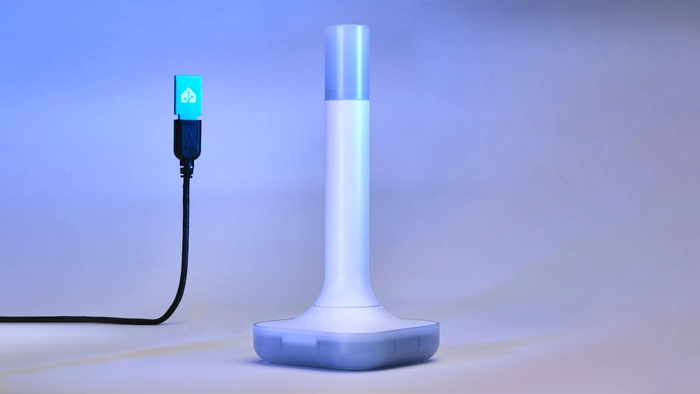
The biggest change is the move from a small "stick" format to a free-standing antenna with base. This has several advantages:
- 📡 Larger antenna - better range and reception of weak signals from distant devices
- 🔌 1.5 meter USB cable - you can place the adapter away from interference sources
- ⚡ Optimized base - acts as a "ground plane" and improves antenna performance
- 🎯 Better placement - easier to find optimal position without needing an extension cable
USB ports and surrounding electronics can cause interference. ZBT-2 with its long cable allows you to place the antenna away from the computer and potential interference sources, which significantly improves network stability.
2. More Powerful Silicon Labs MG24 Chip
Inside ZBT-2 works Silicon Labs MG24 - a more advanced chip than the MG21 used in ZBT-1:
- 🚀 Higher processing power - faster command processing
- 📻 Better sensitivity - hears even weak signals from distant devices
- 🔮 Zigbee 4.0 readiness - the team is working on supporting the new standard
3. Four Times Faster Communication Speed
Nabu Casa raised the baud rate (internal chip communication speed) from 115,200 bps to 460,800 bps. This means:
- ⚡ Faster response when controlling multiple devices at once
- 📊 Better throughput for large Zigbee networks
- 🎮 Smoother control of light groups
Don't expect lights to turn on four times faster - you'll notice a significant difference when controlling multiple devices simultaneously or in automations that control entire groups.
4. ESP32-S3 Chip as USB Controller
A very interesting addition is the ESP32-S3 chip, which controls USB communication. This may sound like overkill, but it opens up interesting possibilities:
- 🔓 Unlocked bootloader - community can experiment with custom firmware
- 🛠️ Future expansion - similar to ZWA-2, where ESP32 enabled adding WiFi and PoE
- 💡 Open source - all firmware is open and modifiable
Nabu Casa hinted that ESP32-S3 isn't just for USB communication - "the sky's the limit" for future features. We might see WiFi backup, remote placement, or completely new uses.
5. Open Design
ZBT-2 takes open source philosophy very seriously:
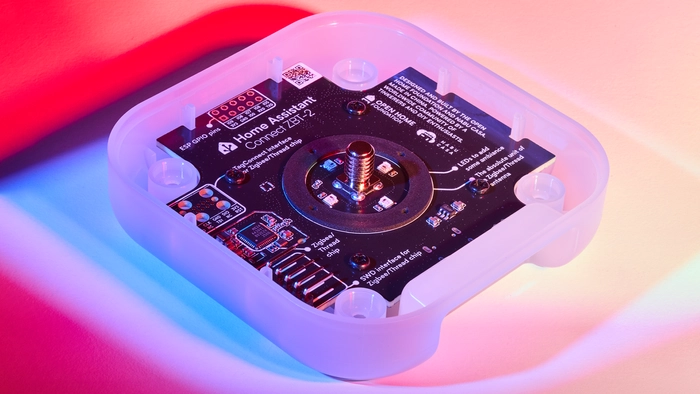
- 🔩 No glue or clips - just standard Phillips screws
- 📋 Descriptive silkscreen - all chips and pins are labeled on the board
- 💻 Open source firmware - everything is on GitHub
- 🌐 Flashing tool - for easy firmware management
Why Not PoE?
You might be wondering why ZBT-2 doesn't have Power-over-Ethernet like ZWA-2. According to Nabu Casa, they decided to focus on maximum performance and ease of use. PoE has its advantages, but also adds complexity and potential minor performance reduction.
Nabu Casa mentioned that if sales are good and the community is interested, we might see a ZBT-2 Pro or another variant with PoE in the future. Let's wait and see what time brings.
Compatibility and Flexibility
ZBT-2 works with popular Zigbee and Thread tools:
Zigbee Support
- ✅ ZHA - native Home Assistant integration
- ✅ Zigbee2MQTT - most popular open source solution
- ✅ zigpy-cli - for advanced users
- ✅ Zigbee 3.0 fully supported
- 🔮 Zigbee 4.0 - team is working on it
Thread/Matter Support
- ✅ matter.js - Matter integration
- ✅ OpenThread Border Router - Thread gateway
- ✅ Certified Matter over Thread devices
ZBT-2 can only run in one mode - either Zigbee or Thread. Nabu Casa tried multiprotocol mode, but for various reasons it doesn't work well.
If you need both, you can use your old ZBT-1 for Thread and the new ZBT-2 for Zigbee. I walk through setting up such a pair step by step in the Zigbee and Thread at the same time section.
Zigbee and Thread at the Same Time: Two Adapters in One Home Assistant
A reader asked me in the comments of this article: "If ZBT-2 can't do Zigbee and Thread at once, how do I get both?" The answer is simple - you use two adapters, each with different firmware. This isn't a workaround, it's the recommended path, because Nabu Casa does not recommend multiprotocol mode after their testing on the ZBT-1.
You have two options:
- 🆕 2× ZBT-2 - one for Zigbee, the other for Thread
- ♻️ ZBT-1 + ZBT-2 - switch the old ZBT-1 to Thread and keep the new ZBT-2 on Zigbee (in my opinion the most sensible choice if you already own a ZBT-1)
The adapter is not "universal". For Zigbee it runs Zigbee coordinator firmware (EmberZNet), for Thread it runs OpenThread RCP firmware. ZBT-2 ships with Zigbee firmware, so you will have to switch the second adapter to Thread. Home Assistant 2025.11 and newer can install and update both firmware variants itself from the integration card - provided you have the ZHA or OpenThread Border Router integration added. Without it the firmware card doesn't show up, which is exactly the situation with a freshly plugged-in second adapter.
1. Physically Label Your Adapters
It sounds trivial, but it's the most important step of the whole procedure. Two ZBT-2 units look identical and Home Assistant shows them under the same name "Home Assistant Connect ZBT-2" - no serial number, no USB path. It's a known limitation, and it means you have to be able to tell the adapters apart yourself.
So grab a label maker or plain tape and write ZIGBEE and THREAD on the bases. Six months later, when you're troubleshooting why one of the networks is down, you'll thank yourself.
2. Find the Stable Path to Both Adapters
Every USB adapter has a stable path in the system that contains its serial number:
ls -l /dev/serial/by-id/
The output will look roughly like this:
usb-Nabu_Casa_ZBT-2_1a2b3c4d5e6f-if00 -> ../../ttyACM0
usb-Nabu_Casa_ZBT-2_9f8e7d6c5b4a-if00 -> ../../ttyACM1
The serial number in the name is different for every unit - and that's exactly how you tell the adapters apart. If an older ZBT-1 fills one of the roles, its name will differ (it contains SkyConnect or ZBT-1), so the pair distinguishes itself. How do you find out which is which?
- List the contents of
/dev/serial/by-id/with both adapters plugged in - Unplug one adapter and repeat the listing
- The path that disappeared belongs to the unplugged adapter
- Write the serial number down next to the matching label
The ttyACM and ttyUSB numbers are assigned by the kernel in the order the devices announce themselves. After a reboot, after unplugging one adapter, or after adding another USB device, they can swap - and then the Zigbee integration tries to talk to the Thread radio. With a single adapter you'll get away with it, with two it's only a matter of time.
In the configuration of ZHA, Zigbee2MQTT, and OpenThread Border Router, always enter the full /dev/serial/by-id/... path.
3. First Adapter → Zigbee
You set up Zigbee exactly the same way as if you had only one adapter:
- ✅ ZHA - native integration, you pick the adapter right in the wizard
- ✅ Zigbee2MQTT - fill in three values in the configuration, otherwise the adapter won't start:
serial:
  port: /dev/serial/by-id/usb-Nabu_Casa_ZBT-2_<serial number>-if00
  adapter: ember
  baudrate: 460800
4. Second Adapter → Thread
You switch the second adapter to Thread directly from Home Assistant:
- Go to Settings → Devices & services
- Find the Home Assistant Connect ZBT-2 integration card
- On the correct adapter, click the cog wheel and select Use as Thread adapter
- Home Assistant flashes the OpenThread RCP firmware and installs the OpenThread Border Router app
- Once finished, you'll see the new OpenThread Border Router and Thread integrations in Settings → Devices & services
Because Home Assistant doesn't distinguish between the two ZBT-2 units in the UI, you risk switching the adapter that holds your Zigbee network to Thread. That loses your Zigbee network - the coordinator firmware is gone once overwritten. Before you click Use as Thread adapter:
- 💾 Make a backup of your Zigbee network (both ZHA and Zigbee2MQTT can back up the coordinator)
- 🔌 Consider plugging the new adapter in on its own first, switching the firmware, and only then plugging in both
- ✅ Verify that the card reports the firmware you expect on that adapter
Alternatively, you can flash the firmware using the Open Home Foundation Toolbox web flasher. It comes in handy if you run an older Home Assistant version, want a specific firmware version, or need to recover from a failed flash. All you need is a browser with WebSerial support (Chrome, Edge) and the adapter plugged into your computer.
If you configure the OpenThread Border Router app manually, use these values:
| Option | Value |
|---|---|
| device | /dev/serial/by-id/usb-Nabu_Casa_ZBT-2_<serial number>-if00 |
| baudrate | 460800 |
| flow_control | enabled |
Thread is just the network - the devices themselves reach Home Assistant through the Matter integration. I explain how it all fits together in my article about Matter and Thread.
5. Placement and Channel Selection
You now have two 2.4 GHz radios in your system and they interfere with each other. It pays off to follow a few rules:
- 📏 Don't put the adapters next to each other - the ZHA documentation recommends placing the adapter at least a meter away from the computer so it isn't disturbed by host electronics and USB 3.0. No figure is given for the distance between two antennas, but the farther the better - and that's exactly what those 1.5 m cables are for.
- 🔌 USB 2.0 ports only - USB 3.x ports (blue on the inside) cause significant interference on 2.4 GHz according to the ZHA documentation. If you only have USB 3.x, use a self-powered USB 2.0 hub.
- 📡 Away from your WiFi AP and also from external SSDs, USB hubs, and power supplies.
- 🎯 Spread out the channels so they don't overlap:
- WiFi - set a fixed channel 1, 6, or 11 (don't leave it on automatic)
- Zigbee - recommended channels are 15, 20, or 25
- Thread - you can change the channel in Home Assistant: Settings → Devices & services → Thread → Configure. Channel 26 is the recommended one, as it sits farthest from the common WiFi channels. The border router schedules the switch for roughly five minutes later so all devices in the mesh switch together.
The ZHA documentation advises that when fighting interference you should first set a fixed WiFi channel and only change the Zigbee channel afterwards. Changing the Zigbee channel can take some devices (especially battery-powered ones) a while, or drop them from the network entirely.
A Few More Things to Watch Out For
- ⚡ Power - each ZBT-2 draws up to 500 mA. Two adapters therefore pull up to one amp from USB, which on a Raspberry Pi with a weak power supply is a recipe for random reboots and strange dropouts. A quality power supply or a powered USB hub is cheap insurance here.
- 🧩 One OpenThread Border Router per instance - the app runs in host network mode with fixed ports 8080 and 8081, and Home Assistant cannot run two instances of the same app. So you can't add a third adapter as a second border router to the same Home Assistant. A Thread network itself does support multiple border routers - they just have to run on a different device (another HA instance, Apple TV, HomePod...).
- 🐳 Outside Home Assistant OS it's considerably more complicated - a container installation has no apps, so you have to run the OpenThread Border Router and the Matter server as separate containers and add the integrations manually.
- 💡 The LED won't help - the "candle" lights up the same on both adapters, you can't tell the role from it.
ZBT-1 vs ZBT-2 Comparison
| Feature | ZBT-1 (SkyConnect) | ZBT-2 |
|---|---|---|
| Chip | EFR32MG21 | EFR32MG24 |
| Format | USB stick | Stand with antenna |
| USB Cable | Extension needed | 1.5 m included |
| Baud Rate | 115,200 bps | 460,800 bps |
| USB Controller | Simple | ESP32-S3 |
| Sensitivity | Standard | Improved |
| Antenna | Small | Large optimized |
| Lighting | No | LED "candle" |
| Price | Lower | Higher |
Migrating from ZBT-1 to ZBT-2
If you already have ZBT-1 and want to switch to ZBT-2, you're in luck! Both ZHA and Zigbee2MQTT now support migration between coordinators without needing to pair all devices again.
Migration in ZHA
- Open Settings → Devices & Services → Zigbee Home Automation
- Select Configure and click Migrate adapter
- Follow the wizard
- Connect ZBT-2 when prompted
- ZHA automatically transfers the configuration
Detailed ZHA migration instructions can be found in my article about ZHA.
Migration in Zigbee2MQTT
Zigbee2MQTT has improved migration tools that work between different coordinator types. Migration happens automatically when detecting a new coordinator with backup data.
Detailed Zigbee2MQTT migration instructions can be found in my article about Zigbee2MQTT.
What to Do with Your Old ZBT-1?
If you're upgrading from ZBT-1, don't throw it away! You have several options:
- 🔄 Switch to Thread - simply switch firmware and use for Matter devices
- 🏠 Second Zigbee network - for separating critical devices or testing
- 🎁 Gift it - help someone get started with Home Assistant
- 💾 Backup - keep as a backup coordinator
Nabu Casa has ended production of ZBT-1, but software support continues. If you have ZBT-1, you can continue using it - it will work for many years to come.
Where to Buy
Home Assistant Connect ZBT-2
 Zigbee
 Bluetooth
 Thread
 Matter
 USB
USB
Specifications
- Zigbee/Thread Chip: Silicon Labs EFR32MG24
- USB Controller: ESP32-S3 (with unlocked bootloader)
- Communication Speed: 460,800 bps (4× faster than ZBT-1)
- Supported Protocols: Zigbee 3.0, Thread (Matter over Thread)
- Antenna: Optimized omnidirectional, 164 mm, gain 4.16 dBi
- USB Cable: 1.5 m USB-C (USB 2.0/3.0)
- Dimensions: 83×83×179 mm
- Weight: 157 g
- Power: USB-C, 5V DC, 500mA
Every purchase of official hardware helps fund the Open Home Foundation and Home Assistant development. Thanks to ZBT-1 sales, for example, improved migration tools were created that all users benefit from.
Design - Finally on Display!
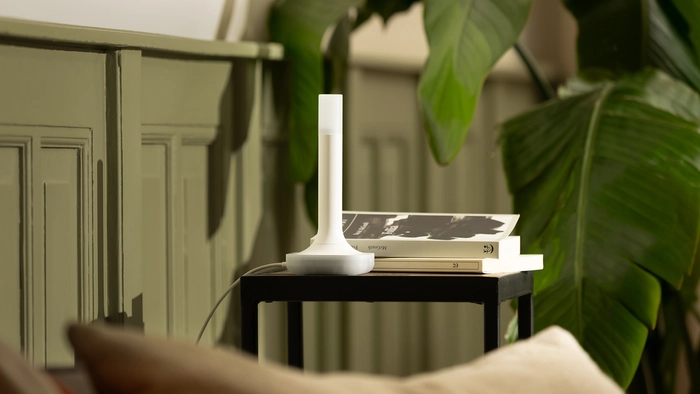
Unlike typical USB adapters that hide behind servers, ZBT-2 is designed to be proudly displayed. The top even lights up like a candle - perfect timing for the holidays! 🕯️
Review
Home Assistant Connect ZBT-2 is a solid upgrade over ZBT-1. The biggest advantages I see are:
- ✅ Improved antenna - significantly better range and stability
- ✅ Long cable - easier optimal placement
- ✅ Faster communication - noticeable with groups
- ✅ ESP32-S3 - interesting potential for the future
- ✅ Open source approach - community can contribute
The only disadvantage I see is that you still can't use Zigbee and Thread simultaneously. For some users, this may mean needing two adapters.
Buy ZBT-2 if:
- ✅ Starting with Zigbee or Thread
- ✅ Want the best performance and range
- ✅ Planning a large Zigbee network (100+ devices)
- ✅ Want to support Home Assistant development
Wait with upgrade if:
- ❌ Your current ZBT-1 works perfectly
- ❌ You have a small Zigbee network (< 20 devices)
- ❌ Waiting for Zigbee 4.0 support
- ❌ Need PoE power
Frequently Asked Questions (FAQ)
Can I use ZBT-2 for both Zigbee and Thread simultaneously?
No, ZBT-2 can only run in one mode at a time - either Zigbee or Thread. If you need both networks, you'll need two adapters. For example, you can use ZBT-1 for Thread and ZBT-2 for Zigbee - I describe the whole procedure in the Zigbee and Thread at the same time section.
How do I tell two identical ZBT-2 adapters apart in Home Assistant?
Home Assistant shows them under the same name, so you have to rely on the stable path /dev/serial/by-id/..., which contains the adapter's serial number - every unit has a different one. To find out which is which, unplug one adapter and compare the output of ls -l /dev/serial/by-id/. Then label the adapters physically and never use /dev/ttyACM0 or /dev/ttyUSB0 - their numbers swap between reboots.
Can I run two Thread border routers in one Home Assistant?
In practice, no. The OpenThread Border Router app runs in host network mode with fixed ports, and Home Assistant cannot run two instances of the same app. A Thread network itself supports multiple border routers, but the second one has to run on a different device - another Home Assistant instance, an Apple TV, a HomePod, and so on.
What's the main difference between ZBT-1 and ZBT-2?
The biggest improvements are: more powerful MG24 chip, larger antenna with better range, 4× faster communication (460,800 bps), and ESP32-S3 chip for future expansion. ZBT-2 also includes a long USB cable (1.5 m) for better placement.
Do I need to re-pair all devices when upgrading from ZBT-1?
No! Both ZHA and Zigbee2MQTT now support migration between coordinators - just follow the wizard and all devices will remain paired.
When is it worth upgrading from ZBT-1 to ZBT-2?
I recommend upgrading if:
- You have range or stability issues with your network
- You're planning a large Zigbee network (100+ devices)
- You want the most modern hardware
- You need faster response with groups
If your ZBT-1 works without issues, there's no rush to upgrade.
Does ZBT-2 support Zigbee 4.0?
Not yet, but the Home Assistant team is actively working on it. The MG24 chip is technically ready and support should come in future firmware updates.
Related Articles
- Zigbee in Home Assistant - Introduction
- ZHA (Zigbee Home Automation)
- Zigbee2MQTT
- Zigbee Recommended Hardware
- Matter and Thread in Home Assistant - an introduction to Matter and the Thread technology.
Did this guide help you?
I write these guides in my spare time and keep them up to date. If one saved you time, you can chip in.
One-off, by card or Apple Pay. You can change the amount on the next page.
Would rather not send money? Buy the parts through my product links. The price is the same for you and it helps too.