Home Assistant 2026.6
Pick a card, any card! 🃏
The sixth release of 2026 focuses mainly on dashboards and automation building. The headline feature is a brand new entity-based card picker that, instead of asking "which card type do you want", asks "which thing in your home do you want to show". On top of that it adds bidirectional infrared (Home Assistant can now receive IR signals too), PIN code management for Z-Wave locks, live condition testing in the automation editor, weather forecasts right on tile cards, and a whole range of other goodies.
Let's take a look at everything that landed in this release.
A Friendlier, Entity-Based Card Picker
Adding cards to a dashboard has historically revolved around the question "which card type do I want?". That's a question that makes more sense to developers than to everyday users. This release flips it on its head - the new card picker asks "which thing in your home do you want to show?".
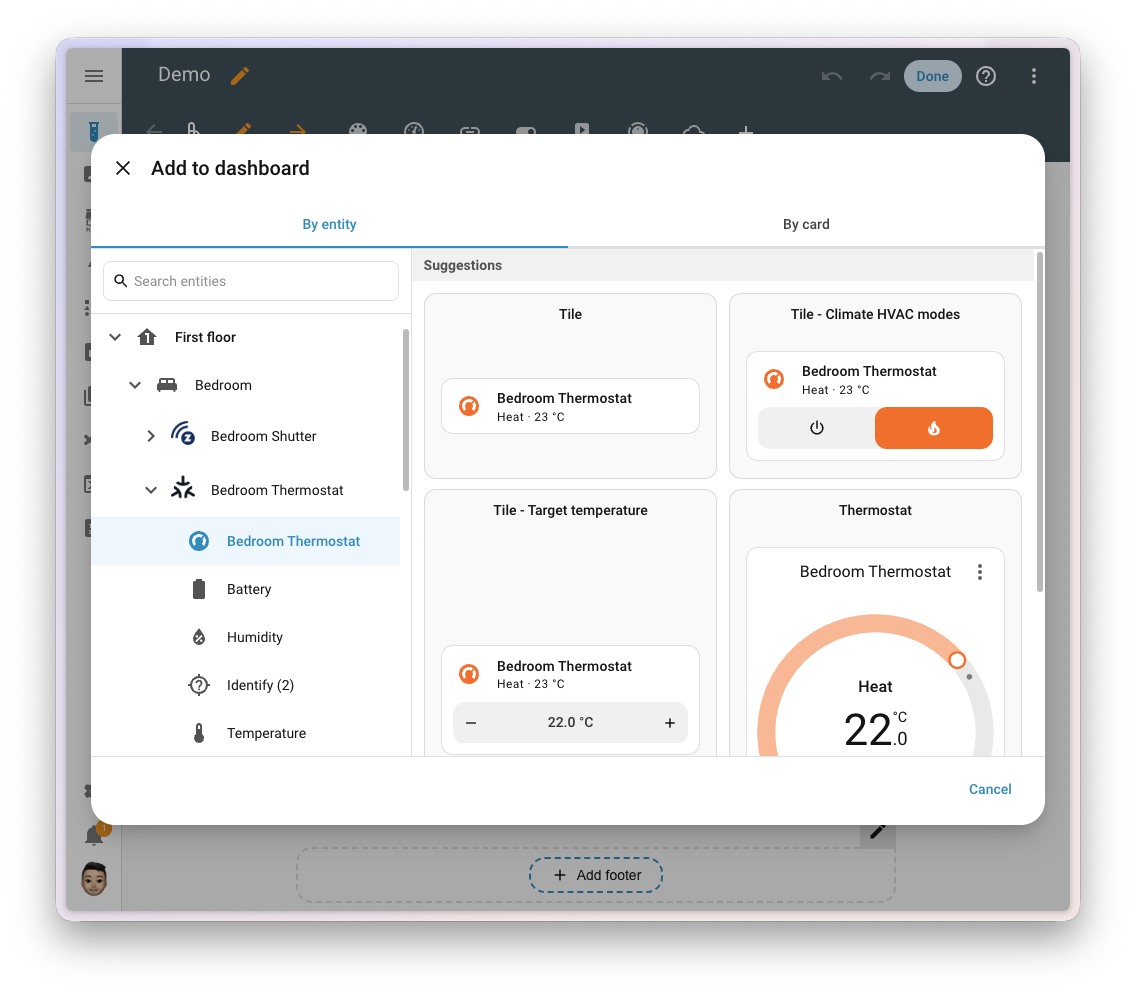
The new By entity tab shows the same hierarchy of your home (floors, areas, devices, entities) you already know from purpose-specific triggers. Pick an entity and Home Assistant immediately suggests relevant card types with a live preview using your real data:
- Lights get a brightness slider card
- Media players show playback controls
- Sensors get a card matching their type
The flow is mobile-friendly (a two-step wizard), unassigned entities are grouped separately, and of course the Browse all cards option remains for those who know exactly what they want. Custom card authors can offer suggestions via the getEntitySuggestion function.
If you've ever struggled with "which card do I actually pick", this change will make your life a lot easier. You start from the thing you want to see, and Home Assistant takes care of the rest.
Infrared Becomes Bidirectional
In the April 2026.4 release, Home Assistant gained native infrared transmit support via ESPHome proxies. This release closes the loop - the IR platform can now receive signals too.
What this means in practice:
- A new receiver event entity captures IR commands from remotes and other devices
- ESPHome is the first transmitter to support IR receiver wiring
- LG Infrared is the first device integration that exposes receiver events
- Received events can trigger automations
As a result, Home Assistant stays in sync even when you control a device with its original remote - a button press on the original remote is reflected in Home Assistant's state. According to the Open Home Foundation roadmap, this delivers on the goal of truly two-way infrared.
Automation Editor Enhancements
The automation editor received several smart improvements in this release.
Zone Triggers and Conditions (Labs)
The purpose-specific automation building blocks keep evolving in Home Assistant Labs. This release adds zone-based triggers and conditions that replace the removed "home"/"person" triggers:
New zone triggers:
- ✅ Person/device enters a zone
- ✅ Person/device leaves a zone
- ✅ Zone becomes occupied
- ✅ Zone becomes empty
New zone conditions:
- ✅ Person/device is in a zone
- ✅ Person/device is not in a zone
- ✅ Zone is occupied
- ✅ Zone is not occupied
They now work for any defined zone, not just home, and support the "for" (duration) field. Note the renamed behaviour options: any → each and last → all.
Target Entity Counting
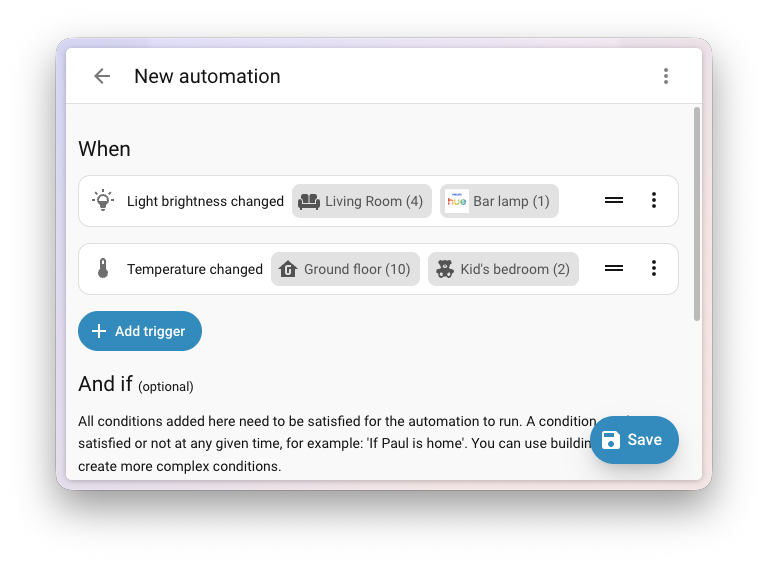
Every automation action now shows the number of affected entities next to its target (device, area, floor, label). You finally know exactly how many entities an action will affect, and clicking through reveals the full list.
Live Condition Testing
This is a feature anyone who debugs automations will love. Condition icons now show a live status badge in real time:
- 🟢 Green checkmark - the condition passes
- 🔴 Red circle - the condition fails
- ⚪ Neutral state - the condition is incomplete or can't be evaluated
- ⚠️ Error indicator - invalid configuration (details in a tooltip)
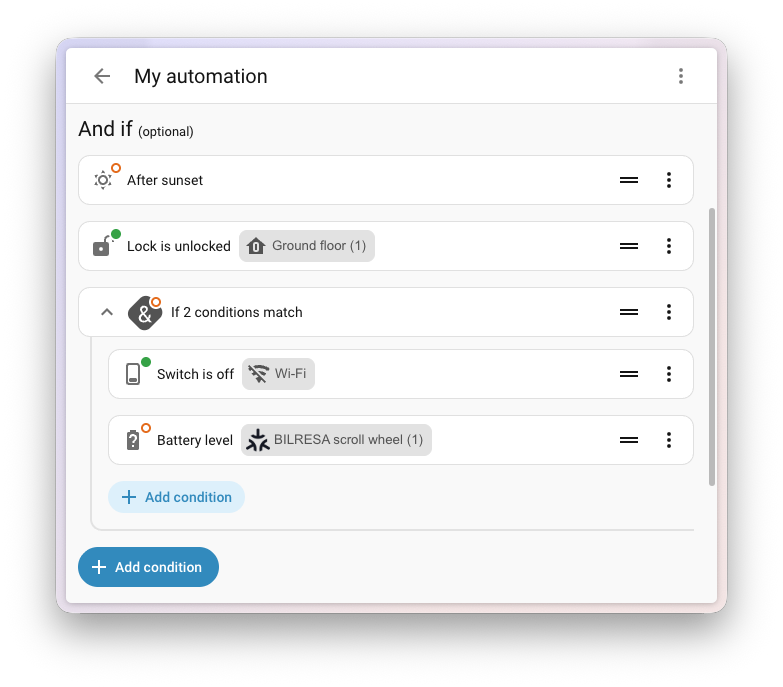
The indicator updates instantly as your home's state changes, and as you edit the condition itself.
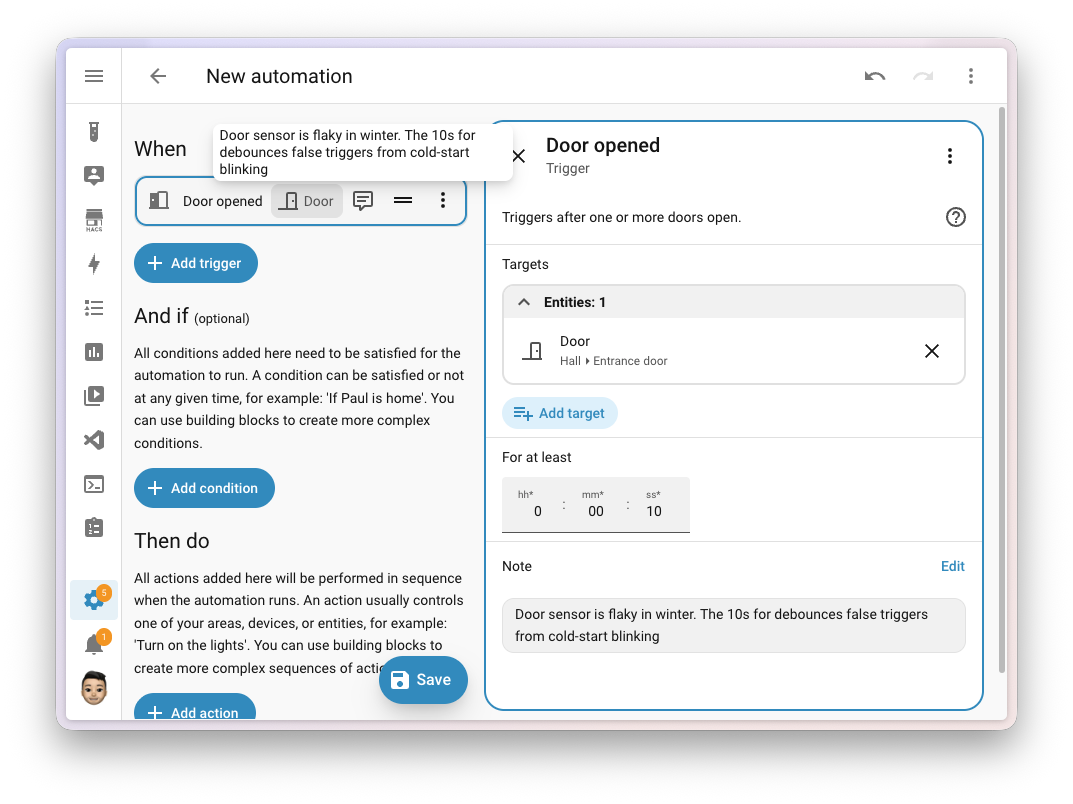
Annotation Notes
Triggers, conditions, actions, options, and scripts can now have a dedicated note field, separate from the alias. Notes persist through duplication, export, and blueprint sharing.
This feature is still evolving in Home Assistant Labs. If you want to try it, enable Labs under Settings > System > Labs and check out my introduction to automations.
Update: Since Home Assistant 2026.7, purpose-specific triggers and conditions are the default way to build automations and no longer require Labs.
Tile Card Enhancements
Weather Forecasts Right on the Tile
Weather tiles got two new features that show the forecast directly on the dashboard:
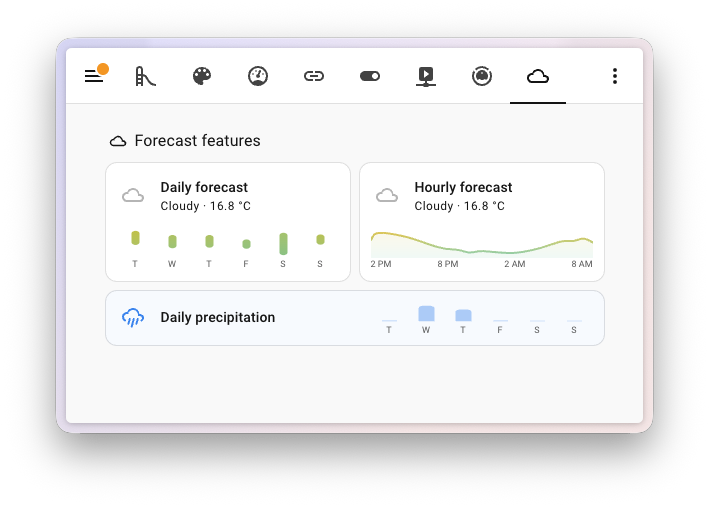
- Temperature forecast - a bar chart of highs and lows for the upcoming days with colour coding (from cyan to deep red) for quick scanning. The hourly view shows a smooth filled curve.
- Precipitation forecast - daily, twice-daily, or hourly rain/snow amounts, with precipitation chance when available. The resolution is auto-detected from your weather service.
Media Player as a Full Remote
Media player tiles have gone a step further and now act as a complete device remote:
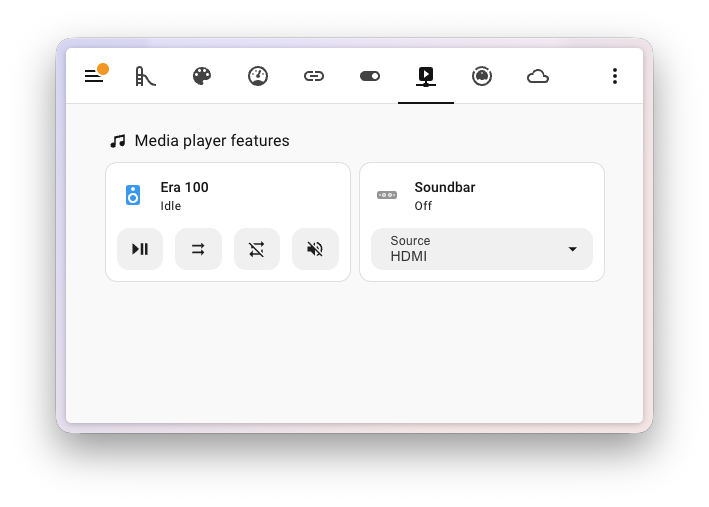
- Mute button on the volume slider and volume buttons
- Shuffle, repeat, volume +/- within the playback feature
- Source and sound mode dropdowns with filtering
- Reorderable playback buttons
PIN Code Management for Z-Wave Locks
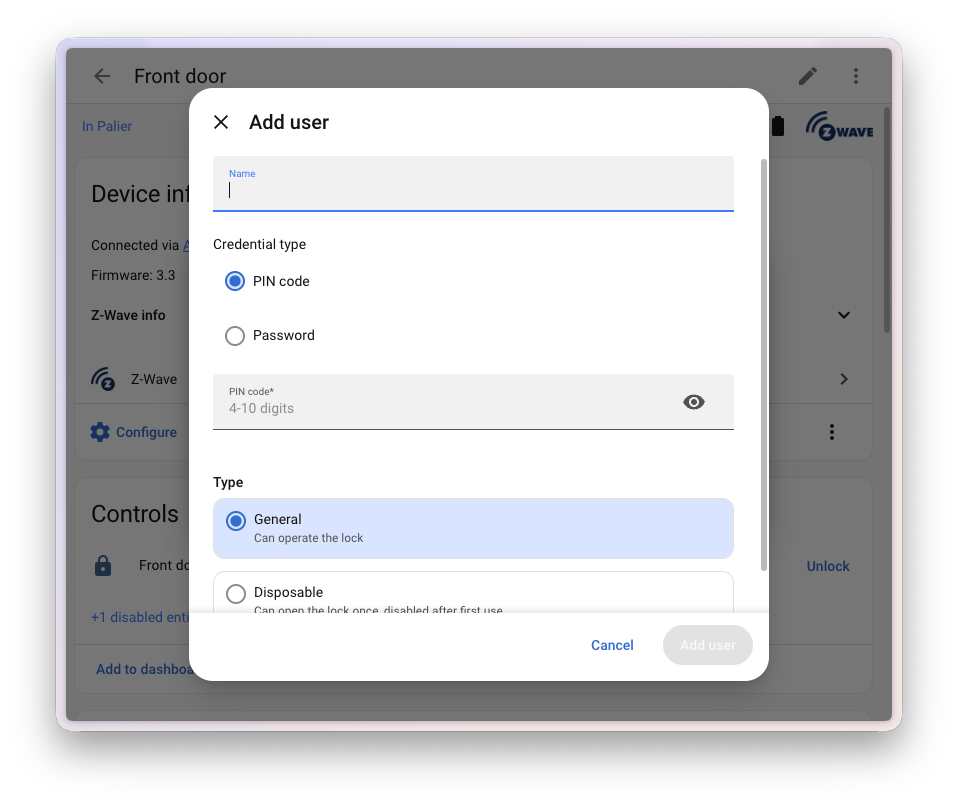
Following Matter locks in 2026.4, Z-Wave smart locks now get their own interface for managing access credentials - right from Home Assistant, without any cloud (communication goes directly over Z-Wave).
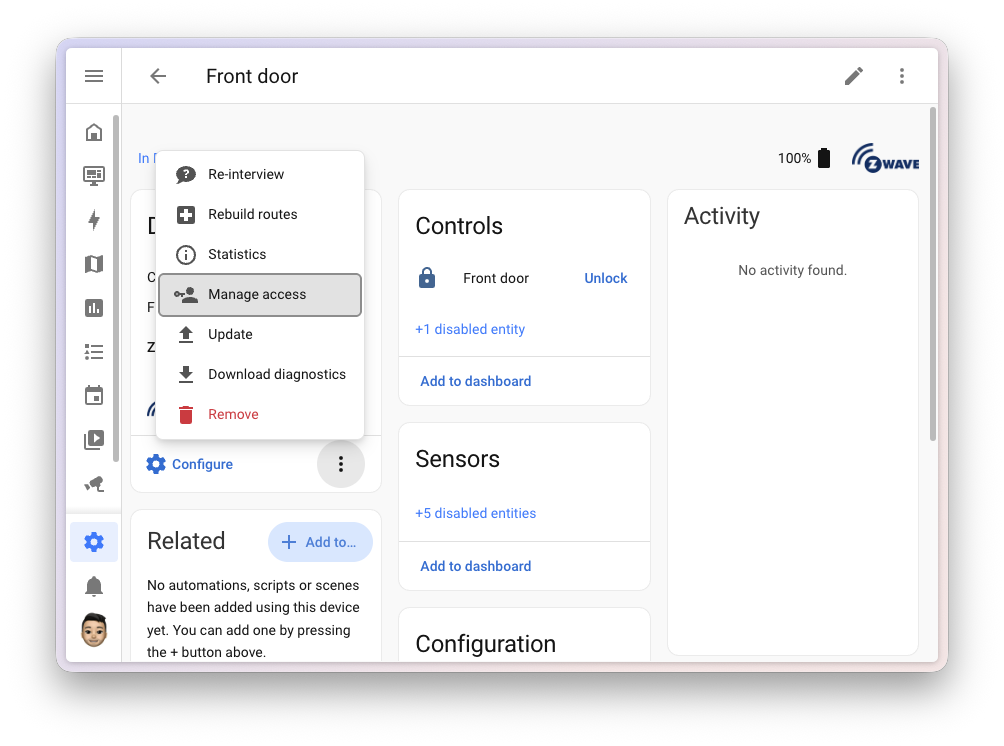
What it can do:
- Add, edit, and remove user credentials
- Support for both PIN codes (digits only) and passwords (alphanumeric, on compatible locks)
- Duplicate PIN detection with warnings
Everything is also available as actions for automations - for example one-time guest PINs, scheduled code rotation, or automatic deletion of a lost user.
Refreshed Apps Page
The Apps page (formerly add-ons) received a visual refresh in the spirit of the redesign from 2026.2.
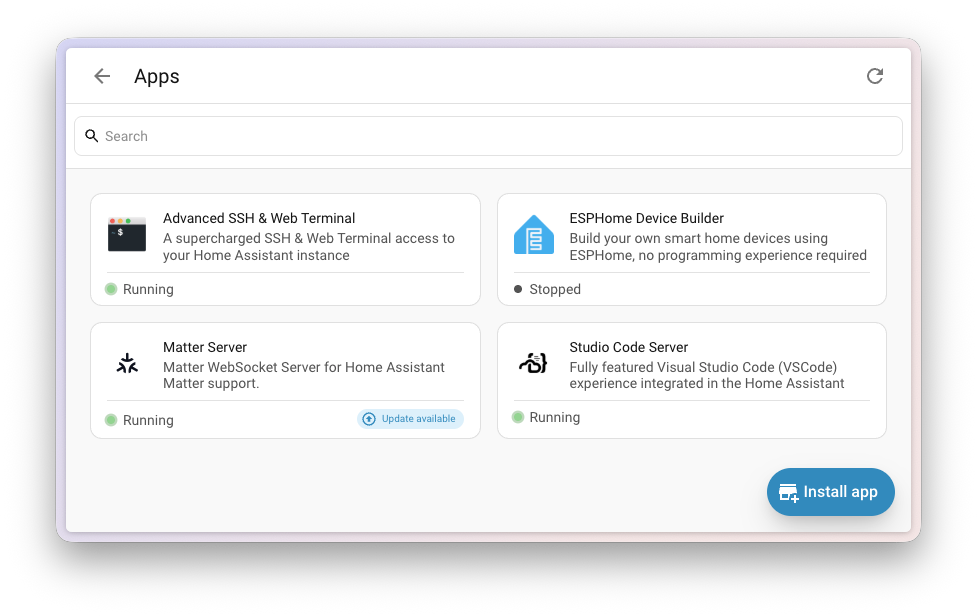
- Apps are displayed as individual cards with an icon, name, and description
- A running status indicator on each card
- Tags highlighting app categories
- Better tablet layout and a cleaner detail design
Energy Dashboard: Battery State of Charge and Custom Source Names
The energy dashboard gained two practical improvements:
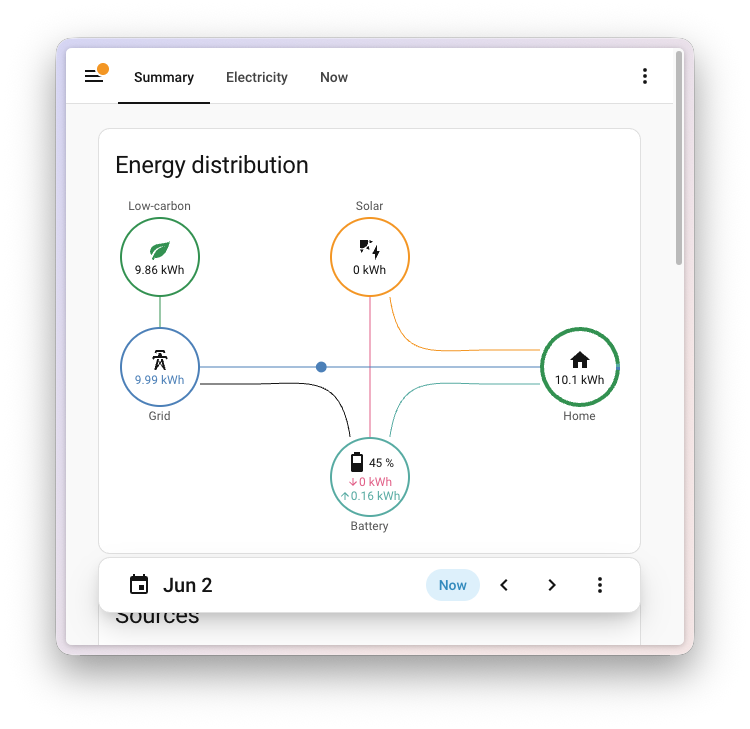
- Battery state of charge - the battery node and a badge at the top of the panel now show the current charge percentage
- Custom source names - you can rename the grid, solar, battery, gas, and water sources. The names then propagate to all cards, charts, and statistics, which greatly simplifies multi-source setups
You'll find it all under Settings > Dashboards > Energy.
Quick Navigation on Device and Area Pages
Device and area pages got quick links that save clicks:
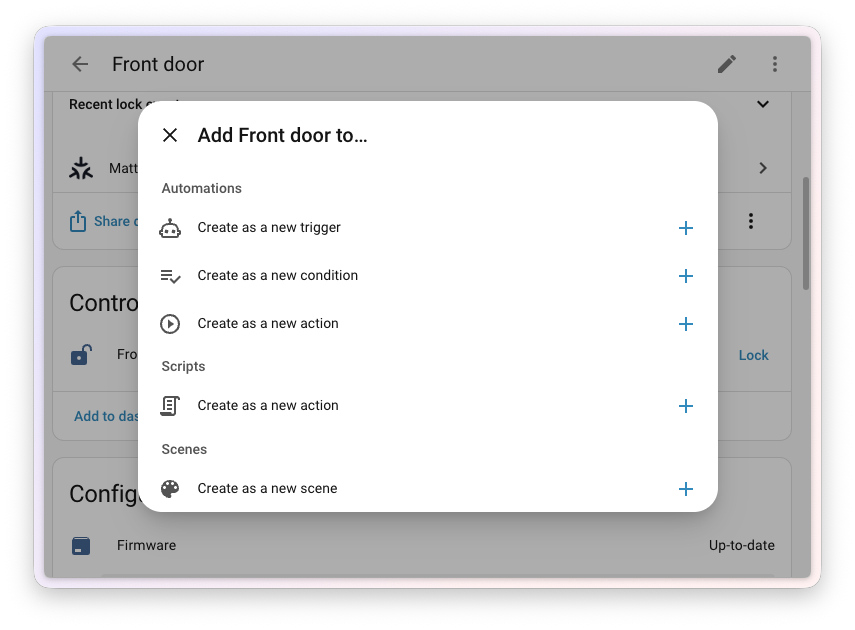
- Device page - related automations, scripts, and scenes in a single card, plus the option to create a new automation or script with the device pre-wired as the target
- Area page - quick links to filtered tables and dashboards
- New creation shortcuts have the target pre-wired into the trigger, condition, or action (requires the purpose-specific triggers Labs feature)
- Label navigation now includes scenes and scripts too
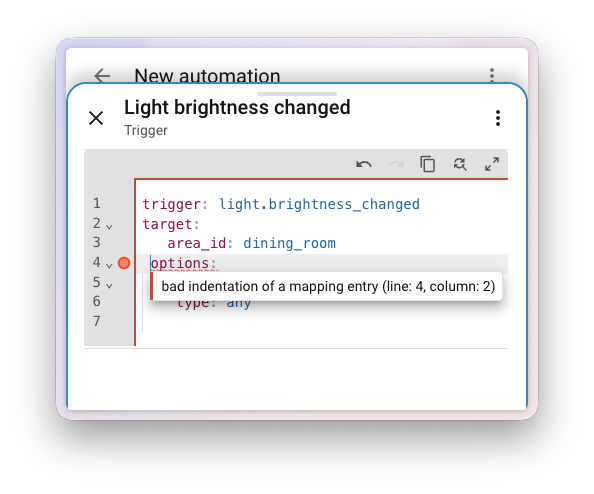
YAML Linting Right in the Editors
Inline YAML linting provides real-time syntax validation right in the UI editors. It warns you about missing colons, unmatched quotes, or incorrect indentation - and highlights the error on the specific line.
Other System-Wide Improvements
- More efficient Bluetooth proxy - the default scanning mode changed from active to Auto, reducing battery usage by 95-96%. It switches to active only when needed
- Matter - device names and areas are set during setup; smoke detectors and alarms are now exposed as proper siren entities. I explain what Matter and Thread actually are and how they work in Home Assistant in my introduction to Matter.
- OpenThread Border Router 1.4 is out of beta with Thread 1.4 and improved mDNS
- The Devices table gained a Firmware column (hidden by default)
- ZHA groups have a new, compact card-based layout
- Label search was added to the helpers, automations, scenes, and scripts tables
- Graph cards (statistics and history) support custom per-entity colours
- Advanced mode was removed - all previously hidden features are now available by default
New Integrations
We welcome the following new integrations in this release:
- AiDot - Local control of Wi-Fi smart bulbs (A19/BR30)
- CentriConnect/MyPropane - Monitor propane tank levels via the cloud
- Cielo Home - Control Cielo smart AC/heat pump controllers (Platinum)
- Data Grand Lyon - Lyon public transit departures and Vélo'v bike availability (Platinum)
- Guntamatic - Local monitoring of wood/pellet heaters (Silver)
- LG TV via Serial - Control LG TVs via RS-232, including over an ESPHome proxy (Silver)
- Marantz Infrared - Control Marantz amplifiers via an IR transmitter (Silver)
- Mitsubishi Comfort - Local control of heat pumps and minisplits
- Ouman EH-800 - Local monitoring and control of Ouman heating controllers
- OVHcloud AI Endpoints - Conversation agent powered by OVHcloud's European open-weight LLMs
- PAJ GPS - Track PAJ GPS trackers on the map
- PTDevices - PTLevel water level sensors with pump automation
- Samsung Infrared - Control Samsung TVs via an existing IR transmitter
- Vistapool - Monitor and control Hayward pool controllers
- Xthings Cloud - Control Xthings smart devices (e.g. U-tec bulbs)
- Yoto - Control Yoto audio players
Notable Improvements to Existing Integrations
- Alexa Devices - Media player platform for Echo devices (playback, volume, mute) and an event entity for voice commands
- Anthropic - A web fetch tool for Claude conversations
- Tuya - Dehumidifiers, water timers, camera improvements, the WG2 alarm panel, and more
- SwitchBot - Support for the Outdoor Light, Weather Station, and Lock Vision Pro/Wifi
- Reolink - Battery cameras now connect directly without a Home Hub/NVR bridge
- Shelly - New occupancy binary sensor
- Sonos - Track search across music services
- SmartThings - TV input source selection and Copper water meter sensors
- HomeWizard - Smart charging strategies and battery group sensors
- Google Nest - Thermostat fan timer action
- Eurotronic Comet Blue - Number platform for eco/comfort setpoints and temperature offset
Now Available via UI and Removed Integrations
Now available to add via the UI: Elgato Avea, openSenseMap, and OPNsense.
The Konnected integration was removed (legacy; a migration guide to ESPHome is available).
Backward-Incompatible Changes
This release includes a few changes that may affect your existing configuration:
- Template entities - the legacy
platform:syntax was removed foralarm_control_panel,binary_sensor,cover,fan,light,lock,sensor,switch,vacuum, andweather. Migrate to the moderntemplate:syntax (see my migration guide) - Bluetooth / ESPHome / Shelly - default scanning changed to Auto mode; set it back to Active manually under Settings > Devices & Services if needed
- Purpose-specific triggers (Labs) - behaviour options renamed (
any→each,last→all) - HDMI-CEC - the
turn_offaction now sends a standard CEC standby instead of a vendor-specific power-off command - ONVIF -
onvif.ptzwithcontinuous_duration: 0no longer sends a Stop command automatically; stop with a separate call - Certificate Expiry - the
errorattribute returnsNoneinstead of the string"None"; in templates change== "None"tois none - IronOS - the uptime sensor changed from a duration (seconds) to a timestamp
- SmartThings - the media player
sourceattribute is normalized to standard values - Tuya - API-provided units now take precedence over Home Assistant defaults
- Velux - the deprecated
velux.reboot_gatewayaction was removed; use the reboot button entity
Full details are in the official blog post.
More Information
Release Party Video
Did this guide help you?
I write these guides in my spare time and keep them up to date. If one saved you time, you can chip in.
One-off, by card or Apple Pay. You can change the amount on the next page.
Would rather not send money? Buy the parts through my product links. The price is the same for you and it helps too.