Home Assistant 2026.8
Approachable by design 🙌
The eighth release of 2026 doesn't have one big star - it has a clear direction. Every major change here pushes toward the same goal: making Home Assistant something you don't need to be technical to use. New installations finally get by without the magic :8123 at the end of the address, and the web server settings now live right in the interface, complete with a safety net. The word "advanced" is disappearing from the system, and Developer Tools is shortened to plain Tools. The Home Assistant Cloud page got a proper redesign and a guided setup. On top of that: entity ID renaming, cleaner device handling, media search, favorite cards, and much more capable Z-Wave lock credential management.
Let's take a look at everything that landed in this release.
The End of the Magic Number
Ever wondered why the address for your own home has a random number stuck on the end? So did the developers. For years, reaching Home Assistant meant remembering :8123 - a piece of technical trivia everybody simply had to learn. This release starts putting it right: new installations of Home Assistant OS use a normal web address with no number on the end.
Starting with 2026.8, the default port for Home Assistant OS is 80, so you type the address just like any other website. For Home Assistant Container, the default remains 8123.
Your Installation Stays As It Is
This part matters: if you already run Home Assistant, there is nothing you need to do. The change only affects new installations of Home Assistant OS. Your existing instance keeps the exact port it has always used and keeps working just as before. If everything works today, the best thing is to leave it alone.
Web Server Settings Now Live in the Interface
If you do want the cleaner address, or need to change the port for another reason, you can do it yourself in Settings > System > Network under HTTP server. The same screen holds other options that used to live in YAML only - such as which network connection Home Assistant listens on, or trusted proxies:
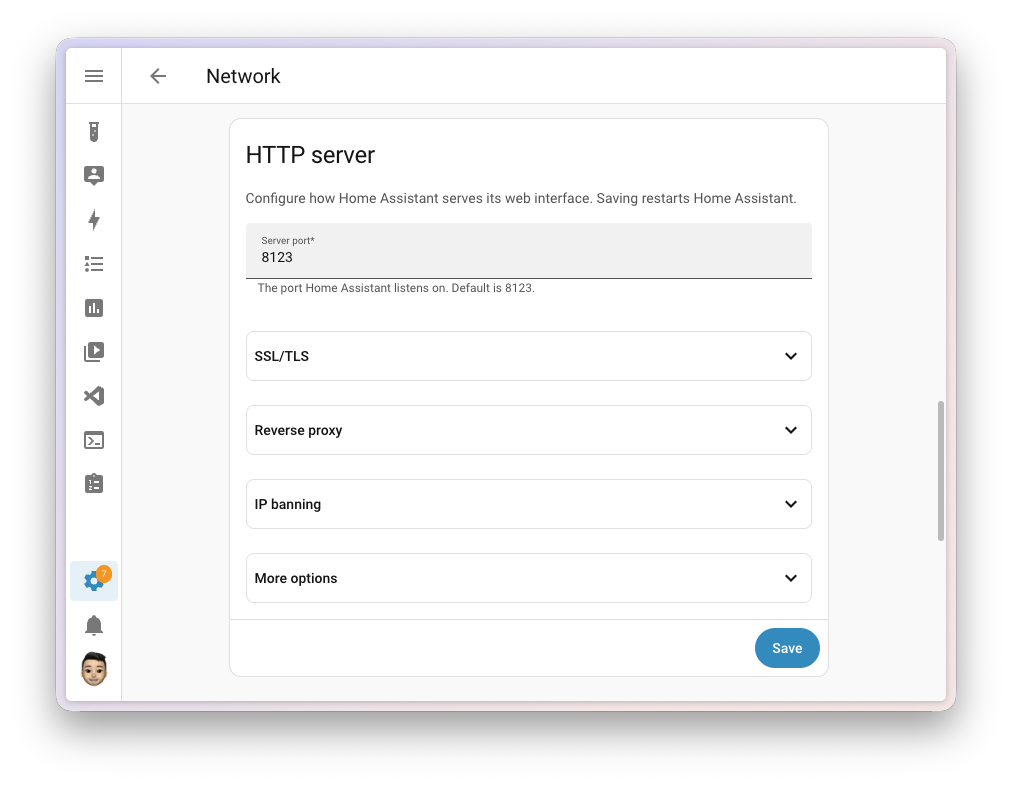
Changing the port your entire home lives on can feel genuinely nerve-wracking, and this is where the implementation shines. Home Assistant applies the new configuration and then waits for you to confirm everything still works. If you don't confirm within five minutes, it assumes something went wrong, restores your previous settings, and restarts. And if the new configuration can't be applied at all, it falls back right away:
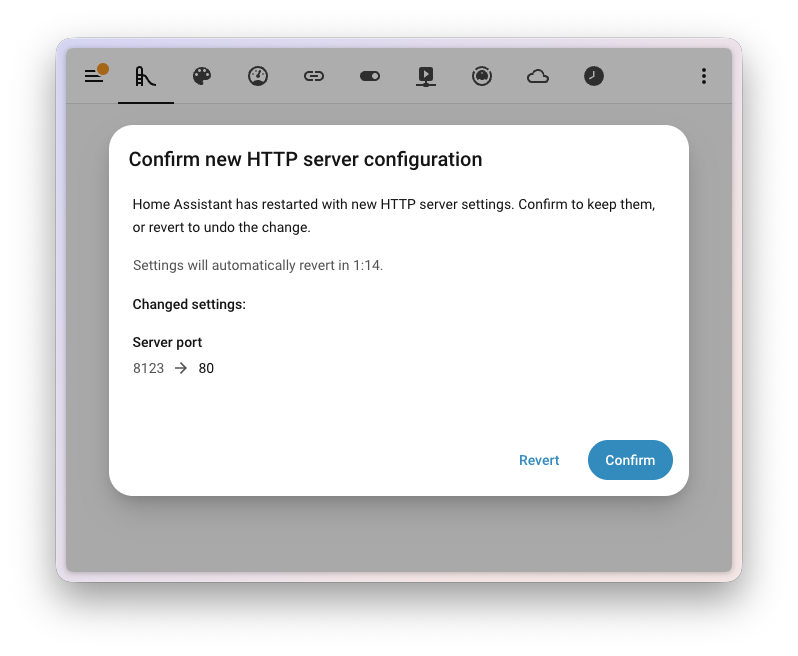
So even if you lock yourself out, you don't have to do a thing - wait a few minutes and you're back where you were.
Anything that reaches Home Assistant using the old address may need updating - browser bookmarks, the mobile app, a reverse proxy, and any connected services and tools. If you use a reverse proxy or your own certificate, have a look at my articles on remote access and the SSL certificate - that's exactly where the port and trusted proxy settings meet.
What About YAML?
If you configure the web server in configuration.yaml, you don't need to change anything either. The first time you start Home Assistant after updating, your settings move into the interface and you manage them there from then on. A repair may appear to let you know about the import and can point you toward tidying up the old YAML - but nothing breaks either way.
Less "Advanced", More Approachable
The word advanced came up around Home Assistant a lot. But what does it actually mean, and who decides what counts as advanced and what doesn't? Far too often it was a label that quietly told people a feature wasn't for them - even when there was nothing difficult about it.
So this release removes that wording in around 43 places - across the app, the documentation, and the companion apps. None of these features changed. The wording now simply describes what each one does, instead of rating your skill.
In the same spirit, Developer Tools becomes plain Tools. It has always been a useful spot for everyone - you check a device's state, test a template, or reload part of your configuration - and you never needed to be a developer to use it. The shorter name matches how people actually use it.
Home Assistant Cloud, Easier to Explore
Home Assistant Cloud by Nabu Casa is how many people add remote access, fast and private voice, and encrypted backups - while supporting the project at the same time. Until now, though, everything lived on a single long page full of switches.
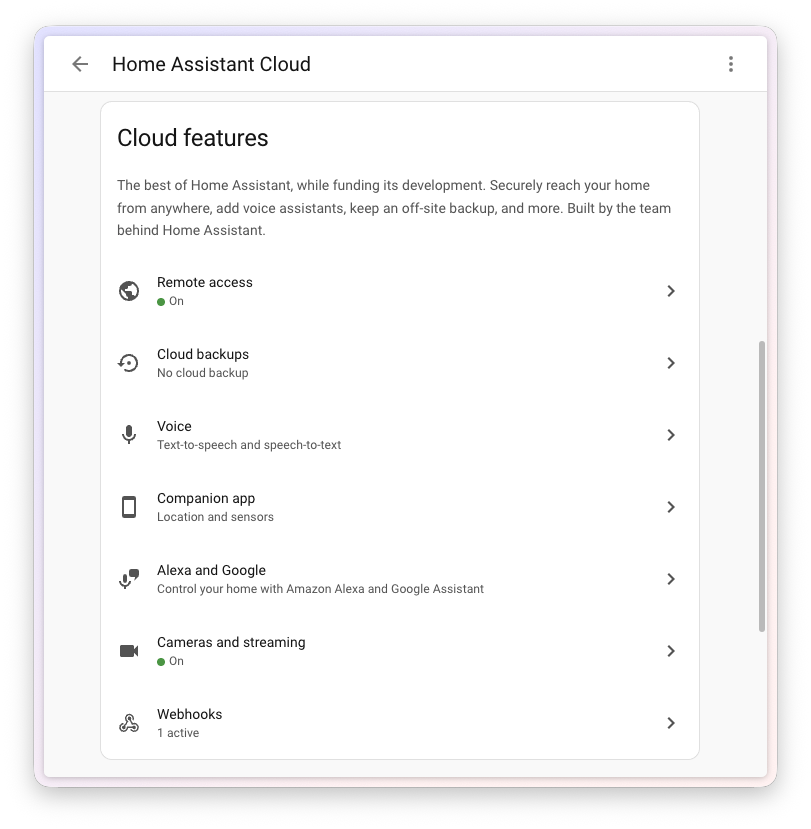
The main page is now a clean overview. Each feature - remote access, backups, voice assistants, the companion app, and more - has its own space, so you can see what you have turned on at a glance. The detailed settings moved onto their own subpages:
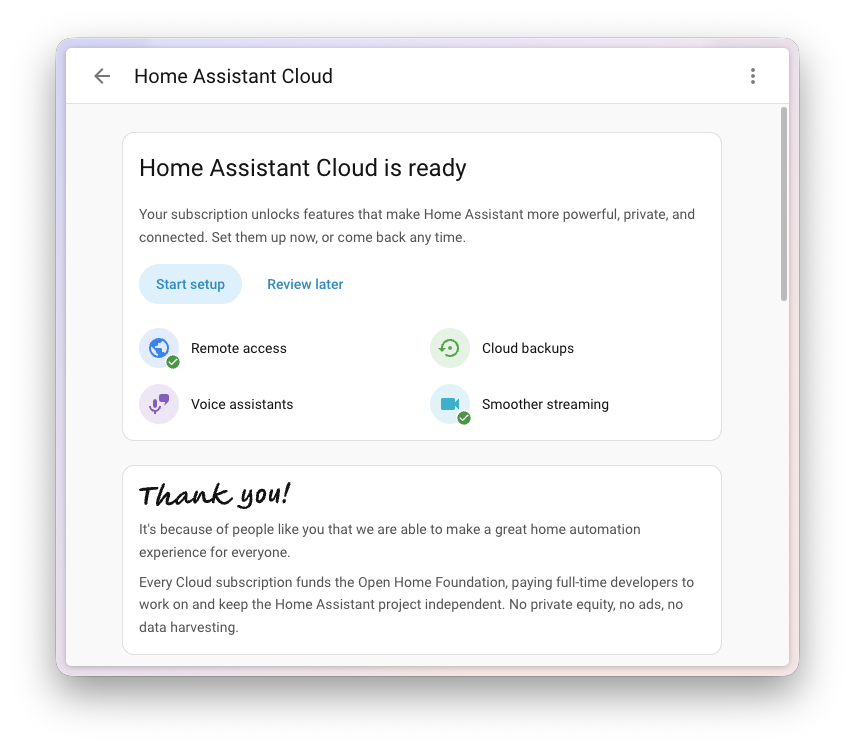
The bigger change is for newcomers: there's now a guided setup that walks you through Home Assistant Cloud step by step, instead of dropping you into a wall of options. And if it's not a good moment, you can put it off and pick it up later.
Home Assistant Cloud isn't the only option - you'll find a comparison with Cloudflare Tunnel and a public IP, including practical guides, in my article on remote access.
Your Entity IDs, Your Choice
Behind every device and sensor sits an entity ID - a short name like light.kitchen_ceiling that your automations, scripts, and dashboards use to refer to it. Most of the time they look after themselves. But when you do want them neat and consistent, you should be the one deciding how they read.
Earlier work headed toward building entity IDs automatically from the area a device belongs to. User feedback showed that this suited some people and not others at all. So this release takes a more flexible route and hands the decision to you: you can rename an entity ID yourself and control how its parts are ordered, so your entities follow whatever naming pattern makes sense to you:
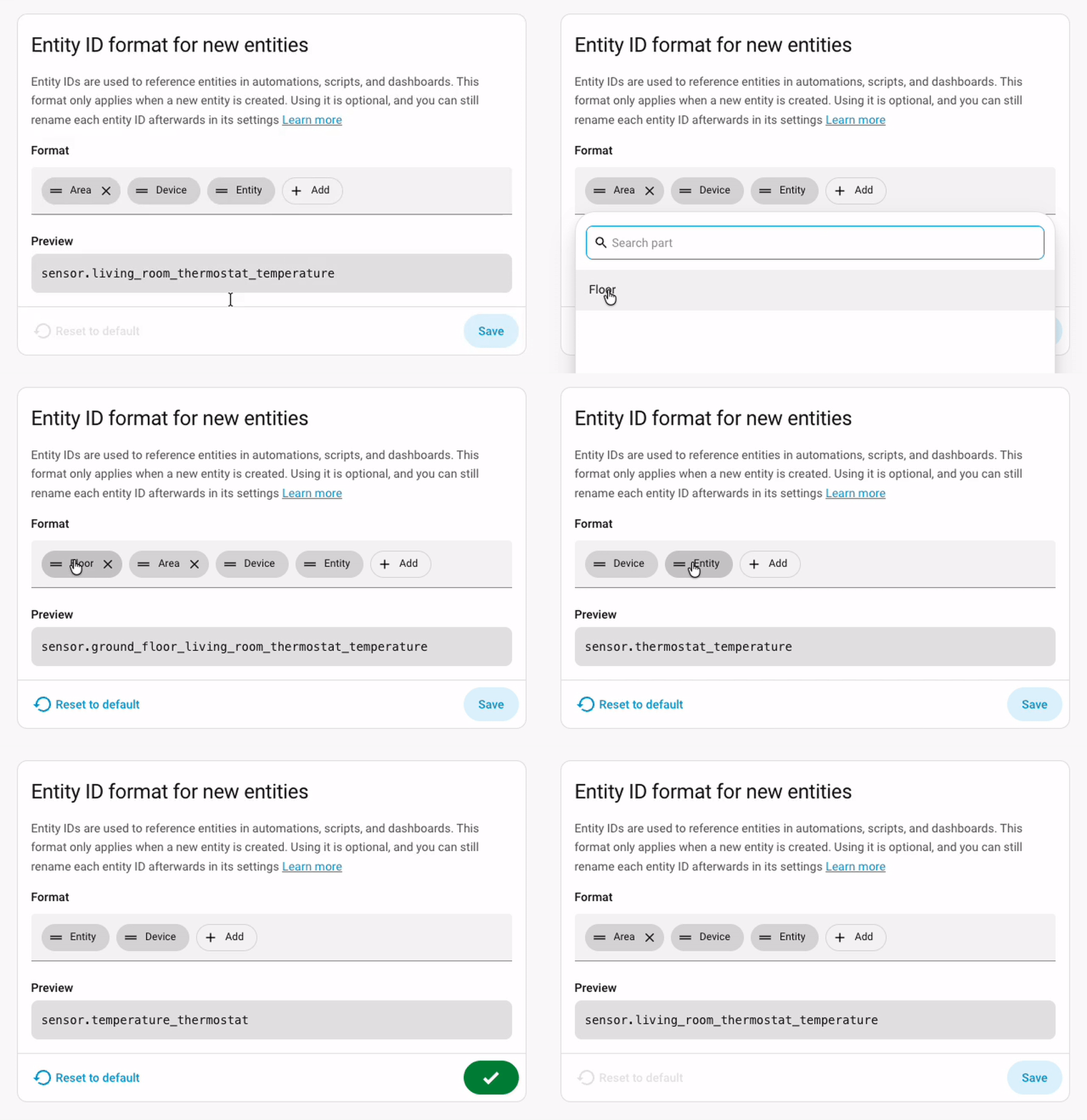
If entities are still a fuzzy concept for you, start with my introduction to entities.
A Cleaner Way to Handle Your Devices
Home Assistant is changing how it keeps track of your devices behind the scenes. Until now, if one physical device was set up through two different integrations, Home Assistant merged them into a single device. Details that can only hold one value - the model or the serial number - could then clash. From this release, each integration keeps its own device entry, so nothing gets collapsed together.
When you update, any devices that were merged this way are separated automatically and their entities move to the right one. Most people will not notice a thing. In the rarer cases where a device was set up through more than one integration, you might see it appear twice - once per integration - and Home Assistant may raise a repair to let you know.
There is nothing you need to do. Automations and scripts keep working, because Home Assistant still sends actions to the right devices after the split. The only things worth a second look are automations that point to a device by its ID directly, and the occasional unusual setup. If a repair appears, just follow it.
Most custom integrations need no changes at all. An analysis of 462 custom integrations that work directly with the device registry suggests at least 90% of them will run unaffected - which also means some will not. The compatible behaviour also stays in place until release 2027.8, so there's a full year for any adjustments. Details are in the developer blog.
This is groundwork for more flexible device handling being built over the coming months, so think of it as a step along the way rather than the finished picture.
New Triggers and Conditions: Vibration and the Moon
Last release made purpose-specific triggers and conditions the new default way to build automations - you describe the moment you care about instead of piecing it together from the technical parts underneath. And it seems there's no stopping the additions:
- Vibration now has conditions to match its triggers. On top of reacting the moment vibration starts or stops, you can now check whether something is vibrating (or not) as part of a bigger automation. The classic example: only send that "laundry is done" message once the washing machine has actually stopped shaking
- The Moon gained the trigger Moon phase changed (
moon.phase_changed) plus the conditions Moon phase (moon.is_phase), Moon is waxing (moon.is_waxing), and Moon is waning (moon.is_waning). So you can start an automation the moment the moon enters a new phase, or just check the phase inside a bigger automation - whether that's mood lighting, a reminder, or purely for fun 🌙
If you're just starting out with automations, I explain the basics in my introduction to automations.
Z-Wave Lock Credentials, Properly Managed
Managing who is allowed to unlock your Z-Wave lock took a big step forward. Building on the new Access Control API in Z-Wave JS, the Z-Wave JS app 1.6.0 brings a heavily revised interface: every supported lock gets a dedicated Access Control tab:
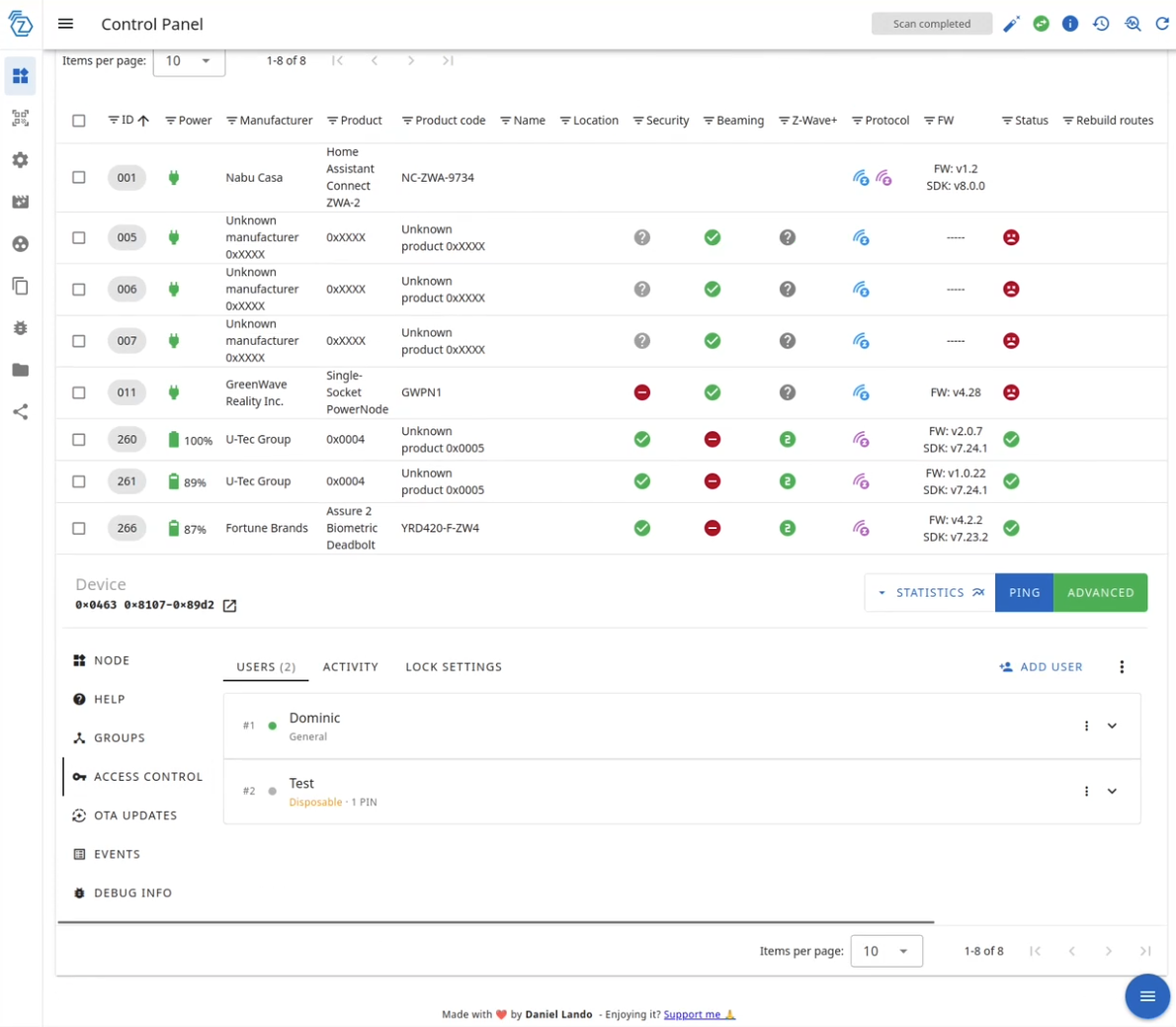
Depending on what your lock supports, you can give each user several credentials of more than one type - so the same person can have a PIN and a fingerprint, or multiple of both. New credentials can be learned on the lock itself: start the enrollment from the interface, then present the finger or type the PIN. There's also an audit log of every change, admin code management for locks that use one, and the ability to move credentials between users or delete them in bulk.
For now this lives in Z-Wave JS UI, not in the Z-Wave panel in Home Assistant. Update the Z-Wave JS app to 1.6.0 or later and you'll find the new tab in Z-Wave JS UI. Basic PIN code management directly in Home Assistant arrived in release 2026.6.
Search Your Media
Finding the right song, photo, or film used to mean clicking through folder after folder. Now, integrations that provide media can offer search right in the media browser - you type what you're looking for and jump straight to it.
What you can search depends on the source. Immich, for example, gained a smart search that finds photos by what is actually in them rather than by filename. And Overseerr lets you search for and request movies and shows without leaving Home Assistant.
A Combined Battery Level You Can Trust
If you track more than one battery in the energy dashboard, you can now give each one a capacity. The combined state of charge is then weighted by size, so a small full battery and a large empty one no longer average out to a misleading number. Batteries without a capacity set keep using the plain average, so nothing changes unless you want it to.
Favorite Cards and a Roomier Template Editor
Two small things that will please anyone who builds dashboards:
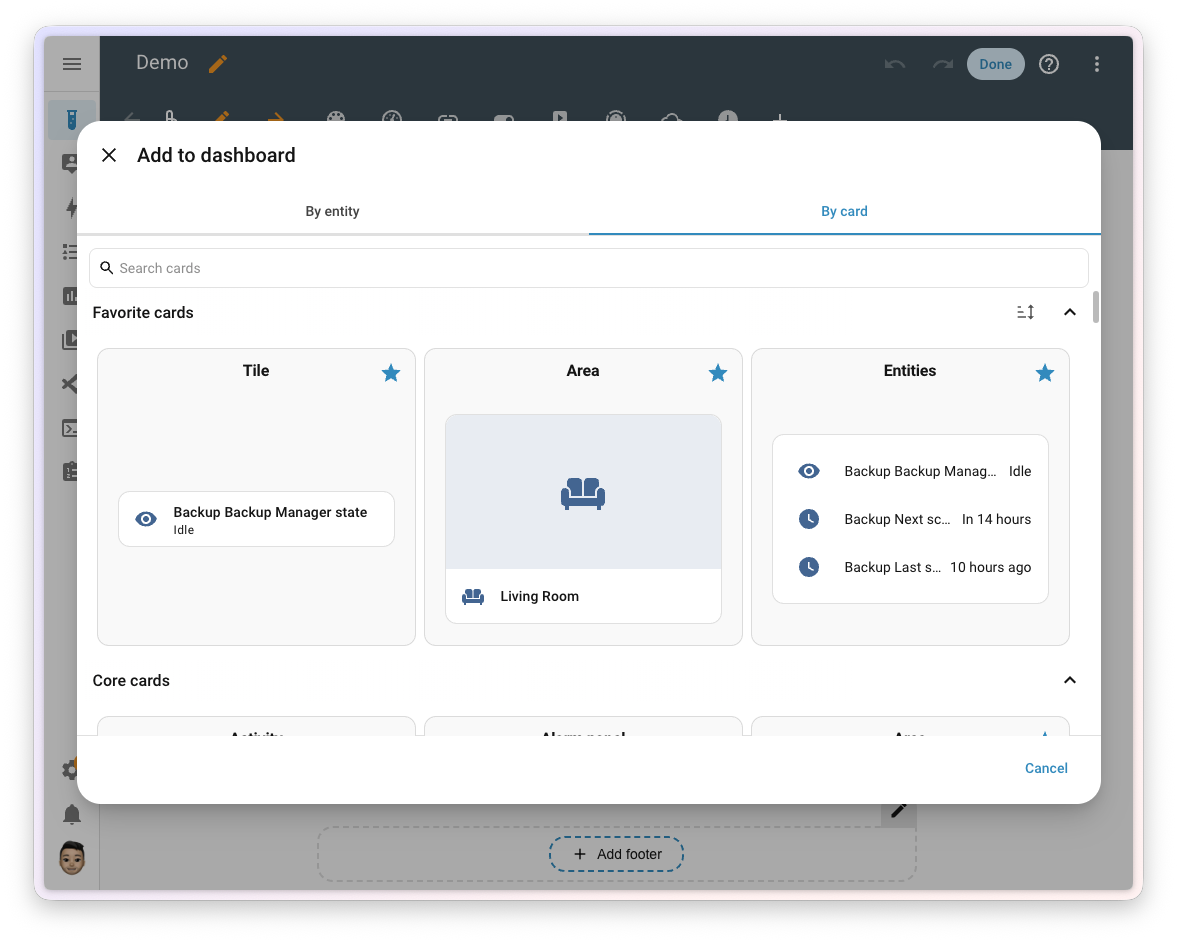
- Favorite cards - in the card picker's By Card tab, you can now mark the cards you use most using the icon in the corner. Favorites float to the top, so if you reach for the same card again and again while building similar dashboards, it's always right there. Tap the icon again to remove it from your favorites
- A roomier template editor - the template tool in Tools has a more comfortable layout: the editor and the result sit in two panes you can drag to resize, and you can switch between side by side and stacked. Your choice is remembered for next time. A handy companion to the template editor autocomplete from 2026.5
More Improvements Across the System
- Templates keep getting faster - templates with a numeric result are up to 40% faster, and templates used on dashboards can now be cached
- Template entities remember their state - fan, cover, and device tracker template entities restore their previous state after a restart
- Search finds more of what is connected - when you search or open a device or entity, Home Assistant digs deeper: scenes, scripts, groups, the people behind a person entity, and anything sharing a label or area show up where you'd expect them
- A reboot heads-up on Home Assistant OS - the system update entity now lets you know when an update needs a reboot to finish
- A new radon device class - sensors and numbers can be classified as radon, so they get the right units and display
- Filter entities by manufacturer and model - the entity filter can narrow entities by manufacturer, model, and model ID
- Ask Assist from quick search - you can now start an Assist command straight from quick search
- A date on the clock card - the clock card can show the date alongside the time
- More from the Activity panel - the Activity panel gained a CSV download and a clear-and-reset action
- Taps that land where you mean them - on the picture elements card, a tap could trigger the element next to the one you meant, or hit nothing at all. Taps now go to the nearest icon or label, so every element can be reached
- A short survey after setup - if you set up Home Assistant recently, you might see an optional survey asking how your first experience went. It's entirely up to you
New Integrations
We welcome the following new integrations in this release:
- Dyson Infrared - Control Dyson fans through any infrared transmitter you already have in Home Assistant. The connection only goes one way, so you see the last command you sent rather than the live state
- Fuelprices.dk - Current fuel prices from Danish fuel companies, with a sensor for each product you select at a station
- Gatus - The health of your services from a Gatus monitoring instance, each monitored endpoint as a binary sensor (Silver)
- GeoSphere Austria Warnings - Official weather warnings for Austria from GeoSphere Austria (formerly ZAMG), issued per municipality - storms, heavy rain, snow, black ice, heat, and cold
- Google Health - Health and fitness data from Google Health and the Fitbit Web API (steps, distance, weight, resting heart rate); it can run alongside the existing Fitbit integration
- Harbor Sleep - Local monitoring of a Harbor Sleep baby monitor - temperature, Wi-Fi strength, stream quality
- Harman Luxury Audio - Network streamers built on the Harman Luxury Audio platform (Arcam Radia ST5 and ST60 plus equivalent JBL and Mark Levinson streamers), locally and with no cloud account
- Karakeep - Bookmark statistics from your self-hosted Karakeep service as sensors
- LED Infrared - Control LED lights through an infrared emitter; supports many branded and unbranded bulbs and strip controllers (assumed state)
- LiteLLM - A LiteLLM proxy as a conversation agent; a single OpenAI-compatible API in front of many model providers, hosted or self-hosted
- llama.cpp - A local llama.cpp server (or any OpenAI-compatible endpoint) as a conversation agent; several agents, each with its own model and instructions, all on your own hardware
- Lyngdorf - Lyngdorf audio processors and amplifiers - power, volume, source selection, and sound modes (Silver)
- Midea - Devices using the Midea protocol, such as air conditioners and air purifiers
- NeoPool - Pool controllers built on the NeoPool system (Hidrolife, Aquarite, Oxilife, and other brands) locally over Modbus TCP - water chemistry, filtration, and hydrolysis, no cloud needed (Silver)
- ScorpionTrack - Vehicles shared through a public ScorpionTrack link on your Home Assistant map, without your account credentials (Silver)
Noteworthy Improvements to Existing Integrations
- Shelly - Support for Enhanced Security (the HTTPS-only mode on firmware 2.0 for gen2 and newer) plus support for Shelly circuit breakers, with on/off control and output-state and safety-switch sensors
- UniFi Protect - Support for the USL smart sensors (Entry, Environmental, GlassBreak) on UniFi Protect 7.2 and newer; cameras gained Motion detection, Smart detection, and Sound detection event entities that fire for any detection the camera reports (a person, a package, barking) with the detected type as an attribute
- KNX - A whole set of improvements: button and notify entities can be configured from the interface, the KNX panel gained a Send telegram dialog (keyboard shortcut
s), a datapoint type (DPT) reference, and a device view for your project data; all KNX entities now restore their state after a reload or restart - MQTT - A new infrared platform, so you can send IR commands over MQTT (building on the native IR support from 2026.4)
- Reolink - Pre-siren entities and a motion device class on the AI-detection binary sensors
- Overkiz - Window and tilt binary sensors for contact sensors, boost and drying-duration numbers for the Atlantic electrical towel dryer, and support for the Somfy Thermostat PRO
- Roborock - The Q10 got plenty of love: a do-not-disturb switch, more switch entities, a map image, and a volume control
- Whirlpool - An oven light, an oven cook-mode select, and an oven target-temperature number
- Enphase Envoy - ACB battery sensors along with sleep and wake controls
- MELCloud - On/off control, an operation-mode select, and a flow-temperature number for air-to-water heat pump zones
- MELCloud Home - Energy-consumption reporting and a number platform
- Portainer - An update platform and container health status
- Mikrotik - Sensor, button, and update platforms
- SMLIGHT - Bluetooth proxy support and an infrared receiver for SMLIGHT Ultima devices
- WiiM - Multi-room grouping and metadata synchronization
- OpenAI Conversation - Support for GPT-5.6
- Steam - An image platform plus new Last online, Level, and Now playing sensors
- Tesla Wall Connector, Teslemetry, and Tessie - Vehicle current and Wi-Fi signal sensors, control for seat coolers, and a navigation-destination text entity
- Gardena Bluetooth - Tank pressure and water temperature sensors
- Victron BLE - Support for Orion XS and inverter devices
- Ecowitt - Soil conductivity sensor support
- OMIE - An action to get prices for a specific date
- LG Infrared - Support for LG air conditioners
Integration Quality, New UI Setup, and Removals
Ten integrations moved up the quality scale this time. Anthropic and SMLIGHT SLZB reached Platinum, and Nobø Ecohub climbed to Gold. Dropbox, Kiosker, OpenWrt (luci), STIEBEL ELTRON, and WattWächter Plus reached Silver, while Midea ccm15 AC Controller and Netatmo reached Bronze.
Now available to set up from the UI: AquaLogic and OpenWrt (luci).
Two integrations were removed. Permobil, because the vendor deprecated the API it relied on and there's no replacement. And Volvo On Call - if you have a supported Volvo, set up the newer Volvo integration instead.
Backward-Incompatible Changes
This release contains a few changes that may affect your existing configuration:
- Robot vacuums - the deprecated
battery_levelproperty has been removed from vacuum entities. If you use a robot vacuum's battery level in an automation, script, or on a dashboard, switch to the vacuum's battery sensor. Affected integrations: LG ThinQ, Neato, Romy, Shark IQ, SwitchBot Cloud, Template, TP-Link, and Xiaomi Miio - UniFi Protect - three changes at once: support for AI Port devices was removed (they only ever exposed diagnostic sensors disabled by default and aren't part of the public API), detection scores are gone, so the
event_scoreattribute on the detection binary sensors no longer exists and automations filtering on it need another condition (the event id and detected types moved to the new event entities), and UniFi Protect 7.1 or newer is now required - Ohme - the energy sensor was removed because it reported an estimate of the energy in the car's battery rather than the energy delivered by the charger, causing confusing jumps in the energy dashboard. Use an Integration - Riemann sum helper on a power sensor instead
- Paperless-ngx - the minimum supported server version is raised to 2.19 (which also restores compatibility with Paperless-ngx 3.0). If you're on 2.18 or older, update the server before Home Assistant
- ScreenLogic - the polling interval option was removed; Home Assistant now polls at a fixed interval. You can set your own polling interval or trigger an update with the
homeassistant.update_entityaction - AirNow - the station radius option was removed, because the 2026 API no longer uses a distance parameter. Existing entries update automatically and no action is needed
- Gardena Bluetooth - the valve's
activation_reasonsensor now reports a fixed set of values instead of free-form text; update any automations, scripts, or templates matching the old text values - Edifier Infrared - on the R2000DB and R2730DB speakers, some buttons were mapped to the wrong IR codes (on the R2730DB, power and mute were swapped). The mappings are corrected and migrated automatically; update anything built around the old, incorrect buttons
- Volvo On Call - the integration was removed, switch to the newer Volvo integration
You'll find the full details in the official blog post.
More Information
- The English blog post with full details
- Full changelog for Home Assistant Core 2026.8
- Web server settings documentation (HTTP integration)
- Developer blog: devices are restricted to a single config entry
Release Party Video
Shortly after the release party comes the ESPHome Starter Kit launch party - August 12 at 21:00 CEST on the ESPHome YouTube channel, together with partners from Apollo Automation. If ESPHome is your thing, it's worth putting in the calendar.
Did this guide help you?
I write these guides in my spare time and keep them up to date. If one saved you time, you can chip in.
One-off, by card or Apple Pay. You can change the amount on the next page.
Would rather not send money? Buy the parts through my product links. The price is the same for you and it helps too.