When the NSPanel won't boot after an update: anatomy of one outage
This article is different from the rest of this site. It isn't a "do this and it'll work" guide but a breakdown of one specific failure — from a black display to a working panel, including every dead end I wandered into along the way.
I'm writing it because the fix itself turns out to be trivial. What's valuable is how you get there — and above all, how you recognise that the hypothesis you're banking on is wrong. The techniques used here apply to any ESP32 device running ESPHome, not just the NSPanel.
Panel black, not on Wi-Fi, and reflashing didn't help? It's most likely latched in safe mode, and factory.bin won't fix that - the failed-boot counter lives in the NVS partition, which a factory image never touches.
esptool --port /dev/cu.usbserial-0001 erase-flash
esptool --port /dev/cu.usbserial-0001 --baud 460800 write-flash 0x0 your-firmware.factory.bin
The full command with an explanation is in The fix, prevention in Prevention. The rest of the article is about how you arrive at that diagnosis.
I assume you're comfortable with a serial line, esptool and reading logs - if not, I have a separate guide for those. If you just want to get an NSPanel running, start with Sonoff NSPanel in Home Assistant: eWeLink, ESPHome and NSPanel Easy. The practical guides without the narrative live in its Troubleshooting section.
Environment
- Sonoff NSPanel EU, ESP32-D0WD-V3 rev 3.1, 4 MB flash
- NSPanel_HA_Blueprint version
2026041, pulled from themainbranch withrefresh: 300s - ESPHome 2026.7.2, ESP-IDF v5.5.5
bluetooth_proxy:enabled in the configuration — six months without trouble- A hidden SSID on a separate IoT network
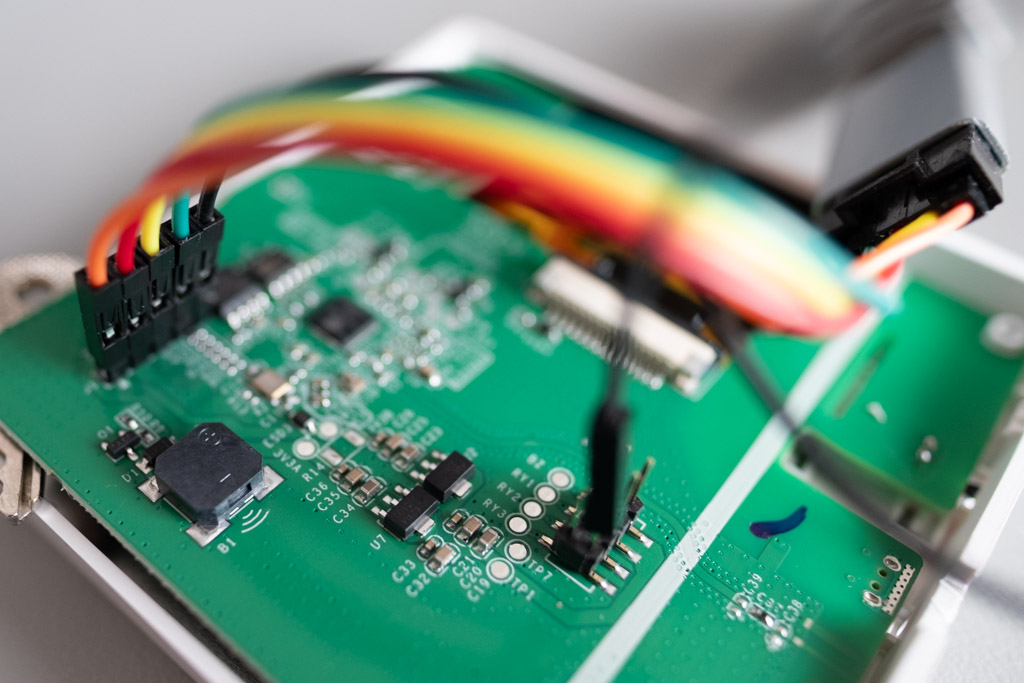
Symptoms
The panel first hung after an update on a blue screen reading Initializing with all fields empty. Rebooting just repeated it. After disconnecting from mains, nothing came up at all — black display, no response, and the panel never appeared on Wi-Fi.
Reflashing the firmware over serial did not help.
Timeline
I reconstructed this only at the end, from Home Assistant's history. I'm putting it up front, but during the diagnosis I didn't have it:
| Time | What happened |
|---|---|
| Jul 21, 18:54 | Last successful boot, panel running |
| Jul 23, 19:06 | Panel went quiet and never came back |
| Jul 25, 10:45 | Diagnosis begins, first serial log |
| Jul 25, 13:01 | First usable log - from a proper supply |
| Jul 25, 13:20 | Flash erased and firmware rewritten |
| Jul 25, 13:31 | Panel fully working again |
The outage lasted 42 hours; the diagnosis itself just under three.
Dead end 1: weak power from the 3V3 pin
The first serial log looked like this (abridged):
[C][safe_mode:189]: Unsuccessful boot attempts: 2
[I][app:060]: Running through setup()
[C][wifi:649]: Starting
ets Jul 29 2019 12:21:46
rst:0x1 (POWERON_RESET),boot:0x13 (SPI_FAST_FLASH_BOOT)
The panel restarted every second and always right after wifi: Starting.
What rst:0x1 (POWERON_RESET) and rst:0xc (SW_CPU_RESET) mean
Here's the first transferable skill. That rst: line is the fastest way to cut the problem in half:
| Code | Meaning | Where to look |
|---|---|---|
rst:0x1 (POWERON_RESET) | Chip lost power, or was reset via the EN pin | Power, hardware |
rst:0xc (SW_CPU_RESET) | Software crashed and restarted | Firmware, configuration |
rst:0x8 (TG1WDT_SYS_RESET) | Watchdog fired — something got stuck | Blocking code |
rst:0xf (RTCWDT_BROWNOUT_RESET) | Brownout detector | Power |
POWERON_RESET in a loop, always at the moment Wi-Fi starts — the point of highest current draw — is a textbook symptom of a weak supply. I closed it as a power problem.
And it was a dead end. Not because I misread the log, but because the measurement setup was faulty.
Why that log was worthless
At that point the panel was powered from the 3V3 pin on the USB-TTL adapter. That pin comes from a tiny regulator on the adapter board good for 50–100 mA. That's enough for the flash itself, which is exactly what makes it treacherous - the firmware writes without a hitch. But at boot, Wi-Fi asks for multiples of that and the supply collapses. So the log faithfully documented the limits of my adapter, not a fault in the panel.
Before you trust data, validate the rig you measured it with. Moving the power lead from 3V3 to the +5V pin of the same adapter is enough - it comes essentially straight from USB VBUS and the panel converts it with its own regulator. No external supply required.
One interesting detail: the crash also happened in safe mode, where nothing from the Blueprint runs. At the time I took that as proof of a hardware cause — and with that faulty rig, it genuinely was one.
Dead end 2: exhausted memory
The second hypothesis rested on the Blueprint's own documentation, which describes the symptom verbatim:
During Startup: If your device runs out of memory at startup, it may not load the firmware, resulting in a black screen and an unresponsive device.
- Be cautious when adding memory-intensive components like
bluetooth_proxy.
Black display, unresponsive device. An exact match. And I did have bluetooth_proxy in my configuration.
Measuring instead of guessing: what bluetooth_proxy really costs
Rather than speculate, I compiled the same configuration twice with bluetooth_proxy: as the only difference. ESPHome prints actual usage at the end of a compile, and Download firmware binary is enough to get it — nothing is uploaded to the panel.
with bluetooth_proxy | without | difference | |
|---|---|---|---|
| Flash | 1,529,391 B (83.3%) | 1,110,539 B (60.5%) | −409 kB |
| DRAM used | 69,352 B | 57,384 B | −12 kB |
| Total DRAM pool | 124,580 B | 180,736 B | −56 kB |
| Free DRAM | 55,228 B | 123,352 B | +66 kB |
Here's something I didn't expect. The total DRAM pool isn't the same in both cases. The BLE controller carves its memory out of the pool at link time — so it isn't merely a matter of consumption. Free internal DRAM drops from 123 kB to 55 kB, less than half.
And PSRAM won't save you, even though the panel has 2 MB of it and uses a few percent. Wi-Fi buffers must be DMA-capable and on the ESP32 they cannot live in PSRAM. Wi-Fi and Bluetooth coexisting is therefore the most internal-DRAM-sensitive spot in the whole system.
sram1_as_iram and 40 kB of IRAMThis entire article is about a panel that ran with no headroom. So what can you actually do about that? One thing comes for free, and on this panel ESPHome asks for it itself - the boot log contains a line I paid no attention to during the diagnosis:
[W][app:198]: Bootloader supports SRAM1 as IRAM (+40KB). Set sram1_as_iram: true under esp32 > framework > advanced
What's on offer is memory the bootloader had reserved as DRAM, which can instead be handed to the application as IRAM: +40 kB. You enable it like this:
esp32:
  framework:
    advanced:
      sram1_as_iram: true
It costs nothing in free heap or DRAM, because that memory was never part of the heap. On top of that it widens the flash cache window for XIP, so there are fewer cache misses and all code running from flash - Wi-Fi, BLE and the API server included - performs better. It also helps against "IRAM overflow" compile errors. Whether you need that second part at all is something to check in the summary at the end of the build - look for the IRAM line in it. This panel reports IRAM 84,263 B (48.98%), 87,769 B left out of 172,032 B, so it still has half the room to the ceiling, which leaves it only the wider flash cache window out of the whole benefit. This is valid only on the original ESP32 and only with the ESP-IDF framework; this panel (ESP32-D0WD-V3, esp-idf) meets both, and the default is false.
Let me be precise about one thing: this would not have fixed the outage. What's being handed out is IRAM, whereas the pressure I measured above was in DRAM. Those 55 kB of free DRAM would have stayed 55 kB.
And above all, don't enable it blindly. It requires a bootloader from ESP-IDF v5.1 or newer, and OTA updates do not touch the bootloader - only flashing over USB or the serial line rewrites it. With an older bootloader the device will not boot at all, and only a serial reflash brings it back. After everything in this article, you can probably guess how little I want to take that panel off the wall again.
So here's the rule that verifies itself: enable it only when that [W][app:198] line is in your own log. ESPHome prints it precisely when it detects that the bootloader supports it. If it isn't there, leave it alone.
Addendum: an OTA rollback confirmed it
After the fix I tried putting bluetooth_proxy back and installing it over OTA. The log then said:
[W][safe_mode:094]: OTA rollback detected! Rolled back from partition 'app1'
[W][safe_mode:094]:  The device reset before the boot was marked successful
The Bluetooth build uploaded, failed to boot, and the bootloader reverted to the previous firmware by itself. I then found the panel working fine — but running the old build without the proxy, not the new one.
In hindsight this is the strongest evidence for the memory hypothesis I have. It's also a fourth safety net I didn't know about during the diagnosis: ESP-IDF watches a freshly uploaded firmware, and if it resets before ESPHome marks it good, it restores the previous version. That's why an OTA update can't kill the panel as easily as a serial flash can.
If you see OTA rollback detected after an OTA, your new version is not running. Check compiled on in the log - if it's older than your last compile, you're looking at the old firmware and the new one never took hold. A second test: dump_config must contain [C][esp32_ble_tracker:...] and [C][bluetooth_proxy:...]. If they're absent, the proxy isn't running.
On the second attempt, this time with safe_mode: storage: rtc in the configuration, the build held on long enough to check in - and ESPHome captured the crashes:
*** CRASH DETECTED ON PREVIOUS BOOT ***
  Reason: Fault - Unknown
  Crashed core: 1
  PC:  0x4011A490     ← first crash
  PC:  0x4000BFF0     ← second crash, this address lies in ROM
Two consecutive boots crashed at different addresses, the second one inside the chip's ROM. Both crashes also pass through the same function - 0x4011A4AB in the second backtrace sits 27 bytes past the first crash site.
That is diagnostically valuable in itself: a deterministic code bug crashes at the same address every time. Varying crash sites, one of them in ROM, point instead to memory corruption or failing allocations claiming whichever victim happens to be next. It also fits the first crash, where LBEG/LEND pointed into the ROM memory-routine area.
I wanted to translate those addresses into function names, and couldn't - and the reason is instructive. I was compiling via a remote build, so there was no local ESP-IDF toolchain (CMAKE_ADDR2LINE not found) and firmware.elf was overwritten by the very next build. When I tried resolving the addresses against the ELF left on disk, I got an unrelated mix of functions from NVS, lwip and the API - because it was the ELF of a different build. I spotted it because its symbol table contained not a single occurrence of bluetooth_proxy.
And here's what a later crash log from this same panel taught me - because "no bluetooth_proxy in the symbols" is a clue you can sharpen.
ESPHome prints decoded function names even while it is warning you that it cannot decode. That log said:
WARNING Crash trace decoding unavailable: ESP-IDF toolchain not available:
        CMAKE_ADDR2LINE not found in CMake output.
and directly underneath it sat perfectly readable function names. That lends them a false authority, and it's easy to take them at face value.
So here's the stronger test: compare the decoded symbol against what your build actually contains. The frame in that log read UserServiceBase<StringRef, StringRef, bool>, meaning an API action with three arguments of type (string, string, bool). The pinned package, however, defines seven API actions and not one of them has that signature - the closest is components_visibility with (string, string[], bool), where the middle argument is an array, i.e. a std::vector in C++, not a StringRef. Please take that as an indication, not proof: I don't know for certain how ESPHome represents string[] in that template.
The third clue is a timing one: the crash was labelled ON PREVIOUS BOOT, yet the firmware had been compiled two minutes before that log. It could therefore belong to an older build than the ELF it was being decoded against.
The lesson: a backtrace is only worth anything with the ELF of exactly the build that crashed. If you want to decode one, compile locally and set that ELF aside before you reproduce the crash.
So, what is and isn't proven: a build with bluetooth_proxy repeatedly fails to boot on this panel - evidenced by the rollback and by two captured crashes. That this is what took the panel down on 23 July is not proven and remains a hypothesis.
Confirmation from the other side: how NSPanel Easy handles boot memory
Independent confirmation of this diagnosis has since arrived from the project itself. Development of NSPanel_HA_Blueprint has moved to NSPanel Easy (I cover the transition in From NSPanel_HA_Blueprint to NSPanel Easy), and it now addresses boot-time memory on its own side too. Its documentation puts it like this in the Reducing Registered API Actions section:
Each API action registered by ESPHome consumes heap memory at boot. On memory-constrained configurations — such as those running Bluetooth Proxy — this can cause boot instability or crashes.
The upload_tft and wake_up actions are therefore excluded by default and re-enabled with the substitutions include_action_upload_tft: true and include_action_wake_up: true. Don't read that as a refutation of what I measured — it's confirmation from the other side, and from the people who write the firmware. It doesn't shrink the main finding, though: the BLE controller carves its 56 kB out of the pool at link time, so the saving on registered API actions is an order of magnitude smaller by comparison (the docs don't put a number on it and I haven't measured it myself). The recommendation to put the Bluetooth proxy on a dedicated ESP32 with all the memory to itself still stands.
Why this is only half an answer
I removed bluetooth_proxy, flashed, powered up — and the panel still didn't boot. That memory pressure was real and measured, but it wasn't the thing keeping the panel dead.
A measured factor and a proven cause are two different things. Finding something objectively marginal did not mean I'd found the culprit.
Finally, a usable log
Only with power from the +5V pin and the serial adapter wired to just TX, RX and GND did I get a log worth having:
[C][safe_mode:189]: Unsuccessful boot attempts: 10
[E][safe_mode:201]: Boot loop detected
[I][app:060]: Running through setup()
[C][wifi:649]: Starting
[D][wifi:1325]: Starting scan
[C][component:209]: Setup wifi took 98ms
[I][app:117]: setup() finished successfully!
Guru Meditation Error: Core 1 panic'ed (LoadProhibited). Exception was unhandled.

Core 1 register dump:
PC      : 0x400e111b  PS      : 0x00060530  A0      : 0x8018ac74  A1  : 0x3ffb8520
...
EXCVADDR: 0x00000000  LBEG    : 0x4000c349  LEND    : 0x4000c36b
...
rst:0xc (SW_CPU_RESET),boot:0x13 (SPI_FAST_FLASH_BOOT)
Everything changed. rst:0xc (SW_CPU_RESET) instead of POWERON_RESET — this is a software crash, not a power problem.
What Guru Meditation LoadProhibited and EXCVADDR: 0x00000000 mean
The second transferable skill. Two lines are enough:
LoadProhibited/EXCCAUSE: 0x1c— the program tried to read from an address it isn't allowed to readEXCVADDR: 0x00000000— and that address was zero
Together that means a null pointer dereference. Somewhere there's a pointer assumed to be valid that isn't.
The other registers help too: A8: 0x00000000 shows which register carried the null, and PC: 0x400e111b is the address of the instruction that crashed.
What this narrowed down
The crash happened in safe mode, where ESPHome starts only logger, wifi, ota and safe_mode. Nothing from the Blueprint, no display, no scripts. So:
- it isn't a panel configuration error
- it isn't a missing TFT firmware
- it's a crash inside ESPHome's own code
Dead end 3: the ESPHome version
A crash after Starting scan plus a fresh ESPHome update made a regression the obvious suspect. I decided to check this one in the source, not by guessing.
Mapping logs to source code
The third transferable skill, and possibly the most useful. Notice the numbers in the brackets:
[C][wifi:649]: Starting
[D][wifi:1325]: Starting scan
Those aren't arbitrary — they're the line in the source file that emitted the log. Fetch the source for your exact version and look:
gh api "repos/esphome/esphome/contents/esphome/components/wifi/wifi_component.cpp?ref=2026.7.2" \
  --jq '.content' | base64 -d > wifi_component.cpp
sed -n '649p;1325p' wifi_component.cpp
Which gives:
649:  ESP_LOGCONFIG(TAG, "Starting");
1325:  ESP_LOGD(TAG, "Starting scan");
It matches. That confirms I'm looking at both the right version and the right file — not a given, because the wifi tag is also used by wifi_component_esp_idf.cpp. That one has only 1288 lines, so line 1325 can't be in it.
Timing killed the hypothesis
I suspected the scan-result sorting that starts just below line 1325 in that file. But look at the timestamps:
[13:01:51][D][wifi:1325]: Starting scan
[13:01:51][C][component:209]: Setup wifi took 98ms
[13:01:51][I][app:117]: setup() finished successfully!
[13:01:51]Guru Meditation Error
All within the same second. And the log is missing both Found networks: and No networks found. A scan normally takes two seconds — so it never finished and the code handling its results was never reached.
Log timestamps are evidence. When a hypothesis claims something happened inside a function that hasn't run yet, the hypothesis is dead — however good its explanation sounded.
Comparing versions
That left checking whether the code in question had changed at all:
diff -u 2026.6.5_wifi_component.cpp 2026.7.0_wifi_component.cpp | grep -c "^[+-]"
# 34
diff -u 2026.7.0_wifi_component.cpp 2026.7.2_wifi_component.cpp | grep -c "^[+-]"
# 0
The Wi-Fi component is byte-identical across 2026.7.0, 7.1 and 7.2. Within the 7.x series it cannot be the difference. And the whole 6.5 → 7.0 transition is 34 lines containing no unguarded dereference — a new roaming condition, renaming USE_RP2040 to USE_RP2, suppressing a reboot during provisioning (which is != nullptr guarded), and a change in where the fast_connect preference is stored.
The source did not confirm the hypothesis. That's a legitimate result even if an unsatisfying one — I eliminated a suspect rather than finding a culprit.
The trap with no way out: three locks of safe mode
Here's the heart of it. In hindsight the important question wasn't "what knocked the panel over" but "why couldn't it recover". A one-off crash turned into a 42-hour outage because three locks lined up.
Lock 1: the counter hit ten in fifteen seconds
ESPHome has boot loop protection: after ten failed boots it switches to safe mode. But the restarts came 1.5 seconds apart, so ten attempts took no time at all. Before I even noticed something was wrong, the panel was locked.
Lock 2: the counter lives in flash and survives a power cycle
The safe_mode default on ESP32 is storage: flash. The documentation says it plainly:
Flash storage: persists through power loss
So every power cycle I tried in order to revive the panel was pointless. The counter stayed at ten and the panel went straight into safe mode — where the display isn't started, hence the black screen.
Lock 3: factory.bin doesn't overwrite NVS, only erase-flash does
And this is the most insidious one. Look at the partition table from the boot log:
0 otadata          OTA data         01 00 00009000 00002000
1 phy_init         RF data          01 01 0000b000 00001000
2 app0             OTA app          00 10 00010000 001c0000
3 app1             OTA app          00 11 001d0000 001c0000
4 nvs              WiFi data        01 02 00390000 00070000
The counter lives in the nvs partition at 0x390000. The factory image is written from 0x0 and covers the bootloader, the partition table and app0. It never touches NVS.
That's why I could reflash the panel as often as I liked. The counter sat there untouched, the panel kept entering safe mode — and safe mode kept crashing on that null pointer.
Any one of those three locks could have been worked around. All three together meant nothing I tried could possibly have worked.
The fix
Once the diagnosis is done, the fix is three commands:
# optional: read the previous firmware's version from the second OTA slot
esptool --port /dev/cu.usbserial-0001 read-flash 0x1d0000 0x200 app1.bin

# erase the ENTIRE flash including NVS - this is the step that matters
esptool --port /dev/cu.usbserial-0001 erase-flash

esptool --port /dev/cu.usbserial-0001 --baud 460800 \
  write-flash 0x0 nspanel01-firmware.factory.bin
Wi-Fi credentials are compiled into the firmware, so erasing NVS costs you nothing.
And the first boot afterwards:
[C][safe_mode:189]: Unsuccessful boot attempts: 0
[I][app:060]: Running through setup()
...
[I][nspanel.core:189]: Blueprint progress: 100.0%
[I][nspanel.boot:165]: Progress: Completed
[C][wifi:1259]:   IP Address: 192.168.1.50
Counter at zero, a full setup instead of safe mode, Blueprint at one hundred percent.
Prevention
Three configuration changes, each addressing one part of this story:
Note: this is the configuration as it stood at the time of the incident — still on the original Blackymas/NSPanel_HA_Blueprint repository. The currently recommended form is in Step 2 of the main guide, and you get there with a plain OTA update, without taking the panel off the wall.
# 1) Counter into RTC memory - a power cycle wipes it
safe_mode:
  storage: rtc

# 2) Hidden SSID: connect directly, skip scanning
wifi:
  fast_connect: true

# 3) Pinned Blueprint version instead of 'main' + refresh
packages:
  remote_package:
    url: https://github.com/Blackymas/NSPanel_HA_Blueprint
    ref: 05ecefde2bac5db8bc96c02148058518d78a06fb
    refresh: never
safe_mode: storage: rtc is the most valuable of the three. RTC memory survives a software reset but a power cycle wipes it. The difference is fundamental:
storage: flash (default) | storage: rtc | |
|---|---|---|
| Transient crash | counter climbs to 10 and latches permanently | every power cycle gives the firmware a clean attempt |
| Persistent crash | dead, serial only | still crashes, but never latches |
Safe mode remains available as a safety net, but the panel can never get stuck in it so badly that only a serial cable saves you.
You'll find the whole configuration in context — today already on the NSPanel Easy package, with a different url and a different ref format — in Step 2 of the main guide.
A pinned ref means the Blueprint version won't shift under you on every recompile. You stop receiving fixes — that's the point. Updates become deliberate: you check the memory figures first and only then upload.
What doesn't work as a rescue
I considered whether a rescue action could be mapped to a physical button. It can't — and it's worth explaining why.
A button stands no chance. In a boot loop the firmware never reaches button handling, and in safe mode the Blueprint's binary sensors don't run at all. Any in-firmware rescue requires the firmware to run; and the firmware is precisely what's crashing.
The factory_reset component with resets_required looks like the exact answer — power cycle five times and the device wipes its preferences. But look at the implementation:
static bool was_power_cycled() {
  return esp_reset_reason() == ESP_RST_POWERON;
}
...
if (was_power_cycled()) { count++; ... }
else { this->save_(0); }   // ANY other reset zeroes the counter
It counts only genuine power-ons. A crash reboot is SW_CPU_RESET, which falls into the else and zeroes the counter. So in a boot loop it goes: power on → 1 → crash → 0 → power on → 1 → crash → 0. You never reach five.
That component is useful for a different situation: the device runs fine but is misconfigured and you can't reach it over the network.
Home Assistant as a forensic tool
I reconstructed the timeline at the top of this article from HA via its REST API. It's an underrated tool — and above all, it lets you disprove hypotheses.
When exactly the device went away comes from the history of any of its entities. Note that without end_time the endpoint returns only one day:
curl -H "Authorization: Bearer $TOKEN" \
  "$HA/api/history/period/$START?end_time=$END&filter_entity_id=sensor.nspanel01_temperature&minimal_response"
That gave me the exact second the panel went silent.
Disproving the power-outage hypothesis was more elegant. If mains had failed, other devices would have restarted too. All it took was looking at the uptime of another ESP32 on the same network:
sensor.esp32_bluetooth_proxy_uptime = 407702 s ≈ 4.7 days
That value spans the entire incident, so mains never failed. One number, hypothesis settled.
A guess about the host running HA rebooting fell the same way — sensor.node_pve_last_boot pointed at a date four months old.
And the logbook showed what actually happened at the moment of the outage: Home Assistant restarted, and everything came back from it except the panel.
What I never found out
Honestly: the original trigger could not be determined, and now it never will be.
The panel ran normally on that firmware for two days, so it can boot. Something knocked it over on 23 July at 19:06, but what, I'll never know — all the evidence has been overwritten:
app0was reflashedapp1, the second OTA slot, was blank (0xffffffff)- NVS was erased, which was necessary for the fix
- the ELF file needed to decode the backtrace was overwritten by new compiles
sw_versionin HA's device registry updated the moment the panel reconnected
So a hypothesis remains: the memory pressure from bluetooth_proxy, with 55 kB of free DRAM, was exactly the kind of headroom a single update swallows. It isn't proven, though, and I won't dress it up as more than it is.
The ESPHome crash in safe mode on a null pointer is a thing in its own right. There's no report of it in esphome/issues, so either it's a rare combination or few people walk that path. Without the ELF from the original build, though, it can't be reported usefully.
Takeaways
Twelve things that transfer elsewhere:
- Read the
rst:code first. It splits power from software faster than anything else. EXCVADDR: 0x00000000in a Guru Meditation means a null pointer dereference.- Validate your measurement rig before trusting data. Powering from the adapter's
3V3pin manufactured a fake fault for me. - The numbers in log tags are source lines.
[D][wifi:1325]can be looked up in your ESPHome version, and the guessing stops. - Timestamps disprove hypotheses. A missing scan log proved the crash was elsewhere.
- Measure, don't guess. Two compiles produced a 66 kB DRAM difference. An estimate would have produced nothing.
- Distinguish pool from consumption. BLE takes 56 kB out of the total pool at link time, not just out of usage.
- Know which partition your flashing tool overwrites. A factory image leaves NVS alone, and NVS held the lock.
- HA is a forensic tool. Another device's uptime disproves a power-outage theory with a single number.
- Varying crash sites mean memory, not a code bug. A deterministic bug crashes at the same address every time. When the fault PC moves between reboots, look for exhausted or corrupted memory.
- A backtrace is worthless without the ELF of exactly the build that crashed. Decoding against a different build produces plausible-looking nonsense - and the treacherous part is that ESPHome prints those decoded function names even while reporting that it cannot decode (
Crash trace decoding unavailable ... CMAKE_ADDR2LINE not found), so they look more trustworthy than they are. Three clues for a mismatch: search the ELF's symbols for a component that build was supposed to contain; compare the decoded symbol against what your build actually defines (aUserServiceBase<StringRef, StringRef, bool>frame against a package in which none of the seven API actions has a(string, string, bool)signature); and for a crash labelledON PREVIOUS BOOT, check that it doesn't belong to an older build than your ELF. I go through it in detail in Dead end 2. - OTA is safer than a serial flash. ESP-IDF watches the new version and reverts on failure. The price is that you're then looking at the old firmware and have to notice
OTA rollback detected.
And finally, the least technical one: leave yourself headroom. The panel ran on 55 kB of free memory for six months and worked. The mistake wasn't that the configuration was wrong — it was that it had no margin, and one routine update swallowed it.
Related Articles
- Sonoff NSPanel in Home Assistant: eWeLink, ESPHome and NSPanel Easy — the main guide, hardware and pinout
- From NSPanel_HA_Blueprint to NSPanel Easy — migration step by step, if your panel still runs the original project
- Flashing ESPHome firmware over USB -
esptool,erase-flashand rescuing a locked device — the practical procedure without the narrative - ESPHome - Introduction and Installation
- Bluetooth Proxy in Home Assistant
Sources
- Safe Mode - ESPHome — counter behaviour and the
storageoption - NSPanel_HA_Blueprint - Customization — memory management and the
bluetooth_proxywarning - NSPanel Easy - Installation — reducing registered API actions to save boot-time memory
- Issue #2669 — removal of the Bluetooth Proxy add-on
- NSPanel teardown on blakadder.com — hardware breakdown
Did this guide help you?
I write these guides in my spare time and keep them up to date. If one saved you time, you can chip in.
One-off, by card or Apple Pay. You can change the amount on the next page.
Would rather not send money? Buy the parts through my product links. The price is the same for you and it helps too.