Home Assistant 2026.7
Automations that speak your language! 🗣️
The seventh release of 2026 is one of those releases many have been waiting for. The headline change is that purpose-specific triggers and conditions graduate from Labs and become the new default way to build automations for everyone. After roughly eight months of development, the era of assembling automations from Home Assistant's technical primitives is over. On top of that comes a beautifully rebuilt Activity logbook as a timeline, an Update all button on the Updates page, dedicated panels for infrared and radio frequency devices, an overhauled ZHA Zigbee device management, and - for a third of all installations - Raspberry Pi firmware updates right from Home Assistant.
Let's take a look at everything that landed in this release.
Purpose-Specific Triggers and Conditions Are Here for Everyone
This is, hands down, one of the biggest and best changes to the automation editor in years. Purpose-specific triggers and conditions, introduced in 2025.12 in Home Assistant Labs and refined every release since (most recently the zone triggers in 2026.6), now graduate from Labs and become the new default for all users. 🎉
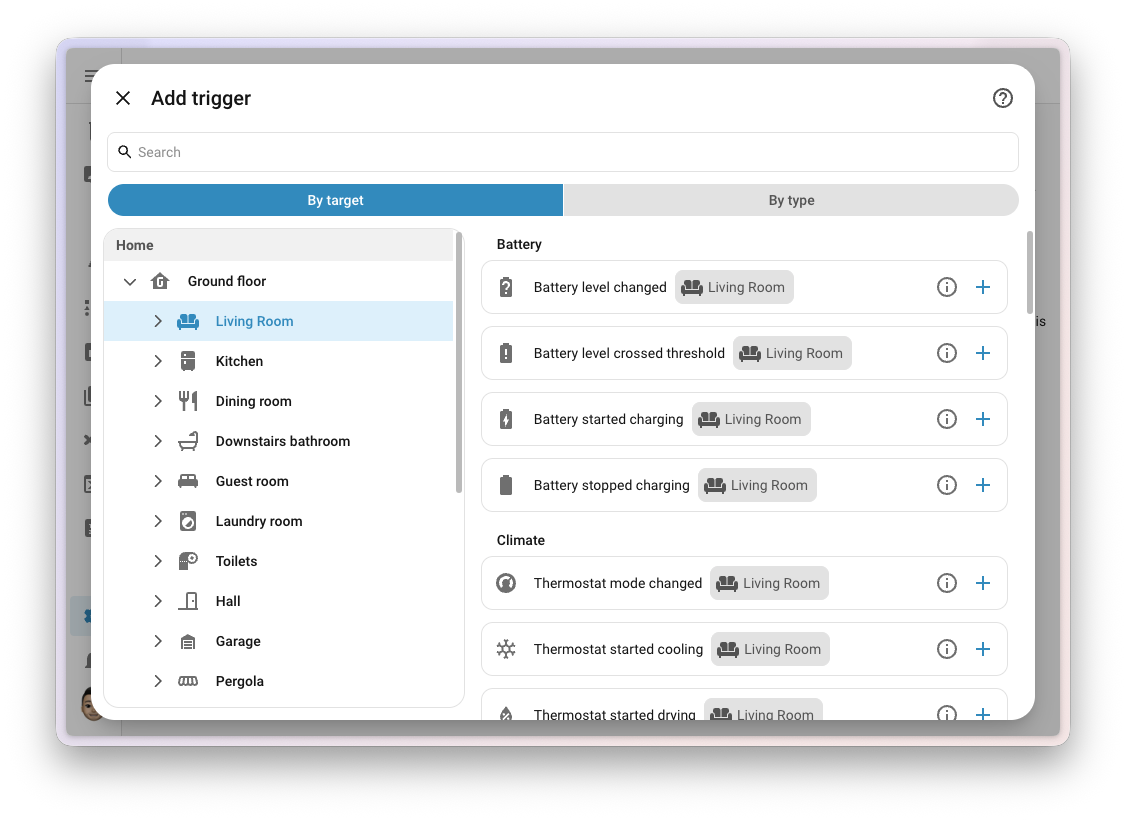
This isn't just a nicer set of menu options - it's a completely different starting point. Instead of thinking in Home Assistant's internals (which entity, which state, a state trigger or a numeric state trigger?), you describe what you want your home to react to:
- "When the bedroom drops below 18°C, turn on the heating" - no numeric state triggers, attributes, or units
- "When a battery runs low" - no need to know how the device reports its battery or what counts as "low"
- "When the front door opens" - you build around the moment itself
Built Around Areas, Not Individual Entities
The new building blocks support targets, and that's a bigger deal than it sounds. You can build an automation around motion in the living room instead of around one specific motion sensor:
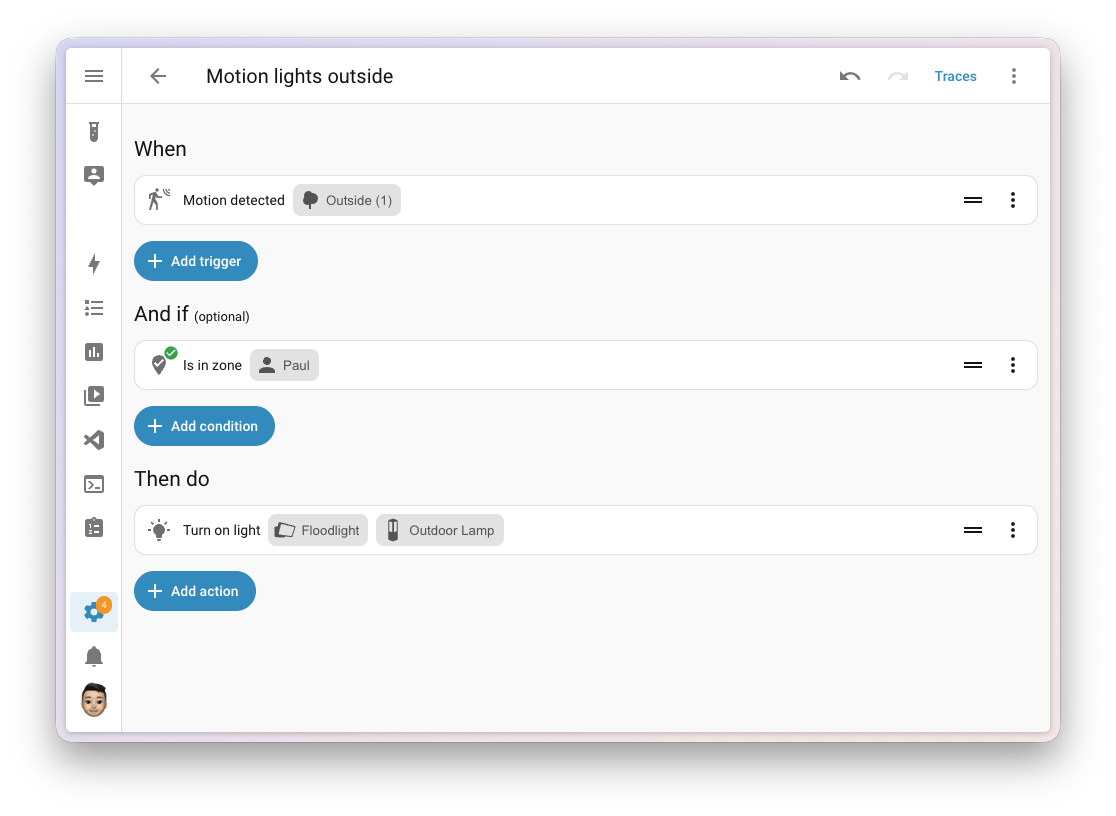
One sensor in the room? Fine. Ten? Also fine. Swap one out next year, add another, or remove the one that kept seeing the cat, and the automation keeps describing the same intent: motion in the living room. It reads like a sentence, and it's one less fragile list of entities to maintain forever.
Integrations Can Teach the Automation Engine
Here's the part that's easy to miss: this isn't just a friendlier wrapper around the old triggers. The new triggers and conditions can be extended by integrations - including custom and community ones. Picture a washing machine integration offering a plain "laundry is done" trigger, with no need to know which state value or attribute actually means finished. Or an electricity price integration offering "when the price is lowest today" - instead of everyone rebuilding the same template over and over.
No Technical Traps
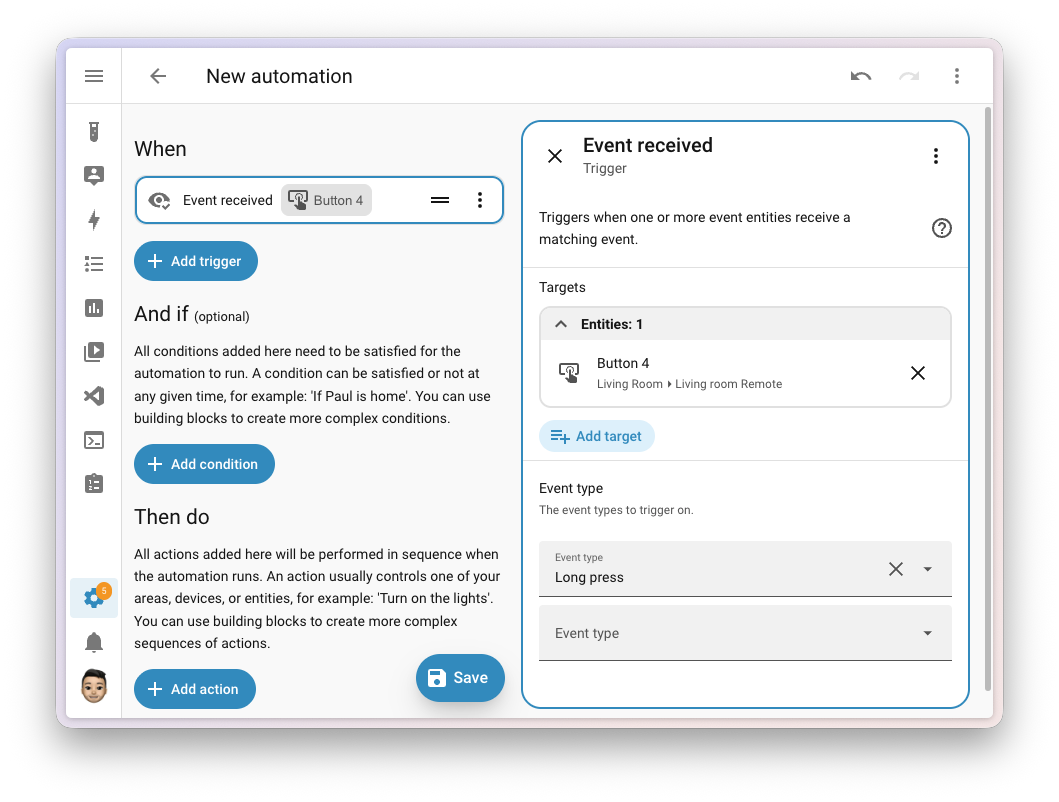
With the new triggers, you don't need to care about unknown or unavailable states - the building block handles those in the way that makes sense for its purpose. And the classic event entity trap, where a plain state trigger doesn't fire the second time the same event happens (because the state didn't change), simply goes away with purpose-specific triggers:
Your Automations Are Safe, and YAML Isn't Going Anywhere
Before anyone opens a forum thread in mild panic: you don't need to rewrite anything. Existing automations, generic triggers, conditions, templates, and YAML all keep working. The new blocks are simply the better starting point for the next automation you build. The team also put real effort into making the new blocks read and write well in YAML - good user experience is not a synonym for "the UI".
On top of that, every trigger, condition, and action now has its own documentation page explaining what it is, how to use it in the UI, its YAML syntax, and real examples. That helps both people and the AI tools that assist with building automations.
If you've been hesitant to dive into automations, this is the best moment yet. Open the editor and start with what you want to happen. I explain the basics in my introduction to automations.
Activity Logbook as a Timeline
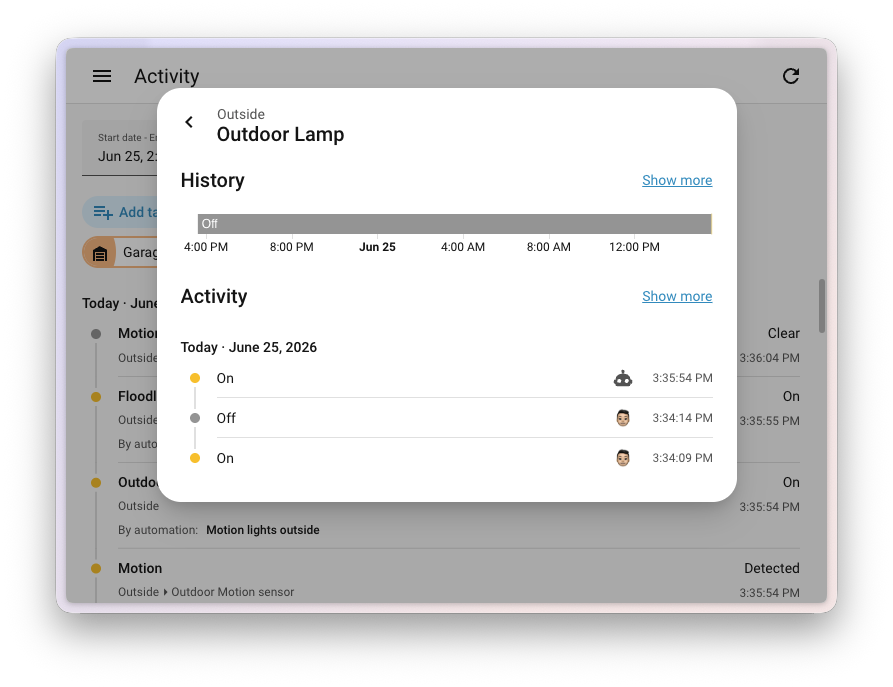
The second star of this release. Activity (formerly the logbook) has always been a flat list of full sentences - the device name repeated on every row, using its own wording that didn't match the rest of Home Assistant. This release rebuilds it from the ground up into a vertical timeline:
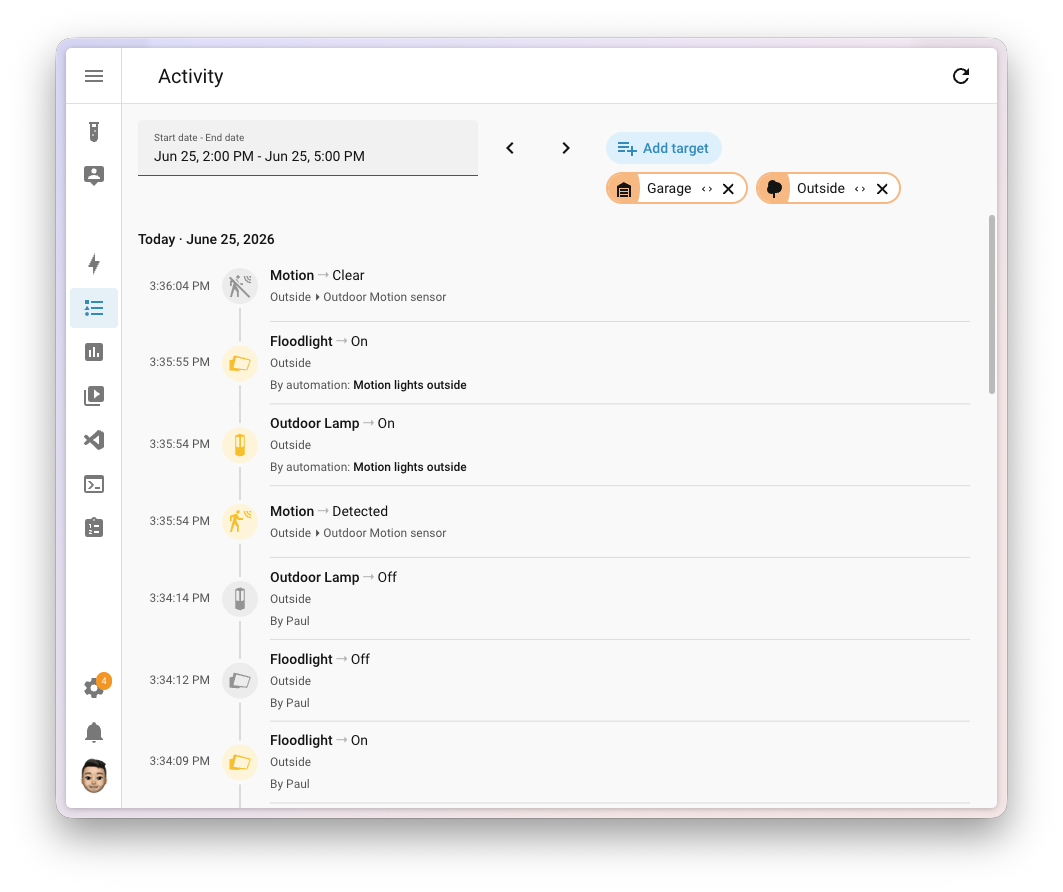
- Timeline layout - time on the left, a colored dot with the entity's icon, and the text beside it. You read it top to bottom like a feed, and the dot takes on the state color, so on and off are easy to tell apart at a glance
- Day grouping - Today, Yesterday, and dated headers, so you never lose track of where you are in time
- Only the context you need - on an entity page you just see the value, on a device page the device name is dropped, and on an area page the area is left out
- The same words as the rest of the app - state text now comes from the backend, so it reads identically everywhere and in every language
- It shows the cause - a change set in motion by a person shows their avatar, an automation shows what triggered it, and an integration shows its brand icon
- Time the way you want it - in compact views, tap the timestamp to flip between absolute time and a relative "2 hours ago"
The same component powers the full Activity page as well as the compact version in dialogs, on device and area pages, and on cards:
Update All with a Single Click
We've all been there. You open Settings > Updates after a few days away and a wall of pending updates awaits. A new Home Assistant release, a handful of apps, and seven ESPHome devices that all shipped new firmware the same week. This release reorganizes the page into clear cards and adds an Update all button:
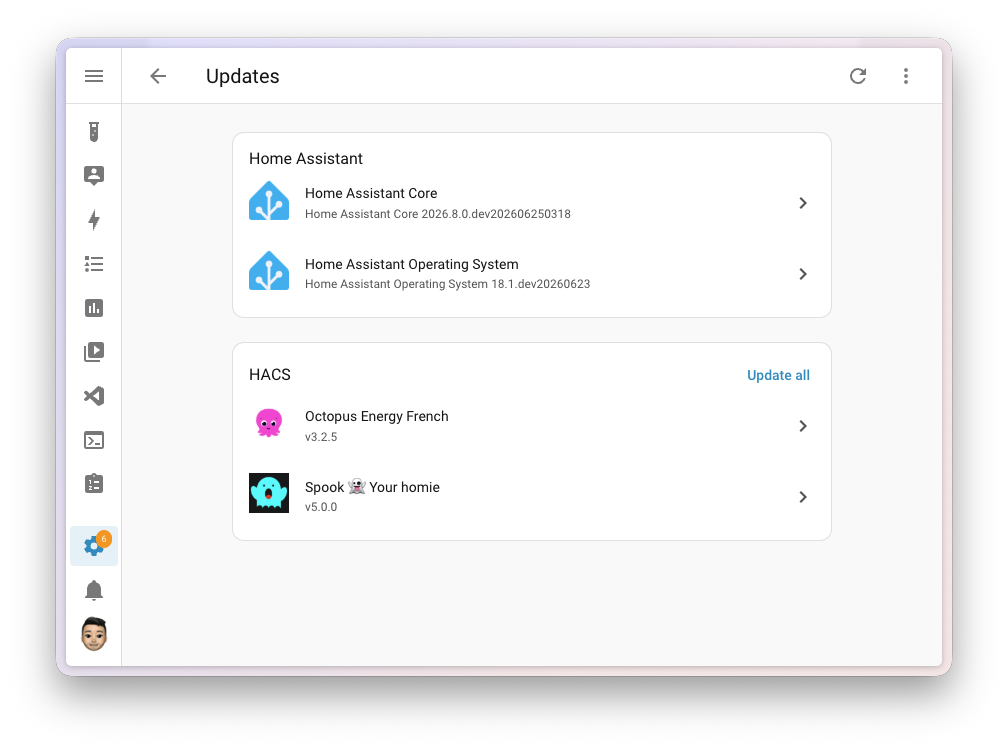
- Home Assistant (Core, Operating System, Supervisor) stays at the top without a bulk button - you update the core of your system deliberately, yourself
- Integrations with several pending updates get a card of their own - those seven ESPHome devices update with a single click, and the same goes for a stack of HACS updates
- The remaining one-off integration updates gather in one tidy card
- Apps (formerly add-ons) get their own card
- Skipped updates stay separate, so an Update all never sweeps them along by accident
Dedicated Panels for Infrared and RF Devices
After Home Assistant gained native platforms for infrared control (2026.4) and radio frequency devices (2026.5) earlier this year, both finally get a proper home. Two new panels appear in the Settings menu - one for infrared and one for RF devices - listing your proxies and transmitters:
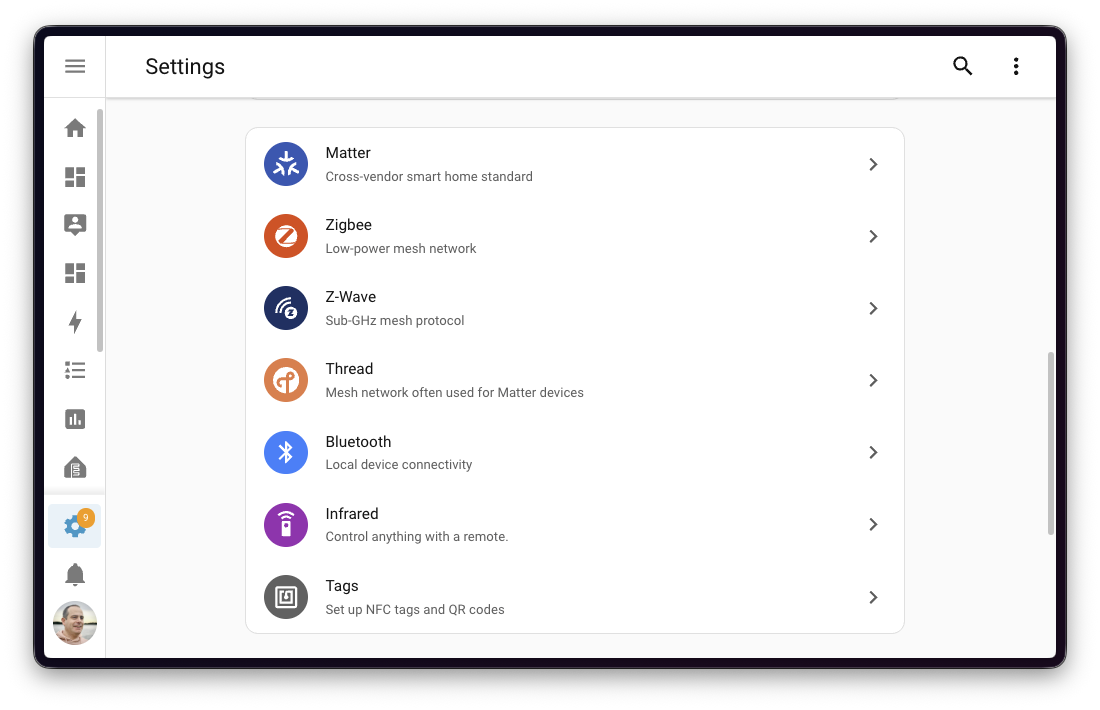
The panels only appear when you actually have such devices, so they stay out of the way otherwise.
Overhauled ZHA Zigbee Device Management
Managing a Zigbee device through ZHA used to mean squinting at a cramped popup dialog. This release moves the clusters, bindings, signature, and neighbors tools onto a dedicated full-page view with tabbed navigation and a device summary card up top:
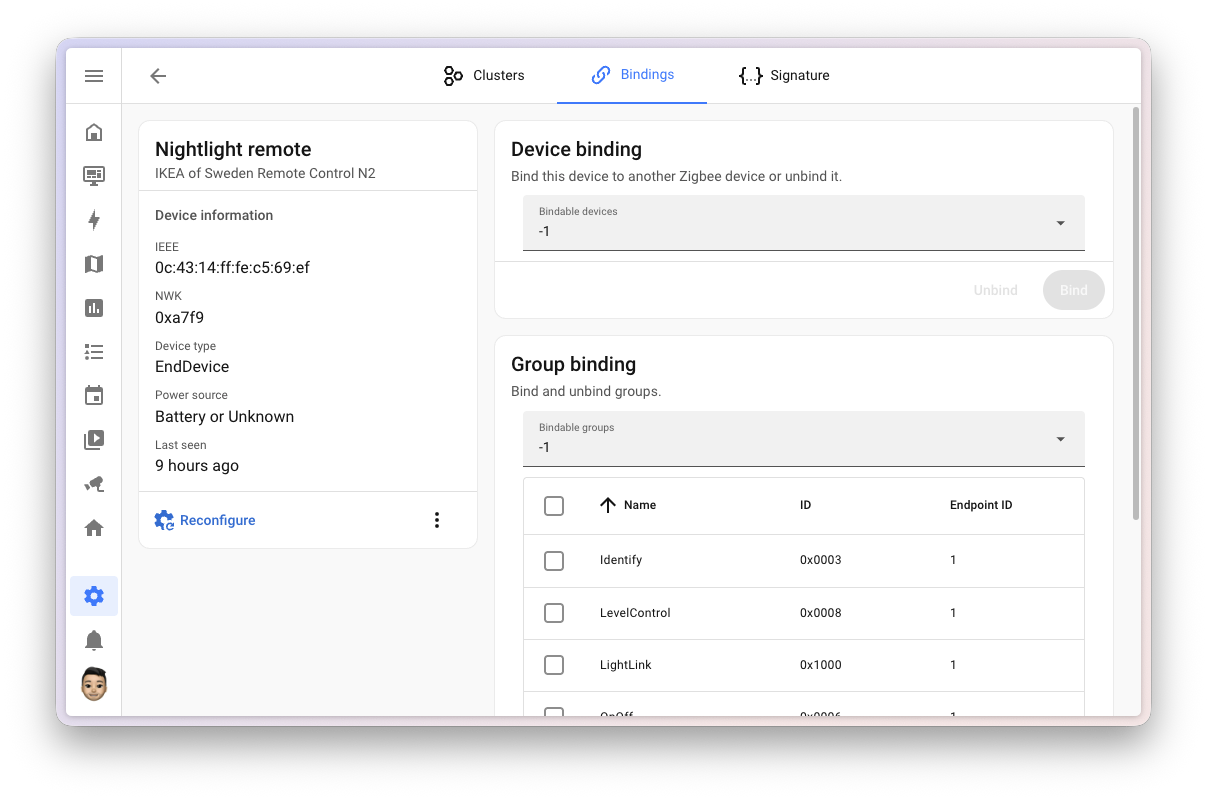
The same powerful tools, just far easier to work with. If you're just getting started with Zigbee, check out my Zigbee introduction.
Raspberry Pi Firmware Updates
Running Home Assistant OS on a Raspberry Pi? You're in good company - per the public opt-in analytics, roughly a third of all installations run on a Raspberry Pi. As of this release, there's an update entity for the bootloader firmware (EEPROM), so you can keep it current right from Settings > Updates:
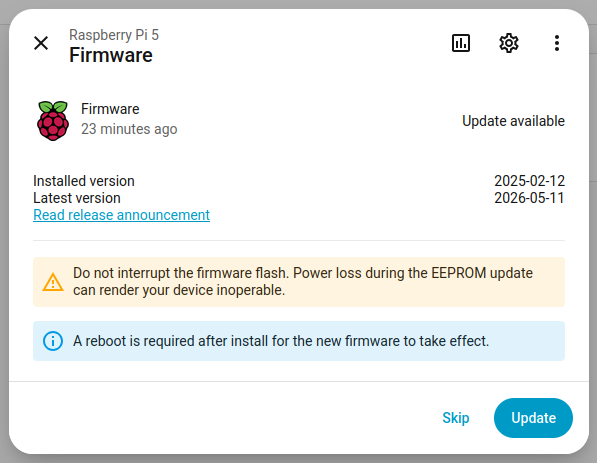
Especially on the Raspberry Pi 5 and Compute Module 5, the firmware contains bug fixes, NVMe drive compatibility improvements, and thermal optimizations. Until now, updating it meant flashing a special SD card or running rpi-eeprom-update by hand with a keyboard and display attached.
The feature requires Home Assistant OS 18 or newer. On a Raspberry Pi 4, the firmware can only be updated when booting from an SD card (not USB), and the Home Assistant Yellow with a Compute Module 4 isn't supported. Where an update can't be applied, the entity simply doesn't appear. After applying the update, Home Assistant prompts you to reboot.
Time Format Selection in the UI
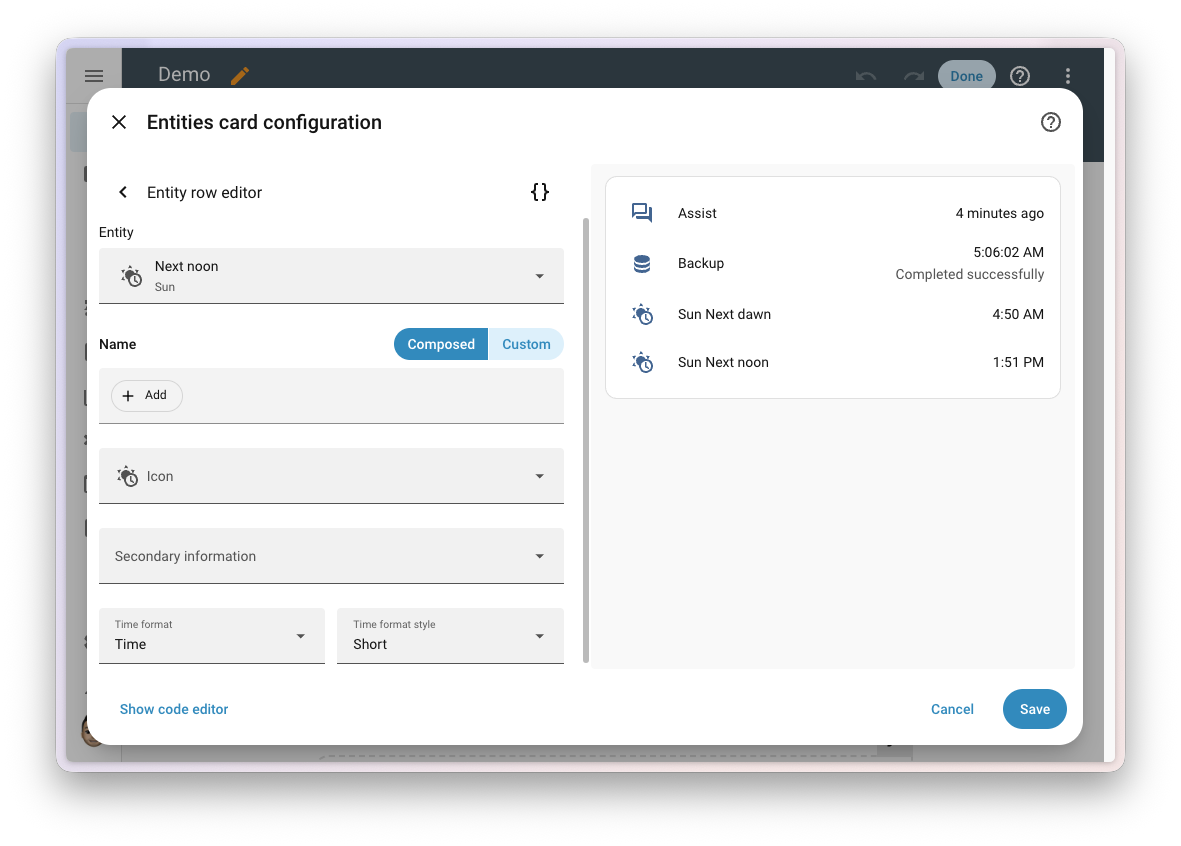
Some entities tell time - the next sunrise, the timestamp of your last backup, a countdown to a calendar event. Until now, changing how they're displayed meant editing YAML. Timestamp entities on tile cards, entities cards, and badges now get a Time format option right in the editor - absolute time, a relative "in 3 hours", plus a new short and long style for the relative format:
Other System-Wide Improvements
- Edit a running timer's duration - change a timer's duration straight from its dialog, no need to cancel and restart
- A faster frontend - a big batch of performance work, most noticeable on the energy, history, and statistics graphs
- Responsive device and area pages - a column layout that adapts to your screen; the device page now lists its main entities first
- More context in the scene editor - entity rows show their type and integration, making large scenes easier to read
- Tags in the Apps store - the store now shows tags and marks which apps you already have installed
- A sub-editor for the statistics graph card - tune each entity right from the card's visual editor
- Live condition testing keeps improving - clearer status icons (addressing the red/green-only accessibility concern), the indicator works on mobile in the visibility editor, and live testing now covers conditions inside actions too
- Hide columns in Developer tools - the States tab can now hide the Device and Area columns
- Matter soil moisture sensors - certified sensors now show up in Home Assistant (more about Matter in my introduction)
- A projector device class for media players - surfaced through Google Assistant, HomeKit, and SmartThings too
- Template lights gain xy color - build template lights with full xy color support
- Clean a specific room from Google Assistant - ask Google to send your robot vacuum to a particular room
- Templates render up to 40% faster thanks to a template engine optimization
- Clearer automation traces - traces now always include template errors when debugging
New Integrations
We welcome the following new integrations in this release:
- Aqvify - Monitor water well and tank levels via a cloud API (Platinum)
- Chef iQ - Read wireless cooking probe temperatures over Bluetooth, no cloud or base station needed
- Dropbox - Store Home Assistant backups straight to Dropbox (via Cloud Account Linking, no HA Cloud subscription required)
- Edifier Infrared - Control Edifier speakers via an existing IR transmitter
- energieleser - Energy consumption readings from stromleser, gasleser, wasserleser, and wärmeleser devices over local HTTP
- Envertech EVT800 - Local monitoring of Envertech solar microinverters
- Greencell - Greencell EV chargers over MQTT (status, voltage, current, power)
- Helty Flow - Local control of Helty Flow decentralized heat-recovery ventilation units
- KlikAanKlikUit - Control self-learning 433.92 MHz RF devices (assumed state)
- MELCloud Home - Mitsubishi Electric air conditioning and heat pumps via the MELCloud Home cloud service
There are also four new virtual integrations: Avosdim (via Motionblinds), BWT (via SEKO PoolDose), Gitter (via Matrix), and Nexen (via Hypontech Cloud).
Notable Improvements to Existing Integrations
- Alexa Devices - Switches to toggle announcements and communications on Echo devices, plus Alexa shopping and to-do list management
- SwitchBot - A button event entity for the Contact Sensor and Standing Fan controls; SwitchBot Cloud can upload images to the AI Art Frame
- Tesla Powerwall - Powerwall 3 support plus sensors for the operation mode and maximum charge/discharge power
- SMTP - Notify entities, the modern way to send email notifications
- Overkiz - Rexel Energeasy Connect support (cloud and local API)
- Wallbox - A button to resume the charging schedule, handy alongside EcoSmart solar charging
- GitHub - Entities that track GitHub user accounts
- Environment Canada - A
get_alertsaction to fetch active weather alerts on demand - Tedee - A lock connectivity binary sensor
- Yoto - A big batch of updates: a media browser, new sensors, a time entity, and display brightness and maximum volume controls; the integration also reached Platinum quality
- Imou - Live camera streaming
From the integration quality scale, it's also worth noting that Anthropic and Growatt reached Gold.
Now Available via UI and Removed Integrations
Now available to add via the UI: SAJ Solar Inverter, SMTP, Swisscom Internet-Box, and UniFi AP.
There was also a bigger cleanup - 20 integrations were removed, most of them broken for years or relying on unmaintained libraries and discontinued services. Among them Acer projector (broken since 2019), Microsoft Face (broken since 2022 after an Azure API change), MS Teams (Microsoft discontinued Office 365 Connectors in May 2026), Gitter (migrated to Matrix; use the Matrix integration), and Watson TTS.
Backward-Incompatible Changes
This release includes a few changes that may affect your existing configuration:
- Purpose-specific triggers and conditions - several keys were renamed for cross-domain consistency:
battery.low→battery.became_low,battery.not_low→battery.no_longer_low,lawn_mower.docked→lawn_mower.returned_to_dock,schedule.turned_on/off→schedule.block_started/ended,timer.time_remaining→timer.remaining_time_reached,update.update_became_available→update.became_available,vacuum.docked→vacuum.returned_to_dock,climate.target_humidity/target_temperature→climate.is_target_humidity/is_target_temperature. Open the affected automation, re-select the trigger/condition, and save - Z-Wave JS - requires zwave-js-server 3.9.0+ (schema 49): update the Z-Wave JS app to 1.4.0+, or the Z-Wave JS UI container to 11.19.1+
- Person - person entities no longer report the home zone coordinates when the location comes from a presence scanner; use the new
in_zonesattribute to check zones - Zone - the zone person count is now calculated from the
in_zonesattribute, so a person can be counted in multiple zones at once; position-aware device trackers now report the smallest zone the device is in - iCloud, StarLine, Tractive - the
battery_levelattribute was removed from device trackers; use the dedicated battery sensor - Tesla Fleet / Teslemetry - the route device tracker no longer reports the destination name as its state, it's now zone-based (home/not_home); the destination name is available via the new Destination sensor (disabled by default)
- Reolink - Duo PoE/WiFi dual-lens cameras now expose a sub-device per lens
- Rabbit Air - preset mode values changed from title case to lowercase (
Auto→auto, etc.) - BSB-LAN - reduced support for the old v1 JSON API; update your device firmware to a version supporting the v2 API
Full details are in the official blog post.
More Information
- Original English blog post with full details
- Complete changelog for Home Assistant Core 2026.7
- Documentation for the new triggers, conditions, and actions
Release Party Video
Did this guide help you?
I write these guides in my spare time and keep them up to date. If one saved you time, you can chip in.
One-off, by card or Apple Pay. You can change the amount on the next page.
Would rather not send money? Buy the parts through my product links. The price is the same for you and it helps too.