Music Assistant: Internet Radio Dropouts over Chromecast
This guide describes a real-world case I worked through: internet radio from Music Assistant played over Google Cast (Chromecast) on a Samsung soundbar always dropped out after a short while. Besides the final fix, I also walk through the entire diagnostics workflow - it may come in handy for similar problems with other players.
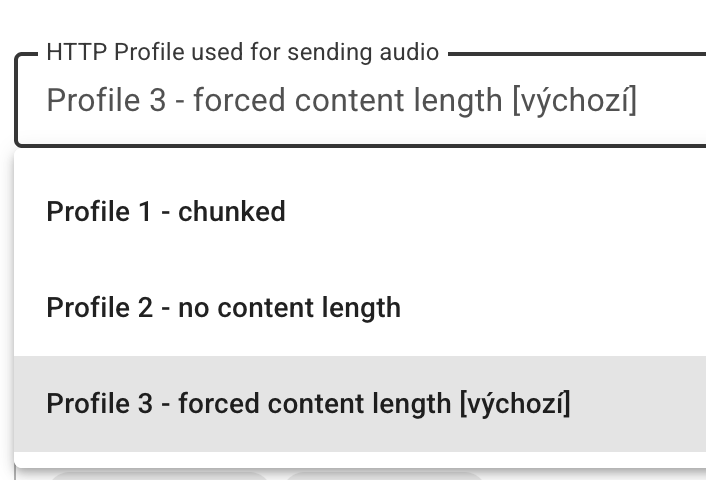
In Music Assistant, open the player settings → expand the Chromecast section and set the HTTP Profile to "Profile 2 - no content length" (the default is "Profile 3 - forced content length") and the Output codec to MP3. In my case the radio then played 9.5 minutes without a single dropout instead of crashing every roughly 90 seconds. The why - and how I got there - is explained below.
This guide builds on the article Music Assistant - Comprehensive Music Server. I assume you already have Music Assistant installed and working.
Environment
- Home Assistant + Music Assistant (version 2.9.x) - i.e. the new unified player interface with toggles for AirPlay, Chromecast, and Sendspin
- Playing internet radio (Evropa 2)
- Target device: Samsung HW-Q800D soundbar connected via Google Cast (Chromecast)
Symptoms: Radio Stops After a Few Minutes and Chromecast Disconnects
The radio started playing normally, but after roughly 80 to 100 seconds playback stopped. The device soon returned to a state where it was ready to play again, but playback did not resume on its own - I had to start it manually. After another ~90 seconds it dropped again.
Diagnostics Workflow
First I needed to find out exactly where the problem originated. Looking directly at the entity states through the HA REST API proved very useful.
1. Watching Entity States via the REST API
Using a long-lived access token (you create one in Home Assistant under your profile, at the very bottom in the Long-lived access tokens section), I inspected two key media_player entities through the REST API:
media_player.q_series_soundbar_2- the player from Music Assistantmedia_player.q_series_soundbar- the native Cast entity directly in Home Assistant
# Current state of all entities
curl -s -H "Authorization: Bearer LONG_LIVED_TOKEN" \
  http://homeassistant.local:8123/api/states

# History of a specific entity over a given period
curl -s -H "Authorization: Bearer LONG_LIVED_TOKEN" \
  "http://homeassistant.local:8123/api/history/period/2026-01-01T00:00:00?filter_entity_id=media_player.q_series_soundbar"
2. Which Entity Fails First?
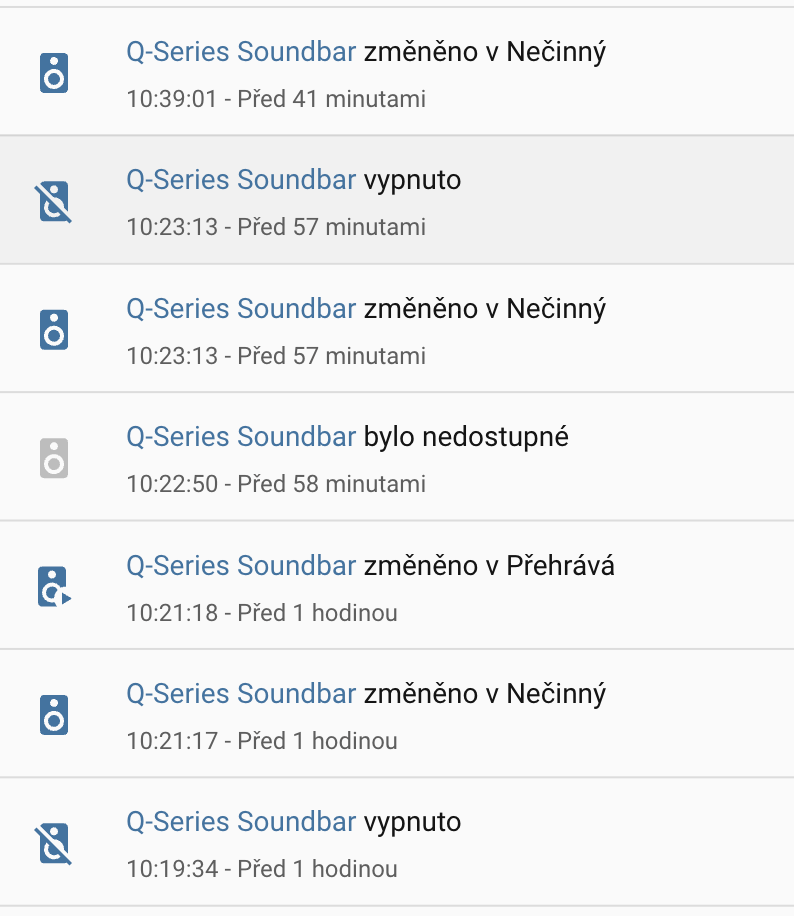
From the history it was clear that the Music Assistant player switched to the idle state at exactly the same second the native Cast entity switched to unavailable.
That is an important finding: Music Assistant merely follows the state of the Cast device. The real cause therefore wasn't in Music Assistant, but in the Cast connection being interrupted.
3. Regularity of the Dropouts
The history showed that the transitions to unavailable recurred regularly, roughly every 80 to 100 seconds - but only during active playback (playing). In the idle state the connection was perfectly stable.
4. Ruling Out Wi-Fi and the Network
I left the soundbar pinging:
ping q-series-soundbar.local
Result: 0% packet loss. So the network, Wi-Fi, and signal were not the cause.
5. Ruling Out mDNS Discovery
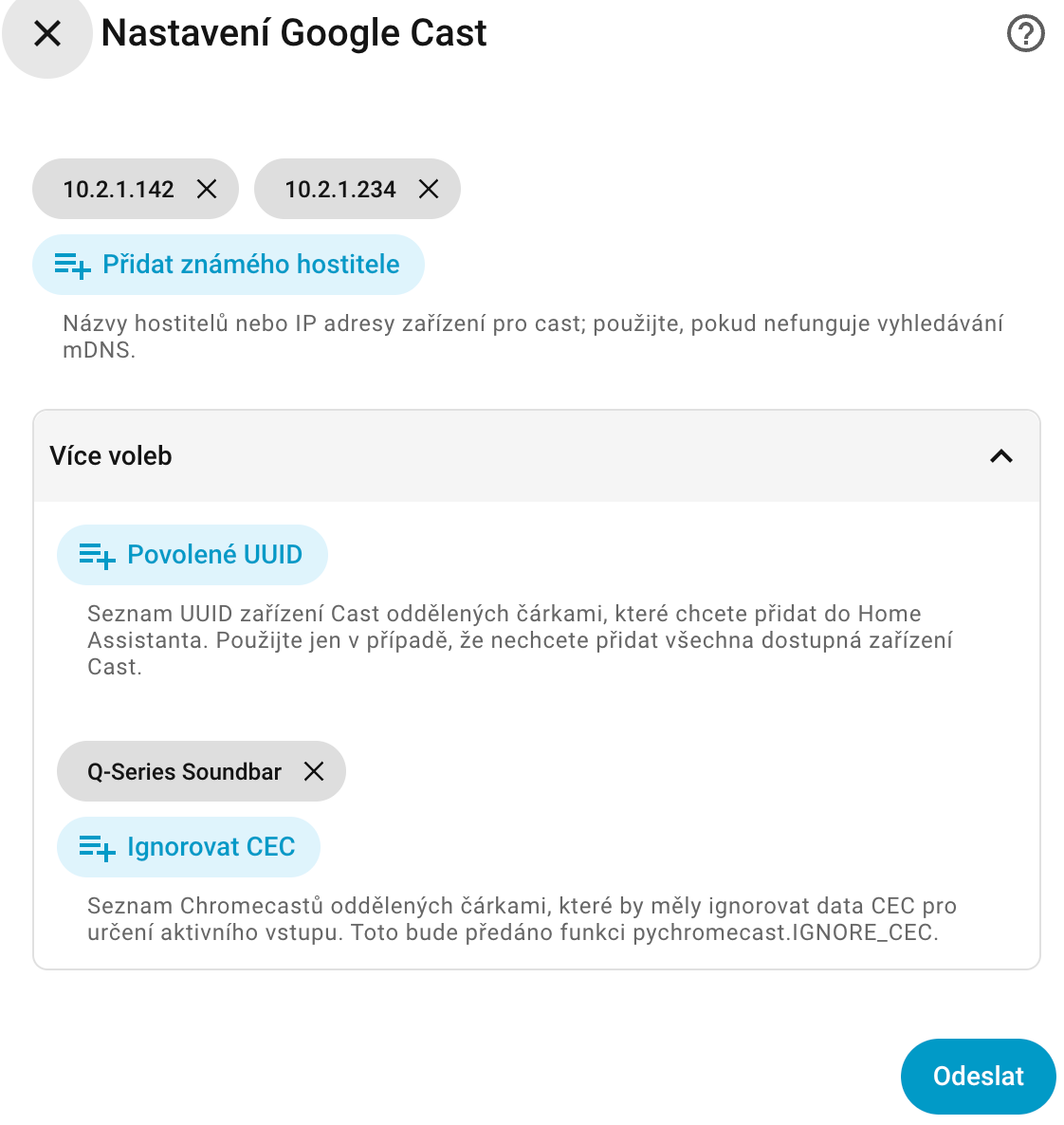
In the Google Cast integration the device's IP address was already listed under Known hosts. So the problem wasn't in device discovery over mDNS either.
6. Ruling Out CEC
I tried adding the device to the Ignore CEC list (IGNORE_CEC). That didn't help either.
The IGNORE_CEC option is not matched by IP address, but by the device's friendly name - in my case Q-Series Soundbar, not the IP address. This is an easy source of mistakes, where the setting looks correct but has no effect.
Root Cause
After going through the Music Assistant source code (providers/chromecast/player.py) and the related GitHub issues (#5057 and #5250), the cause was clear:
Music Assistant sends an endless radio stream to the Cast device as a finite "single track" with a forced Content-Length header (the "forced content length" HTTP profile). The Cast receiver in the Samsung (Tizen) terminates such a session after about 90 seconds. The native Cast entity switches to unavailable, Music Assistant follows it, and playback ends. The device soon returns to an available state (ready to play again), but it does not resume playback on its own - you have to start it manually. And after another ~90 seconds it happens again.
Fix
The solution is in the player settings in Music Assistant:
- In Music Assistant, open the settings of the specific player
- Expand the Chromecast protocol section (the arrow next to the Enable Chromecast support option)
- Set the HTTP Profile to "Profile 2 - no content length" (the default was "Profile 3 - forced content length")
- Set the Output codec to MP3
In this version of Music Assistant there is no main "flow mode" toggle on the general player page. The Cast-specific settings - including the HTTP profile - are tucked away in the expanded Chromecast protocol section.
Verification
After changing the settings, the radio played smoothly for about 9.5 minutes without a single dropout (no unavailable event), compared to the original crash every roughly 90 seconds.
Extra Tips for Internet Radio
While solving the problem, several other findings emerged that may come in handy.
Displaying Track Titles (now-playing)
It depends on the specific radio stream:
- The
ice.actve.net/fm-evropa2-128stream does not send ICY StreamTitle - so track titles never show up. - Feeds via StreamTheWorld do send them:
https://playerservices.streamtheworld.com/api/livestream-redirect/EVROPA2AAC.aac(AAC+ 64k)- an MP3 96k variant
In the RadioBrowser provider, choose the "Evropa 2 - aac" entry. This gives you the title of the currently playing track along with good quality (HE-AAC 64k sounds roughly on par with 128k MP3). Title updates work (verified - I watched three track changes).
Garbled Czech Diacritics in Titles
Broken diacritics may appear in titles (e.g. "Odlétá" shows up as "Odl�t�").
The corruption happens right at the source - the StreamTheWorld feed already sends broken bytes (EF BF BD, i.e. the Unicode replacement character U+FFFD). The original characters are thus irretrievably lost before the data ever reaches Music Assistant. English and ASCII titles are fine.
Don't Switch the Codec to FLAC
For radio, stick with MP3:
- The source is lossy, so FLAC brings no quality improvement - just an unnecessarily larger stream.
- FLAC over Cast to a Samsung is exactly the unstable combination that's best avoided.
FLAC only makes sense with lossless sources.
Displaying Titles on the Soundbar's Display
Music Assistant sends the track title, artist, and album art over Cast (MediaInformation) - you'll see them, for example, in the Google Home app or on the TV.
The small front display of the Q800D soundbar doesn't show track titles from Cast. This is a hardware/firmware limitation of the device that Music Assistant can do nothing about.
Did this guide help you?
I write these guides in my spare time and keep them up to date. If one saved you time, you can chip in.
One-off, by card or Apple Pay. You can change the amount on the next page.
Would rather not send money? Buy the parts through my product links. The price is the same for you and it helps too.