Matter and Thread in Home Assistant (HA)
The smart home has one long-standing problem - fragmentation. For years every manufacturer played in their own sandbox, so an Apple device wouldn't talk to Google, a Zigbee bulb needed its own bridge, and no ecosystem really wanted to cooperate with another. I've run into this many times myself - I'd buy an interesting device and then spend ages figuring out whether it would even work with what I already had at home.
And this is exactly what Matter promises to solve. The goal is for devices from different manufacturers to finally speak a common language - regardless of whether you use Home Assistant, Apple Home, Google Home, or Amazon Alexa.
In this introductory article we'll explain what Matter is, how it relates to Thread, how it differs from Zigbee, and how it all fits into Home Assistant. Think of this article as a companion to my introductions to Zigbee and Bluetooth.

What is Matter?
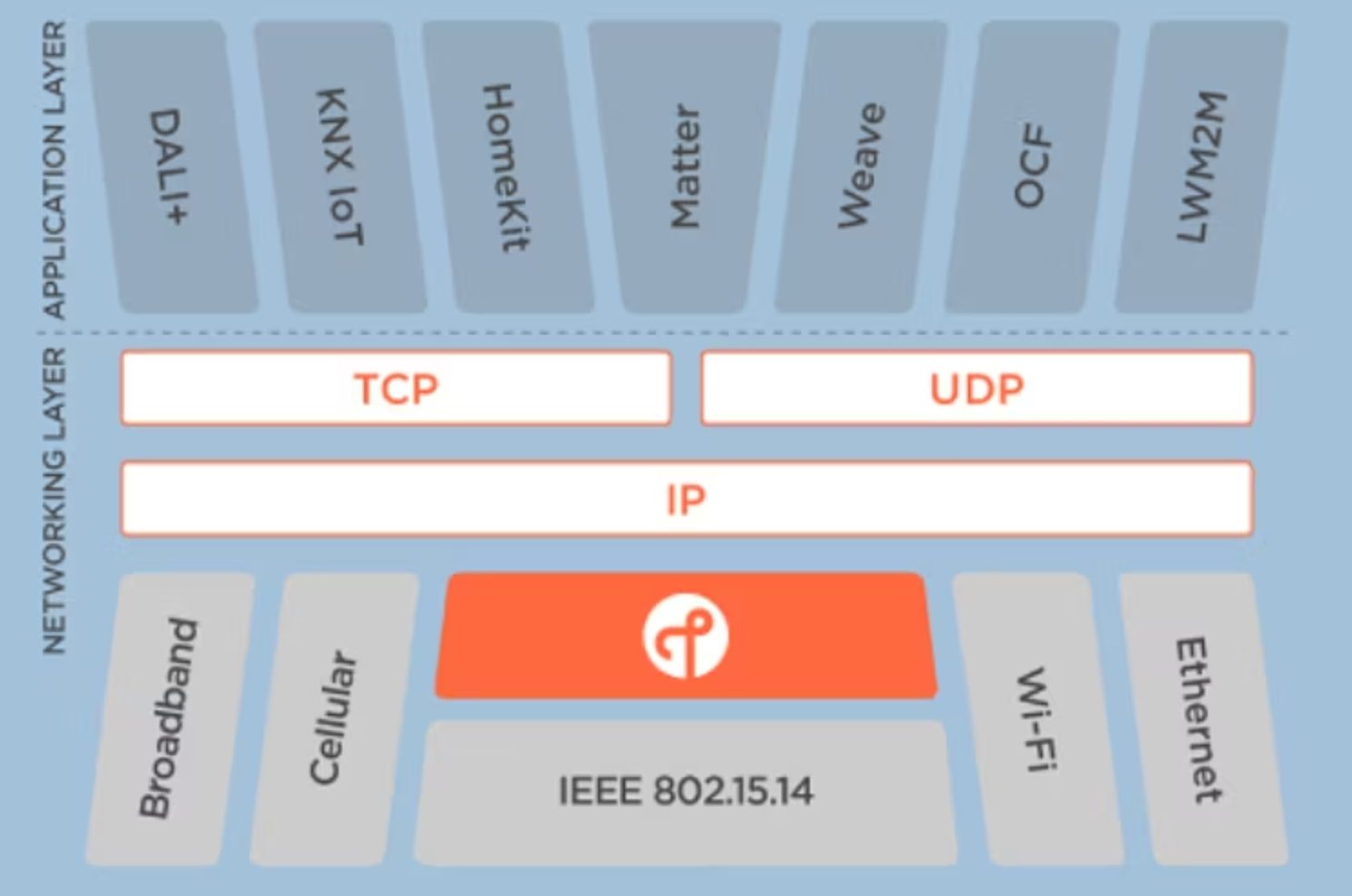
There's one common misconception to clear up right away: Matter is not a transport protocol like Zigbee or Wi-Fi. Matter is an open standard - if you like, an application layer that defines how devices and controllers communicate and what they actually "say" to each other.
Matter runs over several different transport technologies:
- Wi-Fi - typically for permanently powered devices (plugs, larger appliances).
- Ethernet - for devices connected by cable.
- Thread - for low-power, often battery-powered devices (more on that shortly).
Behind the standard stands the Connectivity Standards Alliance (CSA) - not a single manufacturer, but an association that includes all the big players: Apple, Google, Amazon, and Samsung. That's why Matter has a real chance of succeeding where previous attempts at a "universal standard" failed.
A major advantage of Matter is that it's designed for local control without the cloud. Communication happens directly within your home network, so devices work even without an internet connection - which is exactly the philosophy I love most about Home Assistant.
What is Thread and how does it relate to Matter?
Thread is a low-power mesh transport layer. It's built on the same radio standard, IEEE 802.15.4, as Zigbee (and uses the same 2.4 GHz band), but with one key difference - every Thread device has its own IPv6 address. It's therefore a full-fledged part of the IP network.
The key thing to understand is that Thread on its own controls nothing. It's just the "highway" the data travels on. The application layer rides on top of that highway - that is, Matter (or, say, HomeKit). You can sum it up like this:
- Thread = transport (how data gets from place to place)
- Matter = control (what the data means and how the device responds)
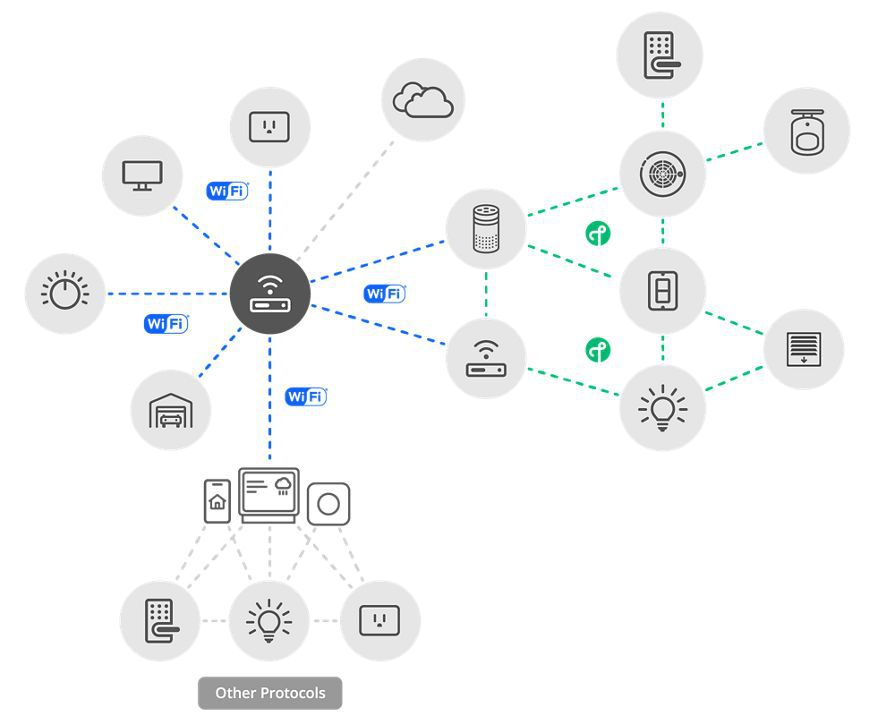
For the Thread mesh network to communicate with the rest of your home IP network, you need a border router - officially an OpenThread Border Router (OTBR). It acts as a bridge between the Thread world and your regular network (Wi-Fi / Ethernet). Without a border router, a Thread device goes nowhere.
For a Thread mesh network I recommend using channel 26 in the border router settings. It sits at the edge of the 2.4 GHz band, where it overlaps least with Wi-Fi, so it tends to suffer the least interference. For me it noticeably helped the connection stability of battery-powered devices.
Matter vs. Zigbee vs. Wi-Fi
Probably the most frequent question I get is: "Will Matter replace Zigbee?" The short answer is no. Matter and Zigbee solve a slightly different problem. Zigbee is a specific transport protocol, whereas Matter is a standard whose main aim is to unify communication across ecosystems. To make it clearer, I've put together a comparison:
| Feature | Matter | Zigbee | Wi-Fi |
|---|---|---|---|
| Type | Standard / application layer | Transport protocol | Transport protocol |
| Transport | Wi-Fi, Ethernet or Thread | Own radio (802.15.4) | Own radio (Wi-Fi) |
| Local operation | Yes (no cloud) | Yes | Depends on device / manufacturer |
| Sharing between ecosystems | Yes (multi-fabric) | No | No (tied to vendor app) |
| Mesh network | Yes (via Thread) | Yes (natively) | No (only with mesh routers) |
| Hub dependency | Border router only for Thread | Requires a coordinator | No hub |
| Maturity / availability | Young, growing fast | Very mature, thousands of devices | Maximum |
The point is that Matter does not replace Zigbee - it rather solves interoperability between ecosystems. Zigbee has years of development and thousands of proven devices behind it; Matter is younger, but its strength is that a single device can work in several systems at once (we'll get to that below).
How Matter works in Home Assistant
Home Assistant acts as a controller - that is, one of the controllers that sees and controls Matter devices. For this to work, a Matter Server runs in the background. It used to be a classic add-on; today it's a full-fledged part of the runtime (an application), but it requires Home Assistant OS - only there is the Matter Server run in an officially supported way.
Adding devices (technically commissioning) works a bit differently than you may be used to from Zigbee. The process goes roughly like this:
- In Home Assistant, open the flow to add a new Matter device.
- Use the mobile Home Assistant Companion app (on your phone), which uses Bluetooth for the initial connection to the device.
- Scan the QR code or enter the setup code from the device.
- For Thread devices you also need an available border router on the network.
The border router can be the official Home Assistant Connect ZBT-1 / ZBT-2 or Home Assistant Yellow, but it can equally be devices you may already have at home - an Apple TV / HomePod, a Google Nest Hub, or Nanoleaf.
Matter (and especially commissioning) relies on IPv6 and multicast. If a Matter device won't add or "disappears" after a while, the culprit is usually filtered or blocked IPv6 multicast. If your home network is split into VLANs or you filter multicast somewhere, you'll very likely run into devices that can't be added or that "disappear." This is one of the most common pitfalls - before you start troubleshooting devices, make sure you let IPv6 multicast pass freely on the network and that the controller and the device are in the same network segment.
Sharing devices between ecosystems (multi-fabric)
And now to what I consider the biggest draw of Matter as a whole - so-called multi-fabric. A single Matter device can be connected to multiple ecosystems at once. The standard requires support for at least five fabrics (a fabric = one ecosystem / controller).
In practice this means you can have one smart plug in Home Assistant, Apple Home, and Google Home simultaneously - and control it from anywhere. Sharing is done through the "Share device" function, where the first ecosystem generates a new pairing (QR) code that you then scan in the next ecosystem.
Zigbee can't do this - there a device always belongs to just one coordinator. Multi-fabric is, in my view, the strongest argument for Matter: you finally don't have to decide "which ecosystem the device belongs to," because it can belong to all of them at once.
The new Matter Server (matter.js) - a big upgrade in 2026
In June 2026, Home Assistant took a big step forward - it switched to a completely new Matter Server built on the matter.js library. It's a complete rewrite from the original Python implementation and brings a lot of improvements:
- Support for Matter 1.5.1 (version 1.6 is in the works) and Thread 1.4 (with a new OTBR).
- Faster startup and recovery of the server.
- More reliable OTA updates of device firmware.
- A more stable network overall.
A big new emphasis is on security: by default the new server blocks uncertified devices and additionally checks certificate revocation. If you want to add an uncertified (e.g. DIY) device, you have to enable it deliberately.
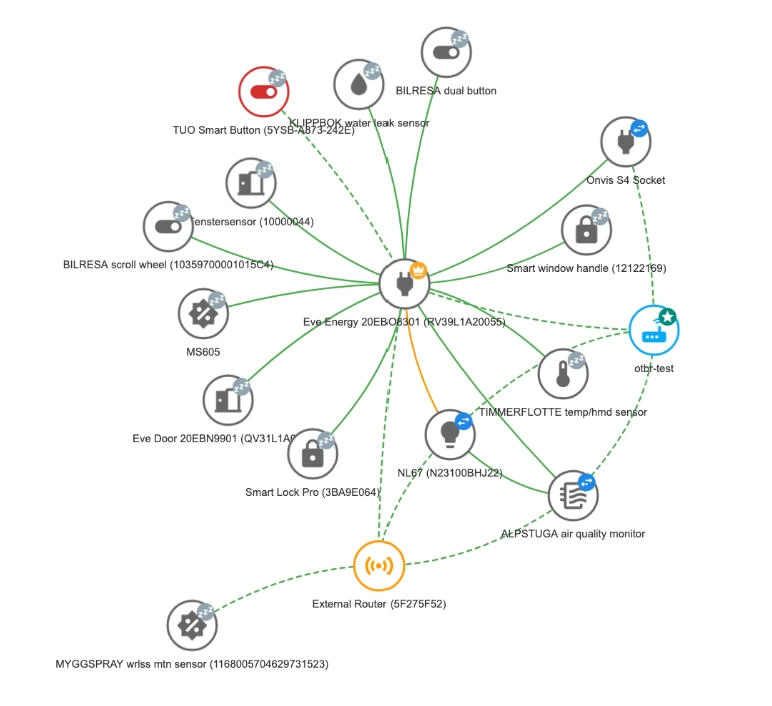
For me personally, though, the nicest new feature is the network visualization. You now see maps of both the Thread and Wi-Fi networks with the roles of individual devices (leader / router / end device) and with a color indication of link quality. So you finally have an overview of what your mesh network actually looks like - something I've known and appreciated from Zigbee for a while.
Data migration to the new server happens automatically, so you don't have to take care of anything manually. And the fact that this is no niche matter is shown by the fact that, according to Home Assistant's data, Matter is used by roughly 38% of installations.
If you're interested in the details, I recommend the official announcement: The Matter upgrade you've been waiting for.
Hardware
What you actually need depends on the transport your device uses to communicate:
- Matter over Wi-Fi - you don't need anything extra. The device connects directly to your Wi-Fi and Home Assistant adds it via the Companion app.
- Matter over Thread - you need a border router (OTBR) on the network.
If you're still figuring out a border router, I recommend the official Home Assistant Connect ZBT-2. It's a universal USB adapter that handles both Zigbee and Thread - but note that it always runs in just one mode at a time (either Zigbee or Thread); if you need both simultaneously, you'll need two adapters. I covered it in detail in the article Home Assistant Connect ZBT-2.
Home Assistant Connect ZBT-2
 Zigbee
 Bluetooth
 Thread
- +2
And as I mentioned above - the border router can also be a device you may already have at home. If you own an Apple TV or HomePod, it serves as a Thread border router automatically; the same goes for a Google Nest Hub. You can find more about Apple TV in Home Assistant in my article Apple TV.
Related articles
- Zigbee in Home Assistant - an introduction to the most widespread smart home protocol.
- Bluetooth in Home Assistant - an introduction to Bluetooth and BLE.
- Home Assistant Connect ZBT-2 - the official USB adapter for both Zigbee and Thread.
Did this guide help you?
I write these guides in my spare time and keep them up to date. If one saved you time, you can chip in.
One-off, by card or Apple Pay. You can change the amount on the next page.
Would rather not send money? Buy the parts through my product links. The price is the same for you and it helps too.