Home Assistant 2026.5
We're on the same frequency now! 📡
The fifth release of 2026 doubles down on open communication protocols. After last month's infrared revolution in 2026.4, Home Assistant now turns its attention to the radio frequency (RF) spectrum and elevates it to a full-fledged platform. On top of that, it adds a serial port proxy via ESPHome, a brand new battery maintenance dashboard, a shortcut card for quick actions, "for" duration support in purpose-specific triggers and conditions, and a genuinely impressive template editor redesign with autocomplete.
Let's take a look at everything that landed in this release.
Radio Frequency as a First-Class Platform
The radio frequency spectrum (typically 433 MHz or 868 MHz) is everywhere in the smart home - it powers wireless switches, motorised blinds, garage doors, ceiling fans, RF outlets, doorbells, and many other inexpensive devices. Until now, there was no unified way to manage them in Home Assistant. That changes today.
Just as the previous release elevated infrared, this release promotes RF to first-class citizen status as part of the Open Home Foundation roadmap.
How It Works
The architecture has two layers:
- RF transmitters - hardware that sends radio signals. Two are supported in this release: ESPHome with a CC1101 module (around $10) and the Broadlink RM4 Pro, which has a built-in RF transmitter.
- RF devices - integrations for specific products. 2026.5 adds two: Honeywell String Lights (RF-controlled holiday string lights) and Novy Cooker Hood.
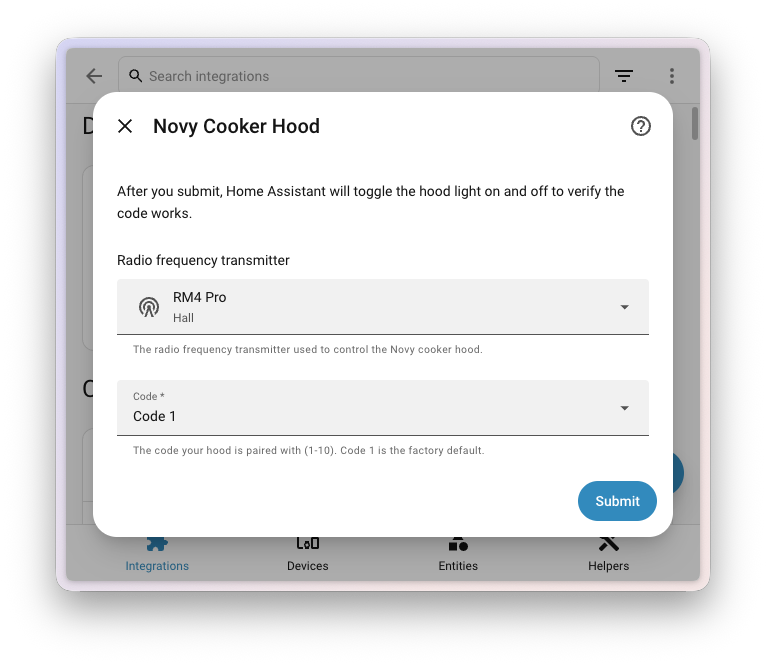
When adding an RF device, you pick the transmitter that will carry its signal from a dropdown:
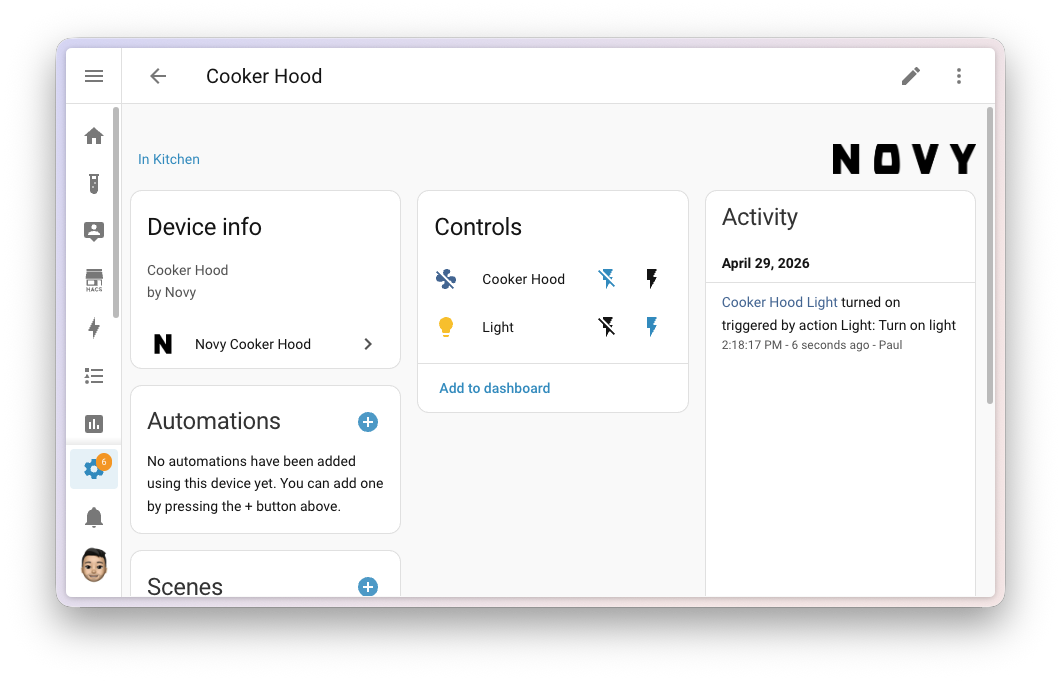
The resulting RF device looks just like any other entity in the interface - you get controls and an activity log:
If you already have an ESP32 or ESP8266, just add a CC1101 module for a few dollars and you have a fully fledged RF transmitter through ESPHome. Learn more in my ESPHome guide.
Serial Ports over ESPHome (Serial Proxy)
The second big "frequency" theme is the serial port proxy via ESPHome. Many devices (Denon RS-232 receivers, P1 smart meters, older AV gear) talk over a serial line, which used to mean physically connecting them via USB-Serial to your Home Assistant server. Not anymore.
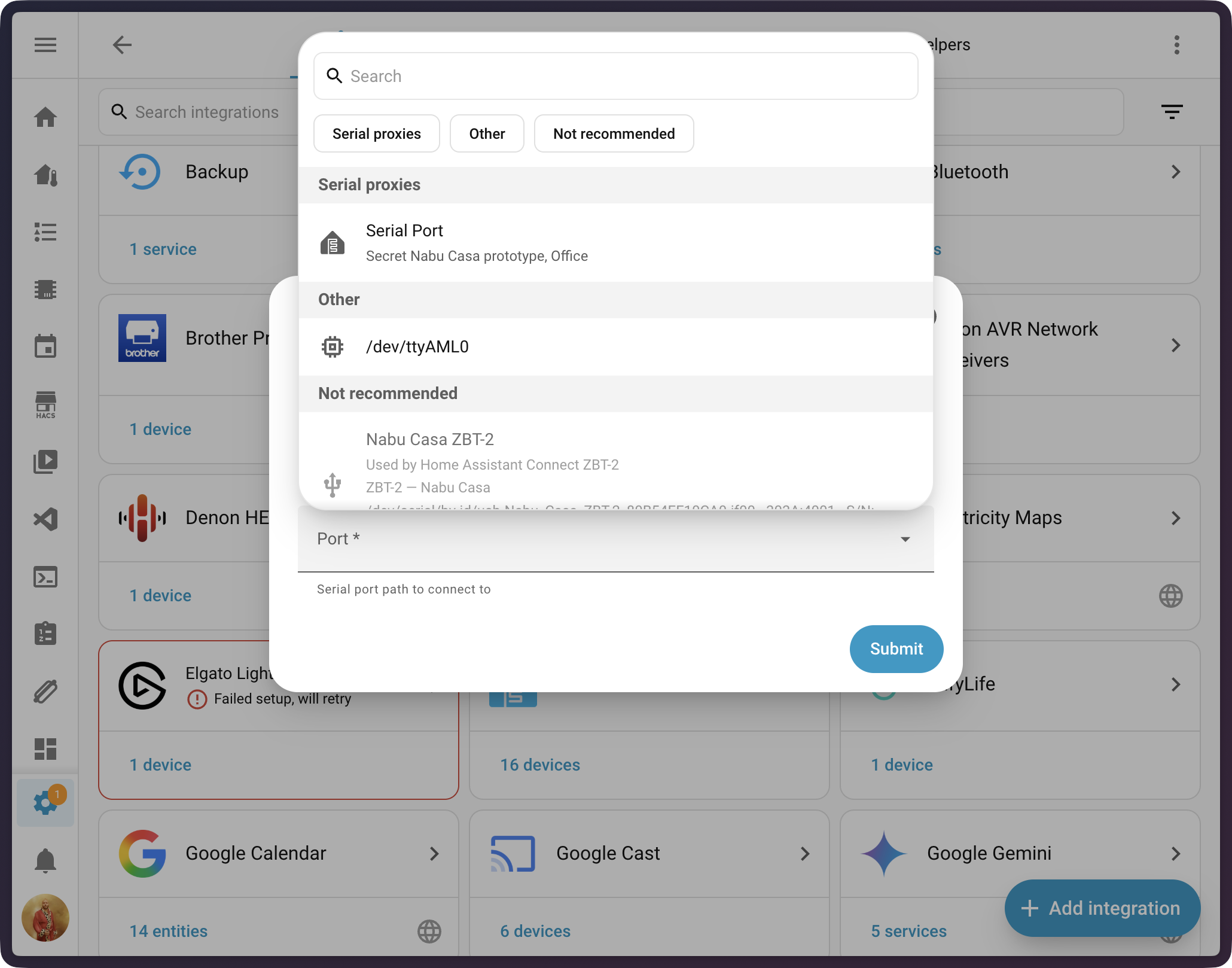
Take an ordinary ESPHome device, wire a serial cable into it, and Home Assistant treats it as a local COM port - as if it were plugged in via USB. In the serial port picker UI, remote proxies appear right next to local USB ports:
Under the hood, Home Assistant also migrated from pyserial to the modern async serialx library, which brings more stable serial communication overall.
Three new integrations benefit immediately: Denon RS-232 for older receivers, EARN-E P1 Meter for Dutch smart meters, and Russound RIO for multi-room audio systems.
Battery Maintenance Dashboard
How many batteries do you have in your house? Smoke detectors, door sensors, remotes, temperature probes... And which one is nearly empty? The new maintenance dashboard answers both questions.
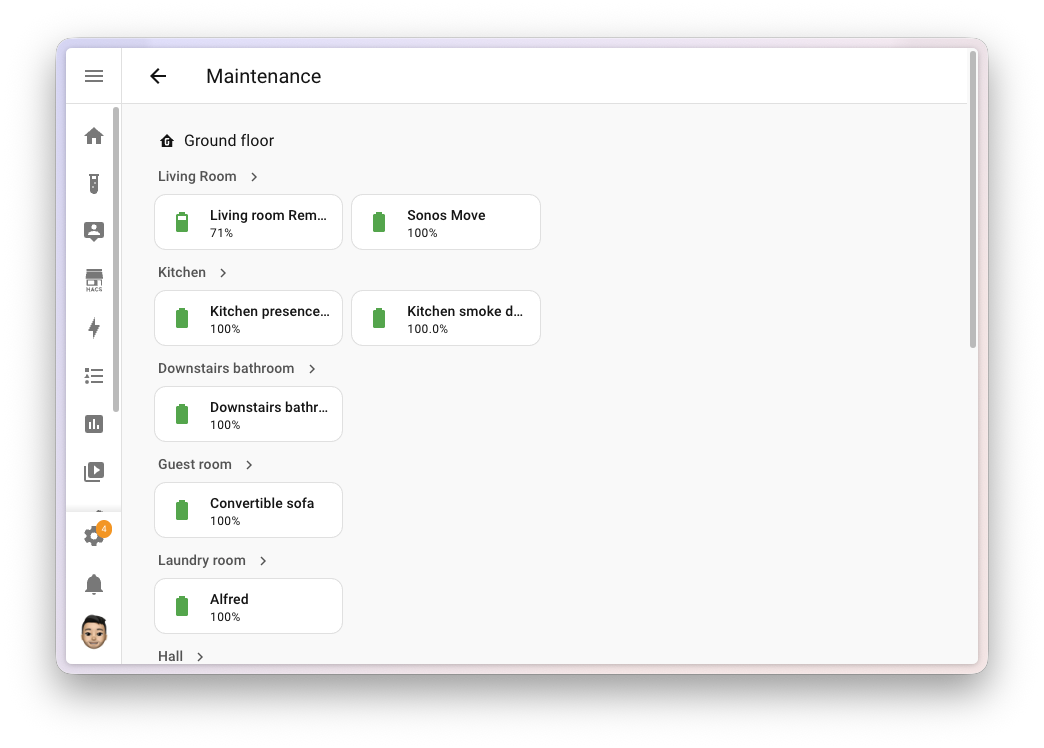
The dashboard:
- Automatically discovers every entity that reports battery state in your instance
- Groups them by area, so you can quickly see where multiple devices are dying at once
- Highlights low levels, so you know where to intervene
- Requires no configuration - it just appears
This little quality-of-life upgrade can save a surprising amount of headache. You finally know which battery to buy and where to replace it without combing through every sensor manually.
Security Dashboard with 24-Hour Activity Log
The security dashboard gets a new sidebar with a 24-hour activity log. It shows what's been happening from a security perspective in your home - when doors opened, when a lock detected motion, when a person came or went, when something triggered on a camera.
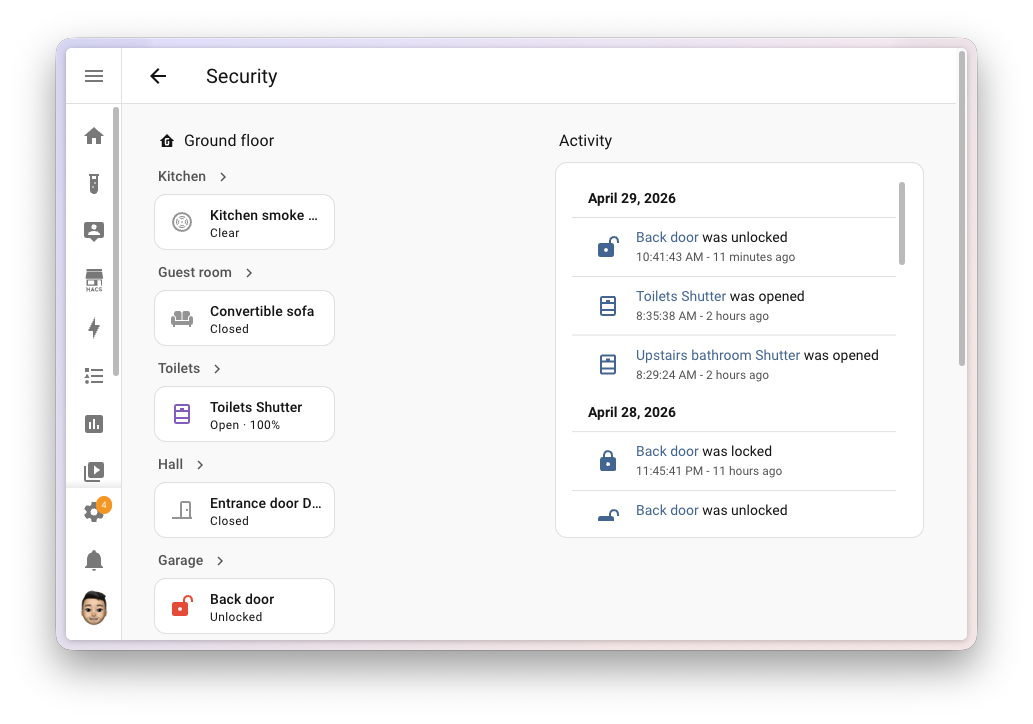
The feature automatically activates if you have the Logbook integration enabled (which is the default). It's shown on wider screens; the mobile layout stays clean.
Shortcut Card
Sometimes you don't need a dashboard tile to show an entity's state - you just need a quick clickable link. To another view, to a specific device, to your router's web interface, or to launch Assist. That's exactly what the new Shortcut card is for:
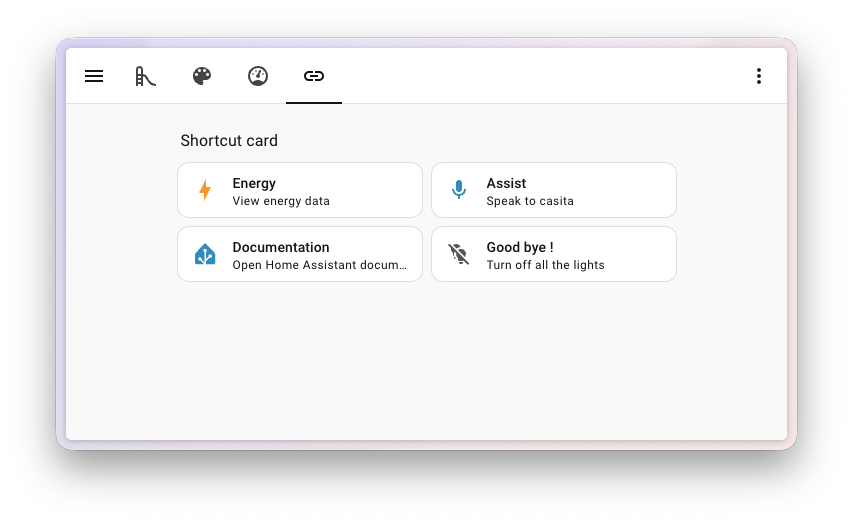
With one click you can:
- Navigate to another dashboard or view - great for moving around larger setups
- Open an area or device page - quick access to diagnostic info
- Open an external URL - your router admin, NAS, or documentation
- Launch Assist - the voice assistant with a single tap
- Perform an action - e.g. Turn off all lights
The card has smart defaults: if you set a target (area, device), it automatically picks up its name, icon and colour. You don't need to fill in anything by hand.
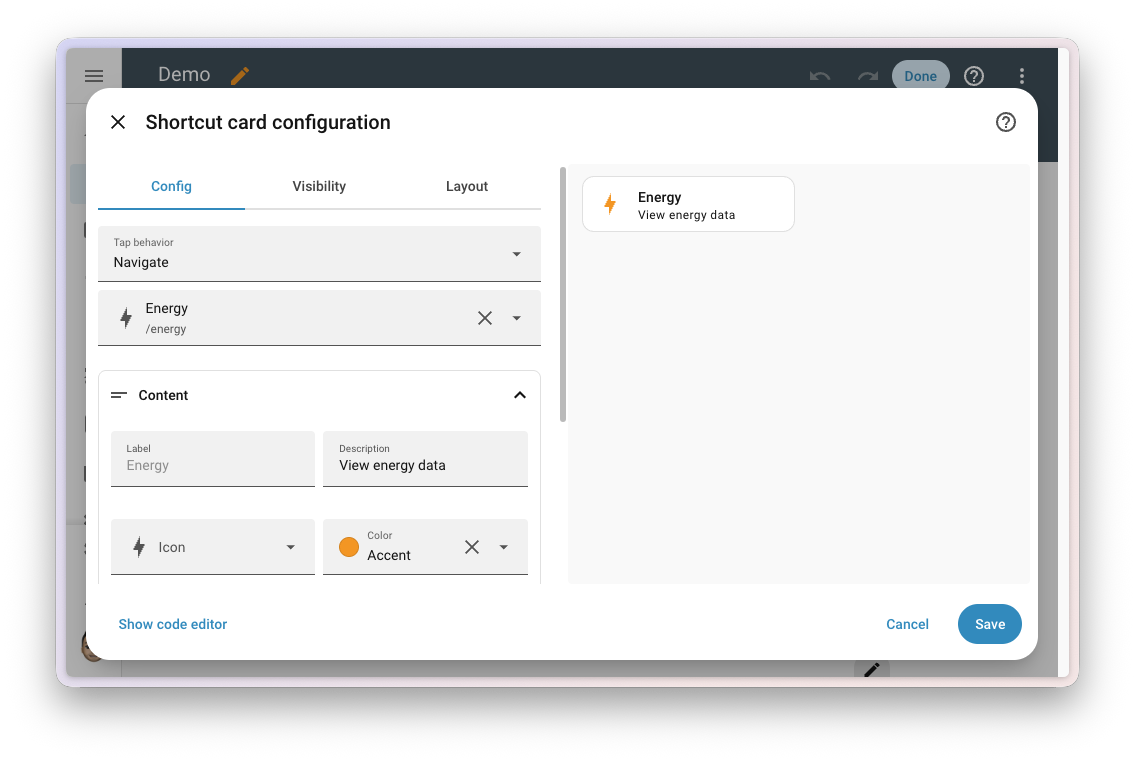
There's also a lightweight shortcut badge variant for badge rows.
Media Player Card Improvements
Media player tile cards get two long-requested options and a redesigned controls editor.
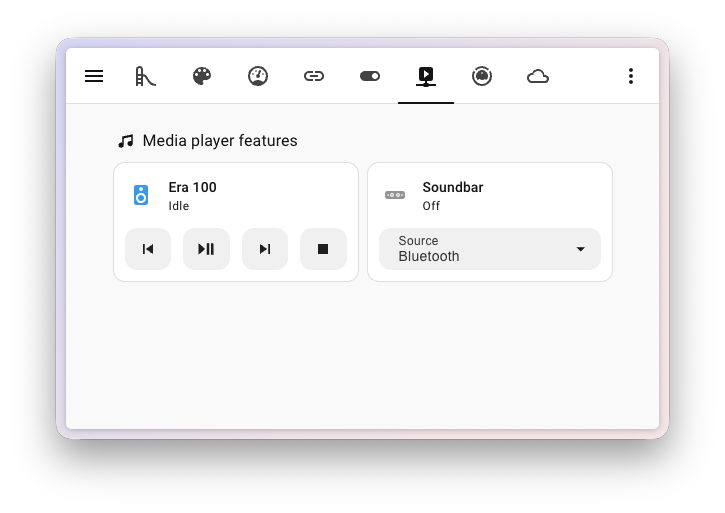
Source and Sound Mode Selection Directly on the Card
The new Select source and Select sound mode features let you switch inputs (HDMI, optical, Bluetooth) and sound modes (Movie, Music, Night) directly from the card without opening the entity detail:
Reorderable Playback Controls
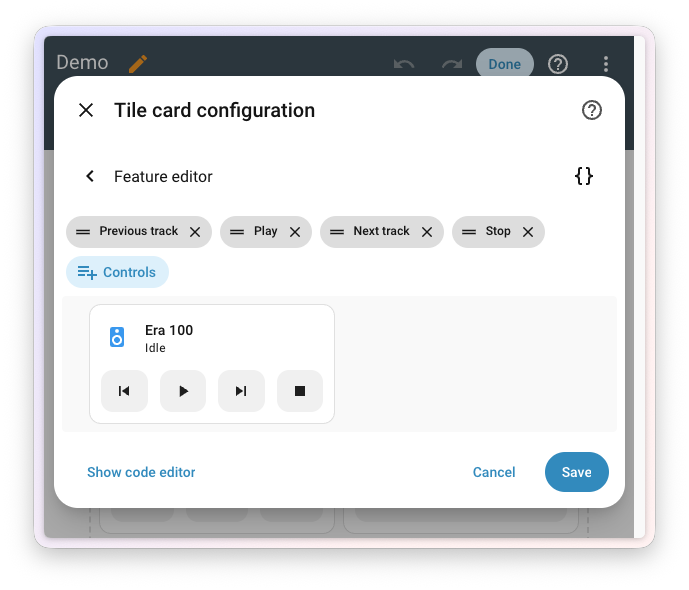
In the media player card editor, you can now choose and reorder the playback buttons (play, pause, stop, previous, next) to match what you actually need. Fewer buttons = a cleaner dashboard:
"For" Duration on Purpose-Specific Triggers and Conditions
Earlier releases introduced purpose-specific triggers and conditions (Home Assistant Labs). This release adds the one missing piece: duration.
Instead of falling back to classic state triggers, you can now simply pick a purpose-specific trigger and fill in the "for" field:
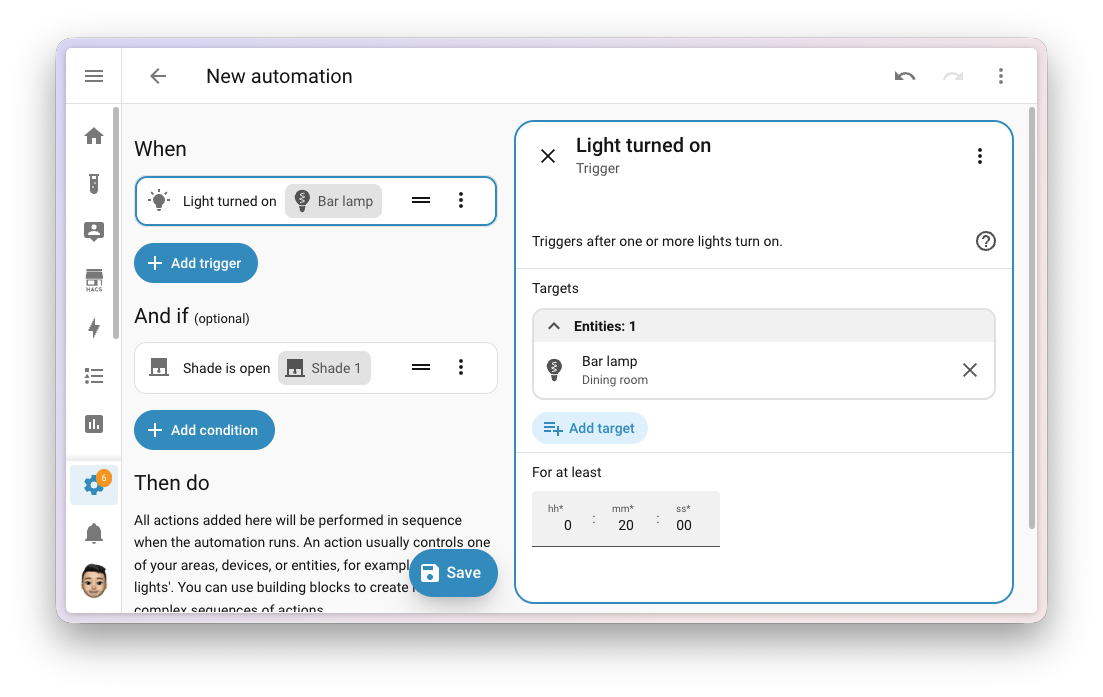
Practical examples:
- "When no motion has been detected for 5 minutes → turn off the lights"
- "If a door has been open for at least 10 minutes → send a notification"
- "When the thermostat has been heating for more than an hour → check the windows"
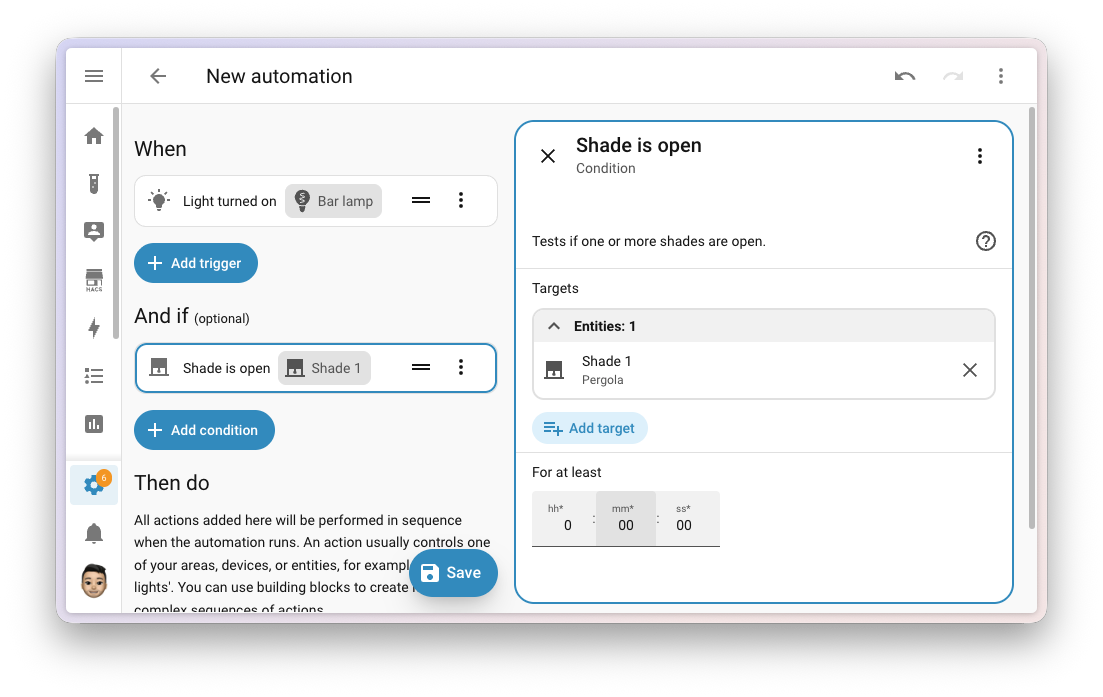
The same field appears on entity-based conditions:
This release also adds timer triggers (started, paused, restarted, cancelled, finished) and a doorbell trigger.
This feature is still evolving in Home Assistant Labs. If you want to try it, enable Labs and check out my introduction to automations to learn how to build one.
Complete Templating Documentation Overhaul
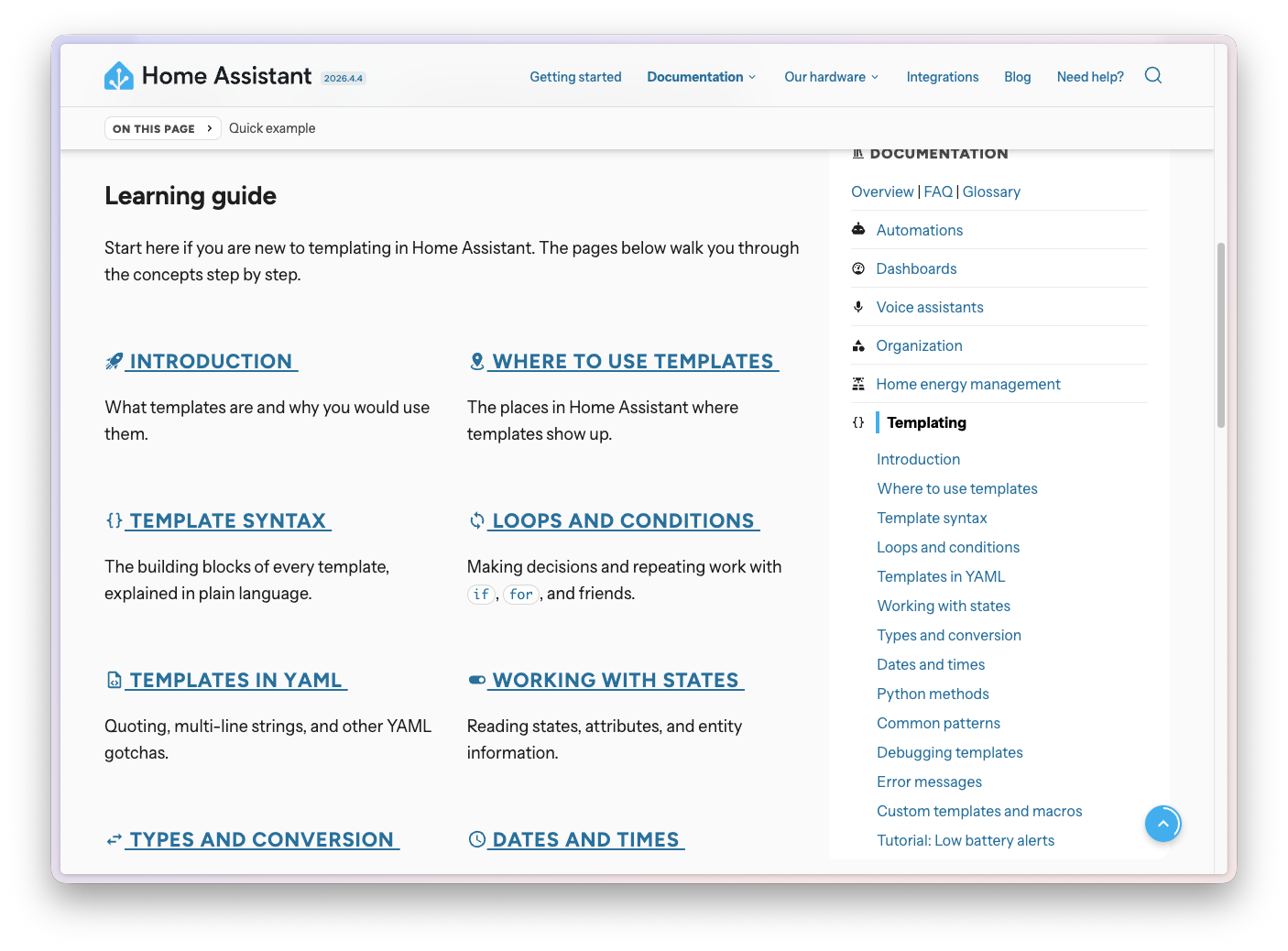
Templating is a powerful Home Assistant tool, but it has long been hard to approach for beginners. This release rewrites the entire templating documentation from scratch.
What's new:
- 14 new learning pages - what a template is, where it's used, syntax, loops, states, data types, dates and times, patterns, debugging
- 2 practical tutorials - low-battery notifications and an average temperature sensor
- Reference for 200+ functions, filters and tests - each with input/output examples
- An error messages page explaining what they mean
- Interactive code examples right on the docs site
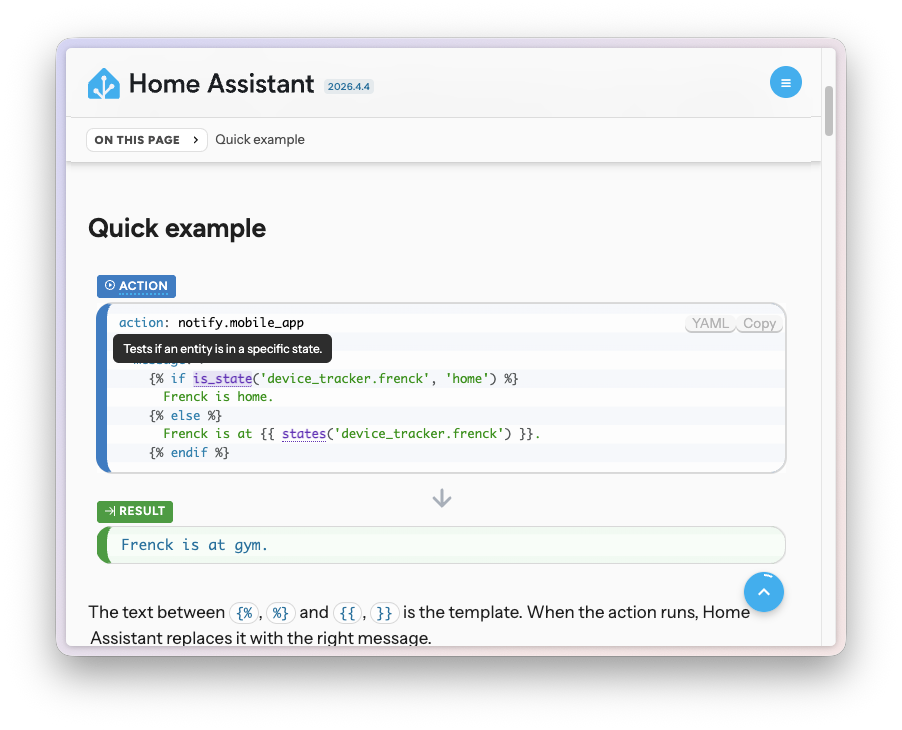
If you're still using the old platform: template syntax, take a look at my template sensor migration guide. The old syntax ends in 2026.6.
Smart Template Editor
Along with the docs, the template editor in automations, scripts and developer tools has been significantly upgraded.
What it now does:
- Function, filter and test autocomplete with signatures and short descriptions
- Context-aware ID autocomplete - entities, devices, areas, labels depending on where you're typing
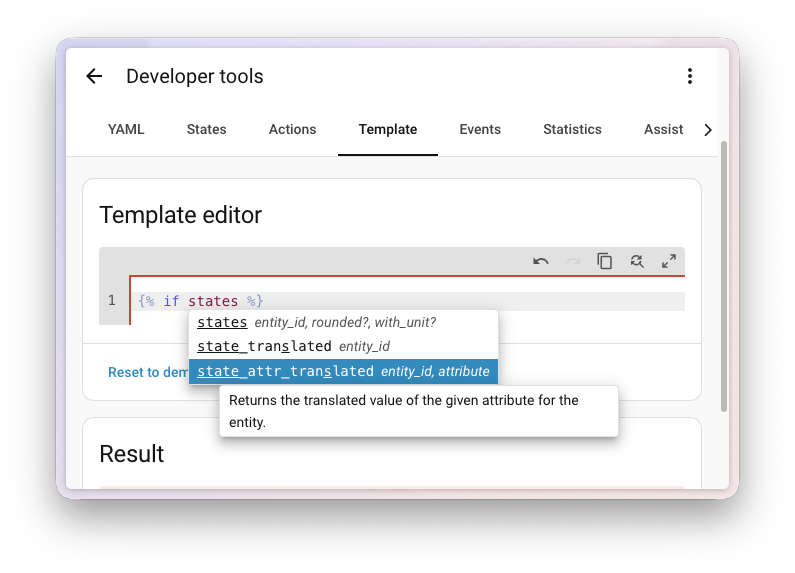
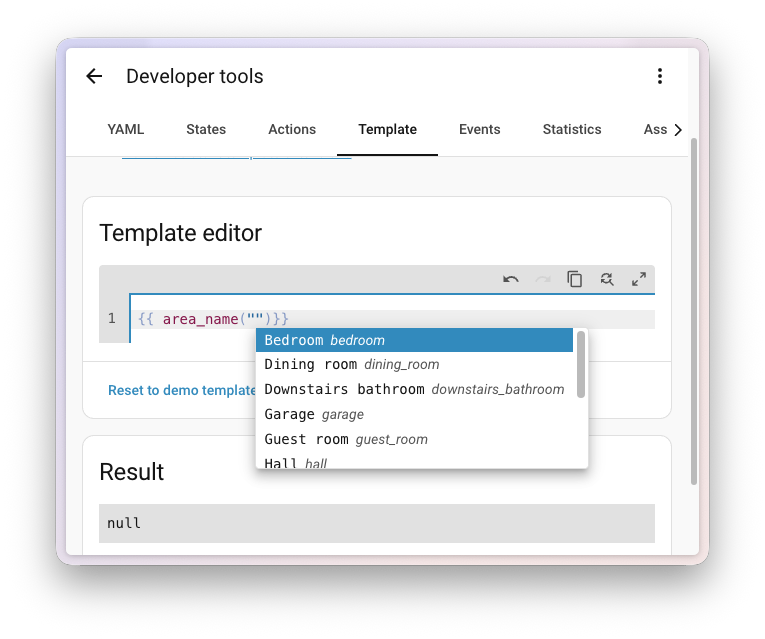
- Hover tooltips show the function signature, description, and a link to the documentation
- Current entity values are shown inline as you type their IDs
- Fully keyboard-driven - arrows, Tab, Enter
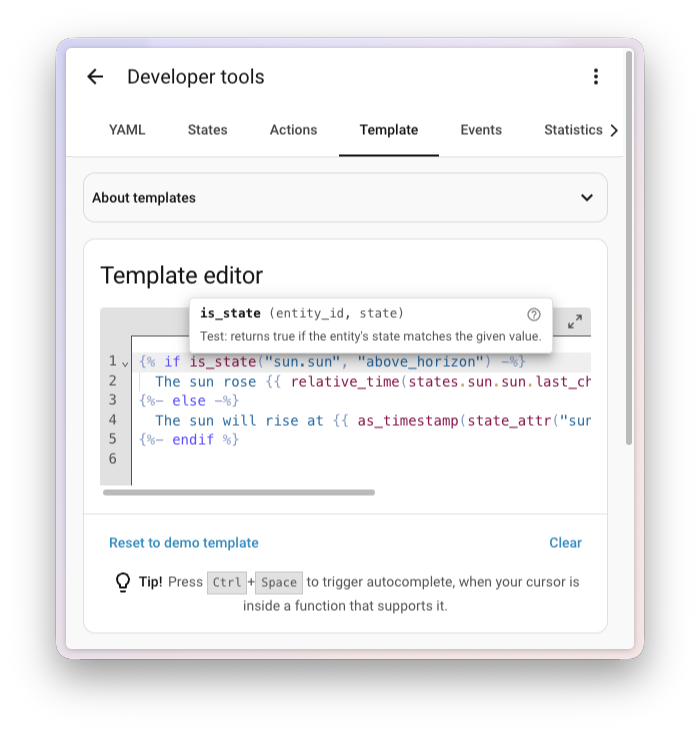
For anyone who has ever written a non-trivial template, this is a massive comfort upgrade.
Robot Vacuum and Lawn Mower More-Info Redesign
The vacuum and lawn mower more-info dialogs got a redesigned interface with illustrations, animations, and clearer controls.
Robot Vacuum
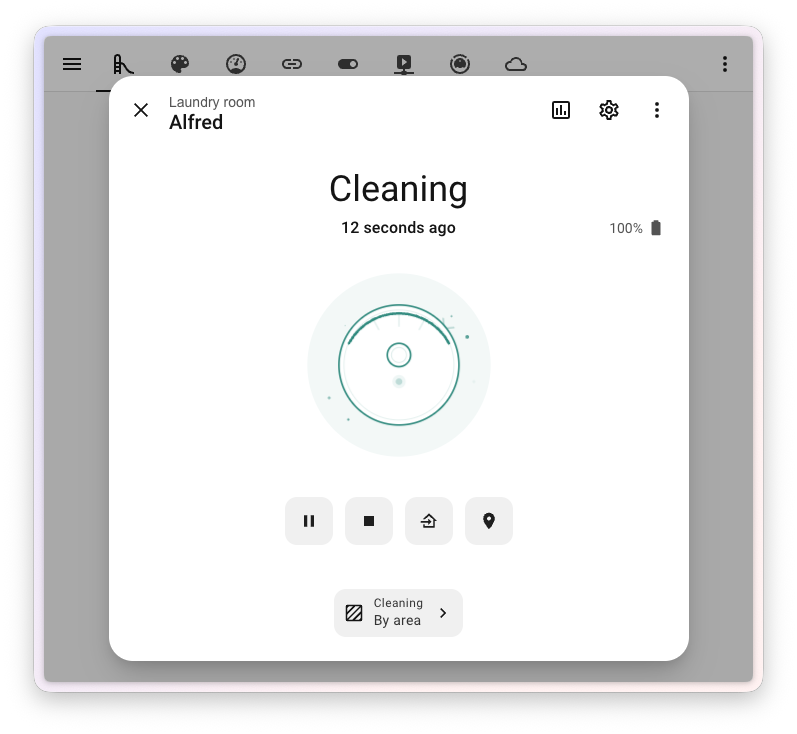
The dialog now includes:
- A status illustration with animations - the robot spins while cleaning, returns home, sits idle on the dock, or shows an error
- Battery state right in the header
- Start, pause, return buttons in a single row
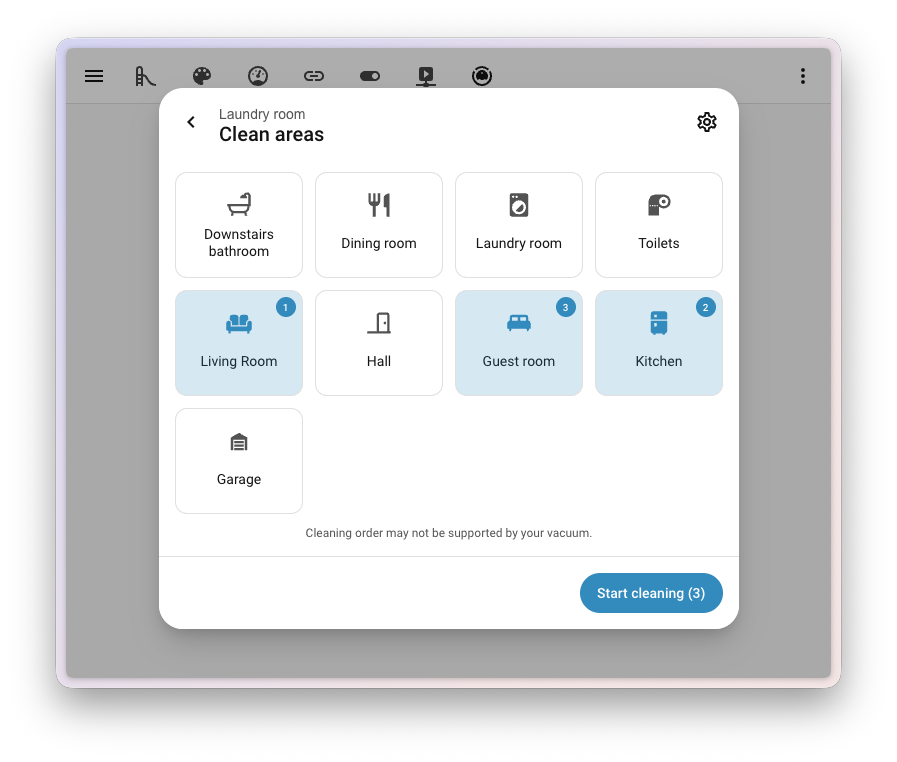
The headline feature is Clean by area - mapping Home Assistant areas to the actual rooms of your vacuum. From the same dialog you can start cleaning just one specific room:
Robotic Lawn Mower
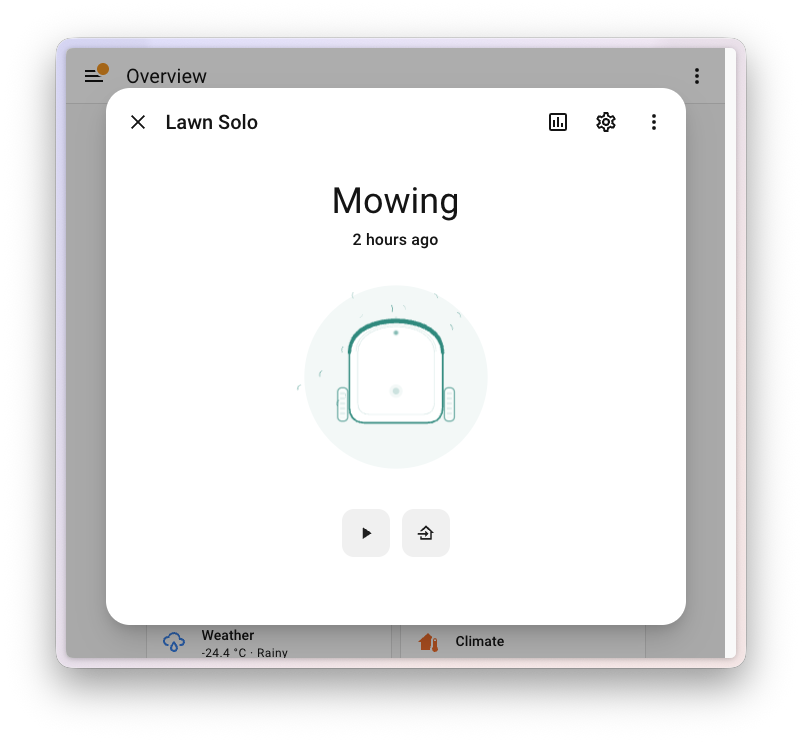
The lawn mower received an identical redesign - status illustrations with animations (mowing, returning to dock, parked, error), battery in the header, unified action row:
Refreshed Toggle Styling
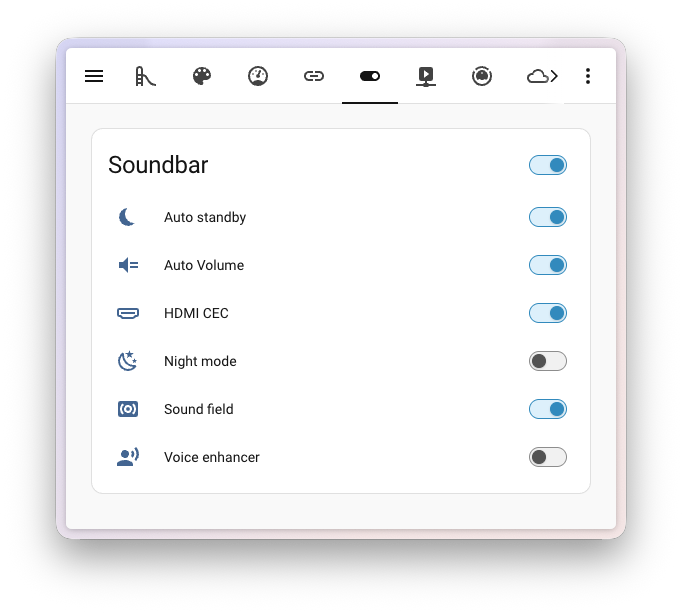
All toggle switches in the interface have been refreshed. They look cleaner, are easier to control with the keyboard (Tab to focus, arrows to switch), and fit better into the modern Material design:
New Integrations
We welcome the following new integrations in this release:
- Denon RS-232 - Control older Denon receivers via serial port (with ESPHome serial proxy support)
- Duco - Monitor and control Duco demand-controlled ventilation units (Platinum quality)
- EARN-E P1 Meter - Real-time data from smart electricity and gas meters via the P1 port
- Eurotronic Comet Blue - Bluetooth radiator thermostats
- Fumis - Control pellet stoves through the Fumis cloud service (Platinum)
- Honeywell String Lights - RF-controlled holiday string lights
- Kiosker - Web kiosk monitoring on iPad or iPhone
- Novy Cooker Hood - RF-controlled cooker hood (fan + lighting)
- OMIE - Iberian Peninsula electricity spot prices (Silver)
- Radio frequency - The foundation platform for all RF transmitter integrations
- Teleinfo - French Linky smart meters (Silver)
- Victron GX - Monitor Victron Energy systems via MQTT (Platinum)
Notable Improvements to Existing Integrations
- MQTT - New
time,dateanddatetimeplatforms for precise time entities - Matter - Radon sensor support added
- ESPHome - Beyond serial proxy, water heater "away" mode is now supported
- Shelly - Tilt and rotation sensors, plus a media player entity for Wall Display
- Sonos - Switches to control automatic TV audio playback
- Music Assistant - Player options and sound mode support
- Broadlink - Now also acts as an RF transmitter platform
- Home Connect - Extended microwave appliance coverage
- Roborock - New sensors for the Q10 S5+ and route control for the Q7
- WLED - Per-segment effect freezing
Other Notable Changes
- Mobile app notifications are now entities, allowing targeting of specific devices or groups
- A search bar has appeared on integration detail pages (Z-Wave, Zigbee, ESPHome)
- Card visibility conditions can now reference the card's own entity
- Visibility conditions also support entity attributes, not just states
- The Shell command integration supports reloading actions without restarting HA
- Template vacuum now supports rooms/segments for advanced scenarios
- New frequency units (mHz to GHz) and microamperes
Backward-Incompatible Changes
This release includes a few changes that may affect your existing configuration:
- "Entered home" and "left home" triggers were removed from Person and Device Tracker integrations (a replacement is coming in later releases)
- Gardena Bluetooth - "Finish watering" was moved from a binary sensor to a timestamp sensor
- pilight integration was disabled due to a stale dependency on setuptools
- Ring - the event type was renamed from
dingtoringfor better standardization - Supervisor actions now properly raise on failure (use
continue_on_error: trueto keep the previous behaviour) - Webhook - the
local_onlyoption must be a strict boolean (true/false), no truthy values
Full details are in the official blog post.
More Information
Release Party Video
Did this guide help you?
I write these guides in my spare time and keep them up to date. If one saved you time, you can chip in.
One-off, by card or Apple Pay. You can change the amount on the next page.
Would rather not send money? Buy the parts through my product links. The price is the same for you and it helps too.