Migrating Template Sensors to Modern Syntax
The legacy platform: template syntax will stop working in Home Assistant version 2026.6 (June 2026). Home Assistant is already warning you, and you need to migrate to modern syntax.
How to Identify the Need to Migrate
Home Assistant alerts you to this issue in two ways:
1. Repairs Section Notifications
The most visible alert appears in Settings → System → Repairs, where you'll see a list of all deprecated template sensors:
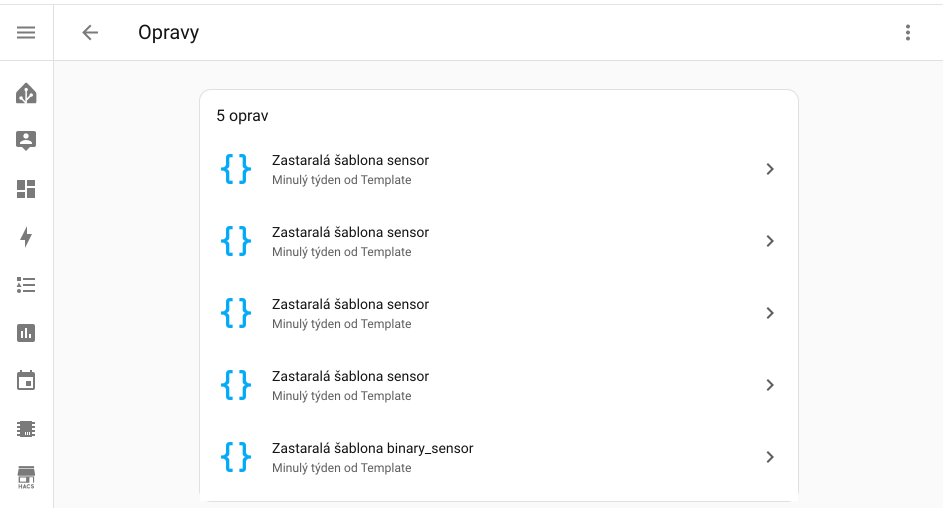
Each deprecated sensor is listed separately with the text "Deprecated template sensor" or "Deprecated template binary_sensor".
2. Log Warnings
Alternatively, you can find warnings directly in the Home Assistant logs (Settings → System → Logs), where you'll see specific details about the issue.
If you're seeing either of these warnings, you're in the right place. In this article, we'll show you how to easily migrate the legacy syntax to modern format.
What's Changing and Why
Home Assistant is gradually modernizing how template entities are defined. The old syntax was introduced years ago and had its limitations. Modern syntax brings:
- ✅ More readable code - better structured and understandable
- ✅ More options - trigger-based sensors, better control over updates
- ✅ Unique ID - ability to edit via UI
- ✅ Consistency - same syntax for all types of template entities
- ✅ Better performance - more efficient processing
When to Migrate
If you have this syntax in your configuration files (typically configuration.yaml or in packages/), you need to migrate:
sensor:
  - platform: template
    sensors:
      # ... your sensor definitions
or
binary_sensor:
  - platform: template
    sensors:
      # ... your binary sensor definitions
Basic Migration Rules
| Legacy Syntax | Modern Syntax |
|---|---|
friendly_name: | name: |
value_template: | state: |
icon_template: | icon: |
sensors: (list) | Direct definition without nested level |
In sensor: section | In template: section |
| (implicit) | default_entity_id: (to preserve entity ID) |
If you want to preserve the original entity ID after migration, you must add the default_entity_id parameter. Without it, the entity ID will be automatically generated from the name value, which may cause ID changes and break automations!
Example:
- Old sensor:
sensor.outside_temperature_celsius(from keyoutside_temperature_celsius:) - New without
default_entity_id:sensor.outside_temperature_c(fromname: "Outside Temperature (°C)"- auto-generated) - New with
default_entity_id:sensor.outside_temperature_celsius(explicitly set)
Example 1: Simple Sensor - Temperature Conversion
The simplest example - a sensor that converts temperature from °F to °C.
Legacy Syntax (DEPRECATED)
sensor:
  - platform: template
    sensors:
      outside_temperature_celsius:
        friendly_name: "Outside Temperature (°C)"
        unit_of_measurement: "°C"
        value_template: "{{ (states('sensor.outside_temperature') | float - 32) * 5/9 | round(1) }}"
Modern Syntax (RECOMMENDED)
template:
  - sensor:
      - name: "Outside Temperature (°C)"
        default_entity_id: sensor.outside_temperature_celsius
        unique_id: outside_temperature_celsius
        unit_of_measurement: "°C"
        state: "{{ (states('sensor.outside_temperature') | float - 32) * 5/9 | round(1) }}"
platform: template→ moved totemplate:sectionsensors:→ removed (entities directly in list)friendly_name:→name:value_template:→state:- Added
default_entity_id(recommended to preserve entity ID) - Added
unique_id(optional but recommended)
Example 2: Binary Sensor - Is Window Open?
Binary sensor that detects whether a window is open based on a contact sensor.
Legacy Syntax (DEPRECATED)
binary_sensor:
  - platform: template
    sensors:
      living_room_window:
        friendly_name: "Living Room Window"
        device_class: window
        value_template: "{{ is_state('sensor.contact_living_room', 'open') }}"
Modern Syntax (RECOMMENDED)
template:
  - binary_sensor:
      - name: "Living Room Window"
        default_entity_id: binary_sensor.living_room_window
        unique_id: living_room_window
        device_class: window
        state: "{{ is_state('sensor.contact_living_room', 'open') }}"
binary_sensorwithplatform: template→template:section withbinary_sensor:value_template:→state:- Syntax is almost identical to regular sensors
Example 3: Sensor with Attributes - Weather
Sensor that displays weather information with additional attributes.
Legacy Syntax (DEPRECATED)
sensor:
  - platform: template
    sensors:
      weather_summary:
        friendly_name: "Weather - Summary"
        value_template: "{{ states('weather.home') }}"
        attribute_templates:
          temperature: "{{ state_attr('weather.home', 'temperature') }}"
          humidity: "{{ state_attr('weather.home', 'humidity') }}"
          pressure: "{{ state_attr('weather.home', 'pressure') }}"
Modern Syntax (RECOMMENDED)
template:
  - sensor:
      - name: "Weather - Summary"
        default_entity_id: sensor.weather_summary
        unique_id: weather_summary
        state: "{{ states('weather.home') }}"
        attributes:
          temperature: "{{ state_attr('weather.home', 'temperature') }}"
          humidity: "{{ state_attr('weather.home', 'humidity') }}"
          pressure: "{{ state_attr('weather.home', 'pressure') }}"
attribute_templates:→attributes:- Attributes are defined the same way, just a key name change
Example 4: Sensor with Dynamic Icon - Battery
Sensor that changes icon based on battery level.
Legacy Syntax (DEPRECATED)
sensor:
  - platform: template
    sensors:
      sensor_battery:
        friendly_name: "Sensor Battery"
        unit_of_measurement: "%"
        device_class: battery
        value_template: "{{ states('sensor.xiaomi_sensor_battery') }}"
        icon_template: >
          {% set battery_level = states('sensor.xiaomi_sensor_battery') | float(0) %}
          {% if battery_level > 90 %}
            mdi:battery
          {% elif battery_level > 70 %}
            mdi:battery-70
          {% elif battery_level > 50 %}
            mdi:battery-50
          {% elif battery_level > 30 %}
            mdi:battery-30
          {% elif battery_level > 10 %}
            mdi:battery-10
          {% else %}
            mdi:battery-alert
          {% endif %}
Modern Syntax (RECOMMENDED)
template:
  - sensor:
      - name: "Sensor Battery"
        default_entity_id: sensor.sensor_battery
        unique_id: sensor_battery
        unit_of_measurement: "%"
        device_class: battery
        state: "{{ states('sensor.xiaomi_sensor_battery') }}"
        icon: >
          {% set battery_level = states('sensor.xiaomi_sensor_battery') | float(0) %}
          {% if battery_level > 90 %}
            mdi:battery
          {% elif battery_level > 70 %}
            mdi:battery-70
          {% elif battery_level > 50 %}
            mdi:battery-50
          {% elif battery_level > 30 %}
            mdi:battery-30
          {% elif battery_level > 10 %}
            mdi:battery-10
          {% else %}
            mdi:battery-alert
          {% endif %}
icon_template:→icon:- Template code remains the same, just the key name changes
Example 5: Trigger-based Sensor - Counter
Modern syntax enables creating trigger-based sensors that update only based on triggers (not every state change).
New Functionality (TRIGGER-BASED)
template:
  - trigger:
      - platform: state
        entity_id: binary_sensor.motion_sensor
        from: "off"
        to: "on"
    sensor:
      - name: "Motion Count Today"
        unique_id: motion_count_today
        state: "{{ states('input_number.motion_counter') | int + 1 }}"
    action:
      - service: input_number.set_value
        target:
          entity_id: input_number.motion_counter
        data:
          value: "{{ states('input_number.motion_counter') | int + 1 }}"
Trigger-based sensors enable:
- Precise control over updates
- Triggering actions on update
- Access to trigger data (
trigger.to_state,trigger.from_state) - Better performance (fewer unnecessary updates)
Step-by-Step Migration Guide
1. Back Up Your Configuration
Before you start, always back up your configuration:
- Settings → System → Backups (create backup)
- Or manually copy
configuration.yamlfile
2. Find All Template Sensors
Search in files (typically configuration.yaml or packages/):
grep -r "platform: template" /config/
3. Perform Migration
For each sensor:
- Remove legacy definition from
sensor:orbinary_sensor:section - Add new definition to
template:section - Change syntax according to table above
- Add
default_entity_idwith original entity ID (strongly recommended!) - Add
unique_id(optional but recommended)
- DO NOT migrate statistics sensors (
platform: statistics) - they use their own platform and remain in thesensor:section. - Always add
default_entity_id- without it, entity IDs may change!
4. Check Configuration
In Home Assistant:
- Developer Tools → YAML → Check Configuration
- Verify there are no errors
5. Restart or Reload
You can use:
- Full restart (Settings → System → Restart)
- Or Template Entities Reload (Developer Tools → YAML → Template Entities)
6. Verify Functionality
After restart check:
- Entities still exist with same entity ID
- Values update correctly
- Warning disappeared from logs
Common Issues and Solutions
❌ Entity Shows unknown State
Problem: After migration, entity shows unknown state.
Solution: Check that template returns valid value. Use states() function instead of states.sensor.xxx.state:
# ❌ WRONG
state: "{{ states.sensor.temperature.state }}"

# ✅ CORRECT
state: "{{ states('sensor.temperature') }}"
❌ Entity Doesn't Update
Problem: Entity stopped updating after migration.
Solution: Check that template contains all required entities. State-based sensors update automatically when referenced entities change.
❌ Duplicate template: Sections
Problem: You have multiple template: sections in configuration.yaml.
Solution: There can be only ONE template: section in file. Merge all definitions under one:
# ❌ WRONG
template:
  - sensor:
      - name: Sensor 1

template:  # ← duplicate!
  - sensor:
      - name: Sensor 2

# ✅ CORRECT
template:
  - sensor:
      - name: Sensor 1
  - sensor:
      - name: Sensor 2
Complex Migration Example
Let's show migration of an entire package file with multiple sensors.
Before Migration (configuration.yaml)
sensor:
  # SNMP sensor - KEEP UNCHANGED
  - platform: snmp
    host: 192.168.1.32
    baseoid: 1.3.6.1.4.1.2021.10.1.3.1

  # Template sensors - MIGRATE
  - platform: template
    sensors:
      lights_on_count:
        friendly_name: "Lights On Count"
        unit_of_measurement: "lights"
        value_template: "{{ states.light | selectattr('state', 'eq', 'on') | list | count }}"

      average_temperature:
        friendly_name: "Average Temperature"
        unit_of_measurement: "°C"
        device_class: temperature
        value_template: >
          {% set bedroom = states('sensor.bedroom_temp') | float %}
          {% set kitchen = states('sensor.kitchen_temp') | float %}
          {{ ((bedroom + kitchen) / 2) | round(1) }}

binary_sensor:
  - platform: template
    sensors:
      anyone_home:
        friendly_name: "Anyone Home"
        device_class: occupancy
        value_template: >
          {{ is_state('person.john', 'home') or is_state('person.anna', 'home') }}
After Migration (configuration.yaml)
sensor:
  # SNMP sensor - UNCHANGED
  - platform: snmp
    host: 192.168.1.32
    baseoid: 1.3.6.1.4.1.2021.10.1.3.1

# Modern template syntax
template:
  - sensor:
      # Lights on count
      - name: "Lights On Count"
        default_entity_id: sensor.lights_on_count
        unique_id: lights_on_count
        unit_of_measurement: "lights"
        state: "{{ states.light | selectattr('state', 'eq', 'on') | list | count }}"

      # Average temperature
      - name: "Average Temperature"
        default_entity_id: sensor.average_temperature
        unique_id: average_temperature
        unit_of_measurement: "°C"
        device_class: temperature
        state: >
          {% set bedroom = states('sensor.bedroom_temp') | float %}
          {% set kitchen = states('sensor.kitchen_temp') | float %}
          {{ ((bedroom + kitchen) / 2) | round(1) }}

  - binary_sensor:
      # Anyone home
      - name: "Anyone Home"
        default_entity_id: binary_sensor.anyone_home
        unique_id: anyone_home
        device_class: occupancy
        state: >
          {{ is_state('person.john', 'home') or is_state('person.anna', 'home') }}
- SNMP sensor remained in
sensor:section - it's not a template - Template sensors were moved to new
template:section - Entity IDs remain THE SAME thanks to
default_entity_id(e.g.,sensor.lights_on_count) - Automations and scripts will work WITHOUT CHANGES
Useful Links
Conclusion
Migrating to modern template syntax may seem complicated at first glance, but it's actually a simple change of key names and moving to a new section. Modern syntax is more readable, more powerful, and allows using new features like trigger-based sensors.
Important Terms:
- ⏰ Deadline: Version 2026.6 (June 2026)
- 🔄 Backward Compatibility: Entity IDs remain the same only with
default_entity_id - ✅ Impact: Minimal - no automation changes needed (when using
default_entity_id)
If you're having trouble with migration, don't hesitate to ask in the comments below this article. Most issues are easily solvable and the community is happy to help!