Zigbee in Home Assistant (HA)
Zigbee is currently very popular as a protocol for smart home devices. Its popularity is mainly due to the fact that it was developed from the beginning with the needs of smart homes in mind, which brings several advantages:
- Simple pairing: New devices can be easily added to the network.
- Low power consumption: Devices can be battery-powered, which is ideal for long-term operation.
- High level of security: Devices are protected by the Zigbee gateway and do not have direct access to the home network.
Why Own Coordinator Instead of Proprietary Gateways?
You might be wondering why you need a Zigbee coordinator when manufacturers already offer their own gateways (Tuya, eWeLink, IKEA, Philips Hue, etc.). I personally see several key reasons to switch to an "own" solution:
Works Without Internet
This is probably the most important advantage for me. When you use proprietary manufacturer Zigbee gateways (like Tuya Smart Life, eWeLink, etc.), your smart home stops working during internet outages or when there are problems with the manufacturer's cloud. With your own Zigbee coordinator connected to Home Assistant, your home operates 100% locally - even if your internet goes down, automation and device control continue to work without any problems.
I've experienced several situations where Tuya's cloud service had an outage and I couldn't control even basic things like lights or thermostats. With a local solution, this hasn't happened to me for this reason.
It's true that some gateways like Philips Hue offer local API and work without internet. However, you still have limitations - you can only use Philips devices or those compatible with Zigbee Light Link profile. With your own coordinator, you have much greater freedom in choosing devices from different manufacturers.
Much Wider Device Support
Proprietary gateways usually only support devices from that manufacturer or their ecosystem. With your own Zigbee coordinator and integrations like ZHA or Zigbee2MQTT, you have access to thousands of supported devices from hundreds of different manufacturers. You can freely combine:
- Sensors from Aqara
- Bulbs from IKEA
- Buttons from Sonoff
- Thermostats from various manufacturers
- And many more...
Privacy and Security
With your own coordinator, all data stays local in your home. No sending information about your motion sensors, lighting status, or temperature to third-party clouds. You have full control over what happens with your data.
No Vendor Lock-in
You're not dependent on a single manufacturer. You can add devices from another manufacturer at any time, switch to a different integration (from ZHA to Zigbee2MQTT and vice versa), or even change the coordinator itself - all without having to re-pair all devices.
Faster Response
Local communication is significantly faster than communication through the cloud. When you press a button, the response is instant - you don't have to wait for the round trip to the manufacturer's cloud and back.
Advanced Features
With your own coordinator, you get access to advanced features like:
- Binding - direct connection between devices (works even when Home Assistant isn't running)
- Zigbee groups - native device groups for faster control
- OTA firmware updates - ability to update device firmware directly from Home Assistant
- Detailed diagnostics - overview of signal quality, mesh network status, etc.
If you already have devices paired with a proprietary gateway (e.g., Tuya), you'll need to reset them to factory settings before connecting them to your own coordinator and pair them again. This can be time-consuming, but believe me, it's definitely worth it!
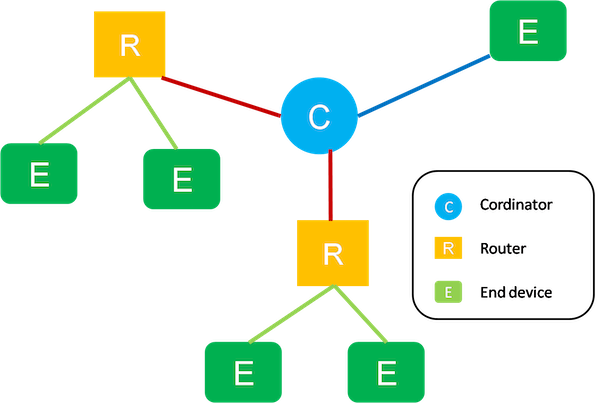
Network Topology Elements
For signal propagation in the Zigbee network, so-called routers are used. These are generally any Zigbee devices that are permanently powered, i.e., not battery-powered.
In contrast, end devices, so-called end devices, are Zigbee devices that are battery-powered. Unlike routers, they do not propagate the Zigbee signal further but only consume it.
The last type of device is the coordinator - coordinator, which can be thought of as gateways between the Ethernet world - the classic network used in the home - and Zigbee. They mediate all traffic and also gather information about all devices in the given Zigbee network.
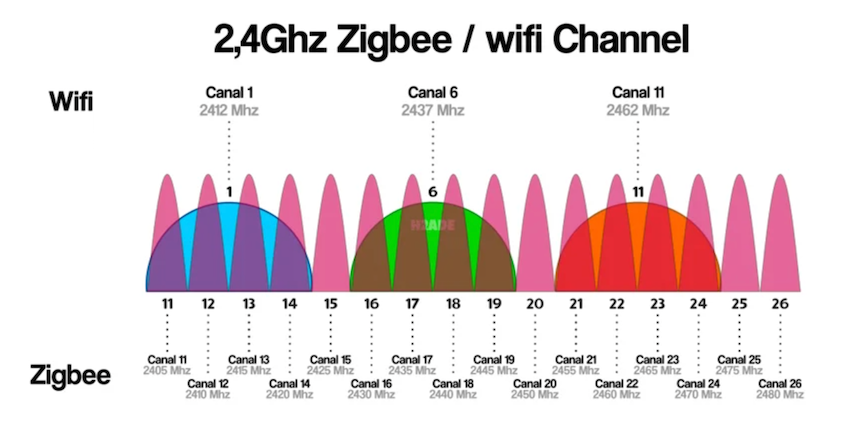
Comparison of WiFi vs. Zigbee vs. Bluetooth
You might be wondering why we have Zigbee when we already have good WiFi coverage at home and the possibility of using Bluetooth.
Although these technologies are similar in many ways, there are also significant differences.
| Feature | WiFi | Zigbee | Bluetooth |
|---|---|---|---|
| Frequency | 2.4 GHz and 5 GHz | 2.4 GHz | 2.4 GHz |
| Signal range | Higher | Lower | Medium |
| Data transfer rate | Higher | Much lower | Lower |
| Power consumption | Higher | Much lower | Low (especially BLE) |
| Compatibility | Wide | More limited, requires compatible hub | Wide, integrated in most smart devices |
| Security | Strong, mostly WPA2 / WPA3 | Strong, AES-128 encryption | Strong, with encryption and authentication |
| Mesh networking | Limited or none | Natural support for mesh | Limited or none |
| Use in smart home | Ideal for high-speed devices like cameras | Ideal for low-speed sensors and control devices | Ideal for localization, tracking devices, and door locks |
Generally, Zigbee and Bluetooth devices are very good for various sensors and buttons, especially those on batteries. For permanently powered devices, the advantages decrease, and it is good to consider WiFi as well. These are often still significantly cheaper.
Integrating Zigbee into HA - Which Integration to Choose
Deciding on the right Zigbee integration for Home Assistant can be challenging, as each option offers different advantages and disadvantages. The best integration choice may change over time, depending on current needs and trends.
1. ZHA (Zigbee Home Automation)
Ideal choice for beginners and new users who want to use Home Assistant
- Easy integration: ZHA is tightly integrated with Home Assistant, making setup easier.
- Dependence on Home Assistant: Using ZHA essentially locks you into the Home Assistant ecosystem, which can be limiting.
- Slow adoption of new products: ZHA strictly follows rules, which can lead to slower adoption of new products, and some lesser-known products may never be supported.
... learn more
2. Zigbee2MQTT
Ideal choice for more experienced DIY enthusiasts who like to try a wide range of products and do not want to be tied only to Home Assistant
- Wide product support: Offers extensive support for many products and has a large user base.
- Flexibility: Can be used not only with Home Assistant but also in other systems.
- More complex installation: Setting up Zigbee2MQTT can be more challenging for beginners.
... learn more
3. Deconz
For those who want a system with a nice and simple user interface and support for a reasonable number of products
- User-friendly interface: Offers a simple and intuitive interface, ideal for beginners.
- Fewer supported products: Product support is not as extensive as with Zigbee2MQTT.
... learn more
4. Tasmota
For special use cases where we want to extend the Zigbee network far from the central point of the home (house)
- Flexibility in placement: Ideal for extending the Zigbee network to remote areas where the Zigbee mesh network is not available, but Ethernet or WiFi is.
- Compatibility: Can be connected to both ZHA and Zigbee2MQTT, bringing the advantages of both systems.
- Specific use: Tasmota is suitable for specific scenarios and may not be ideal for standard home use.
... learn more
Remember that these evaluations reflect my personal experiences and opinions. Others may have different preferences and experiences with these integrations. I recommend trying different options and finding the one that best suits your specific needs.
Comparison of Zigbee Systems
Finally, a tabular comparison of individual integrations with their main features.
| Feature | ZHA | Zigbee2MQTT | Deconz | Tasmota |
|---|---|---|---|---|
| Integration | Directly in Home Assistant | Via HA add-on + MQTT broker | As standalone software (HA add-on) | Various options via WiFi or Ethernet |
| Hardware support | Requires Zigbee coordinator | Requires Zigbee coordinator | Requires ConBee / RaspBee | Requires gateway with ESP32 chip |
| User interface | Limited, via HA | Web interface | Graphical and web interface | Depends on the used Zigbee system |
| Flexibility | High (within HA) | Very high | Medium | Depends on the used Zigbee system |
| Updates | Monthly + fixes (part of HA) | Approximately monthly | Approximately monthly + fixes | Approximately monthly |
| Community support | Good | Excellent | Good | Good |
| Complexity | Medium | Medium to high | Low to medium | Very high |
Notes
- Integration: Refers to how the system communicates and connects with Home Assistant.
- Hardware support: Indicates the type of hardware or device needed for each system.
- User interface: Describes how you can work with the system, whether through Home Assistant, a web interface, or a graphical interface.
- Flexibility: Reflects how adaptable and customizable the system is within the Home Assistant ecosystem.
- Updates: Provides an idea of how often each system releases updates and fixes.
- Community support: Indicates the level of support and available resources from the user community.
- Complexity: Gives an idea of how easy or difficult it is to set up and use the system.